Your servers. Your repo. One symlink between a deploy and a rollback.
SrvYard logs in to your Ubuntu machines over SSH and runs what you would run: installs the stack, writes the vhost, builds each release in its own folder and switches traffic to it. It shows you the output, all of it.
Free plan: 1 server, 3 sites, 100 deployments a month. Compare plans.
# example output: release 85 of a Laravel site, started by the API
> Cloning acme-studio/shop (main) at 6f43fdf5
> Linking shared paths: .env, storage
> Running the deploy script
  composer install --no-dev --optimize-autoloader
  npm ci && npm run build
  php artisan migrate --force
> current -> releases/85
> Reloading PHP-FPM
> Health check: GET /up
  200 OK
Finished

# when the health check fails after the switch
The release is live but the health check failed.
SrvYard does not roll back automatically:
use Rollback on an earlier deployment if needed.
curl -fsS "https://your-srvyard-host/hooks/deploy/<token>?branch=main"
# or the API: a scoped bearer token, srv_...
curl -X POST \
-H "Authorization: Bearer $SRV_TOKEN" \
-H "Idempotency-Key: $(uuidgen)" \
https://your-srvyard-host/api/v1/sites/<site>/deployments
# 202 Accepted with a status_url to pollPOST https://your.app/hooks/srvyard
X-SrvYard-Event: deployment.finished
X-SrvYard-Timestamp: 1700000000
X-SrvYard-Signature: t=1700000000,v1=<hmac-sha256(secret, "t.body")>01Product
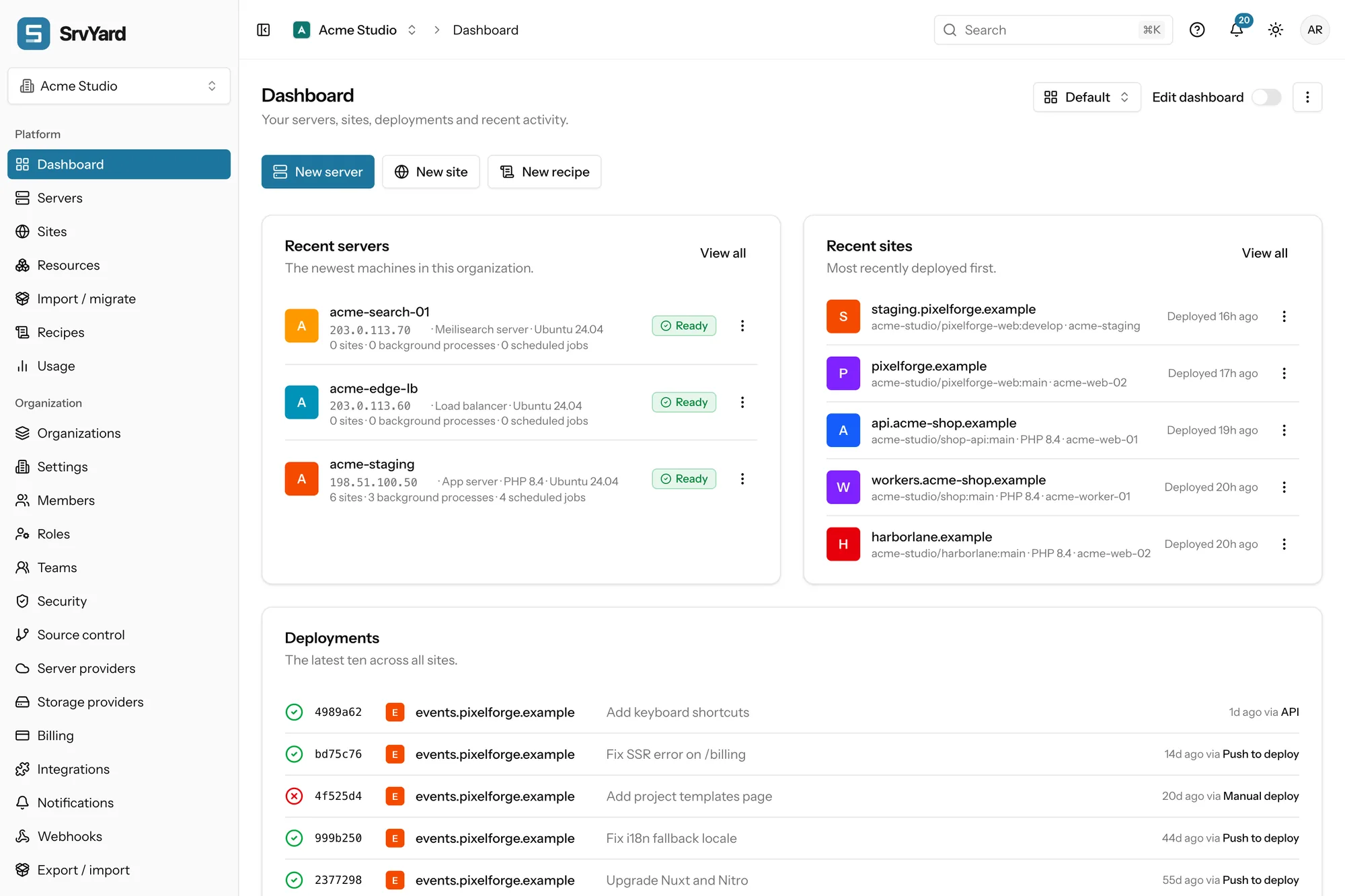
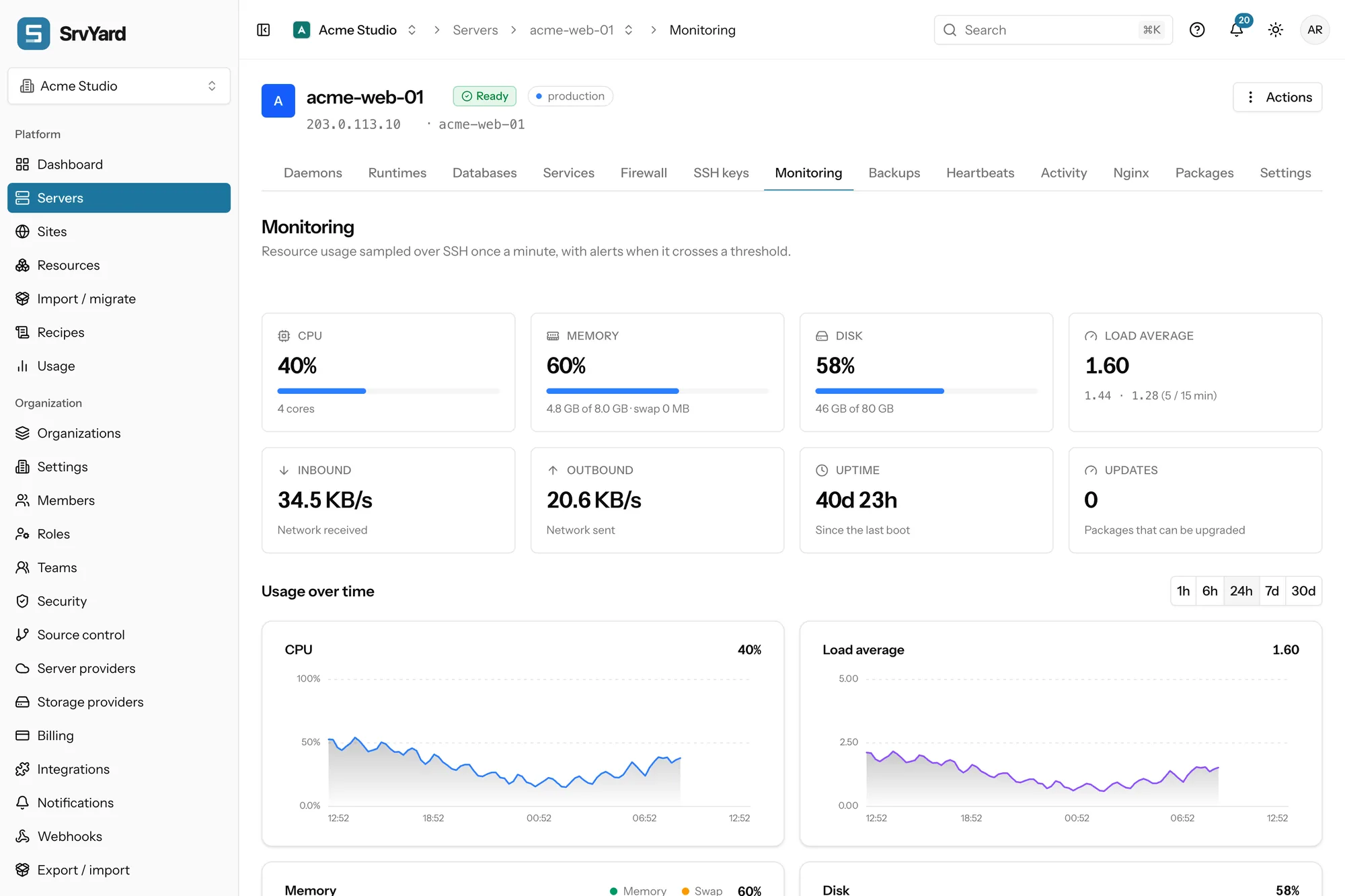
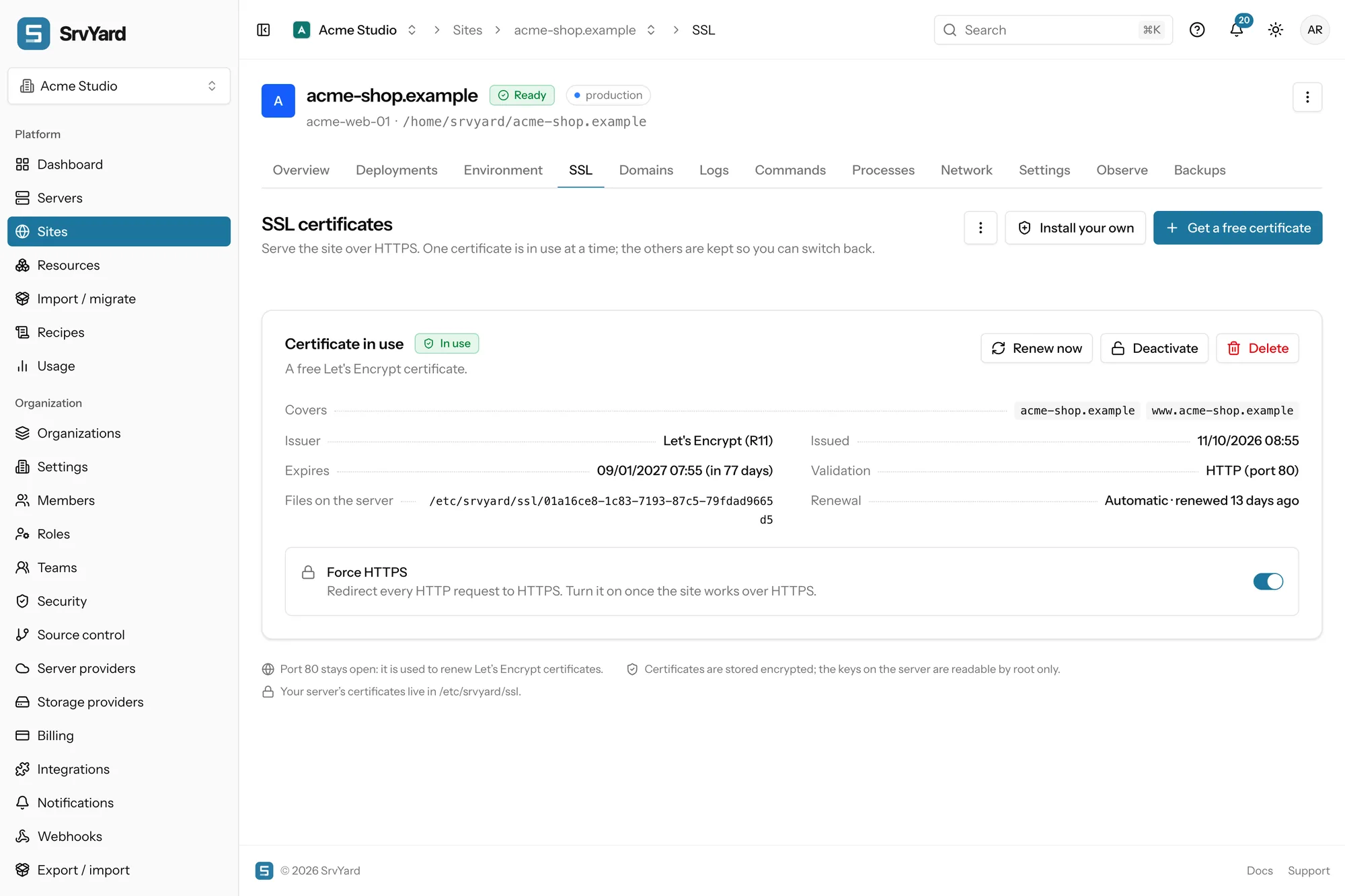
screenshots of a demo organisation, not mock-upsEverything it does is a page you can read.
Servers, sites, deployments, databases, certificates, firewall, SSH keys, cron, daemons, backups and monitoring. Each is a tab with the real state and the real log, not a status light.
- user
- srvyard (not root)
- site root
- /home/srvyard/<domain>
- release dirs
- releases/<deployment id>
- shared
- .env, storage, your own paths
- web server
- Nginx, PHP-FPM or a Node process
- os
- Ubuntu 24.04 and 26.04
02How it works
about ten minutes to a first siteAdd a server
Run one command as root to authorise SrvYard’s key, or have it create a machine at Hetzner, DigitalOcean, Akamai (Linode), Vultr, AWS or Proxmox.
Provision
It installs Nginx, PHP and what the server type needs, closes the firewall to SSH, HTTP and HTTPS, and from then on logs in as
srvyard.Create a site
Pick a type, a repository and a branch. Go online on a free
srvy.shaddress and add your own domain whenever you like.Deploy
Push, call the deploy hook from CI, or press the button. Roll back by pointing
currentat an older release.
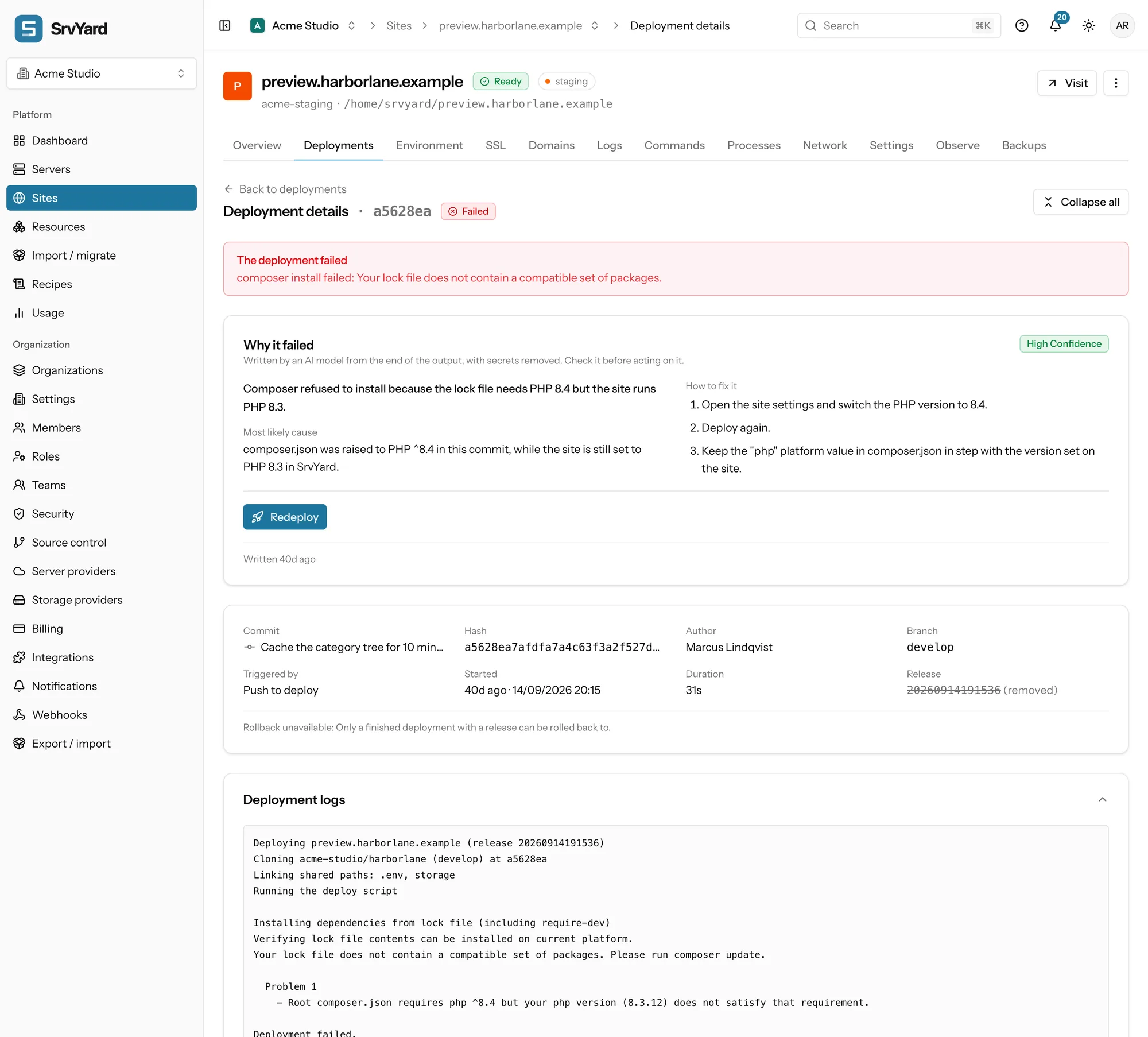
On Business, a failed deploy gets a summary, a likely cause, fix steps and a confidence rating, written from the end of the output with secrets removed. The raw log is always one scroll below it, and it is the thing to believe when the two disagree.
03Spec sheet
what is in the box| Area | Detail | Plan |
|---|---|---|
| Servers | Bring your own over SSH, or create at DigitalOcean, Hetzner Cloud, Akamai (Linode), Vultr, Amazon EC2 and Lightsail, or Proxmox VE 8.1+. Services, PHP versions, firewall, SSH keys, cron and daemons. | all |
| Sites | Laravel, Symfony, Statamic, WordPress, PHP, Next.js, Nuxt.js, static, and Other. | all |
| Deployments | Zero-downtime or in place. Shared paths, hooks, a health check, rollback, push to deploy from GitHub, GitLab and Bitbucket, and a deploy hook URL. | all |
| SSL | Let’s Encrypt over HTTP-01, DNS-01 for wildcards, custom certificates, force HTTPS. | all |
| Databases | MySQL, MariaDB and PostgreSQL, plus Redis, created from the server page. | all |
| Backups | Database and file backups to S3-compatible storage, restores, retention, and provider snapshots. | Pro, Business |
| Monitoring | CPU, memory, disk, load and network sampled once a minute, alert thresholds, uptime checks and heartbeats for scheduled tasks. | Pro, Business |
| API | 250 paths and 376 operations, described in OpenAPI 3. Bearer tokens bound to one organisation and scoped by permission. RFC 9457 errors and idempotency keys. | Pro, Business |
| Webhooks | HMAC-SHA256 signed. Notification channels for Slack, Discord, Telegram and email. | Pro, Business |
| Access | Five built-in roles, custom roles, teams that limit who sees which servers and sites. | Teams: Business |
| Import | Laravel Forge, Ploi and VitoDeploy through a read-only token: drafts, then a scan and adopt of the real server. | all |
04What it does not do
so you can rule it out earlyNot supported
- Docker, Docker Compose and Kubernetes. Sites run directly on the server. If your app needs Docker, you install and run it yourself.
- Python, Ruby, Go, Java and .NET as managed site types. The Other type lets you write your own deploy script; the runtime and the wiring are your work.
- Windows servers, and Linux other than Ubuntu 24.04 and 26.04.
- Hosting your sites. The machines are always yours, in your own provider account.
Also worth knowing
- No domain registration and no email hosting.
- No command line tool. Use the dashboard or the REST API.
- Octane keeps the application in memory and cannot follow a zero-downtime switch.
- A rollback repoints the release folder. It does not undo database migrations.
Not sure your project fits? Describe it and we will tell you.
05Plans
read live from the consolePrices in £, € or $, billed by Stripe. Your servers stay in your own cloud account.
Hobby
One server and a few sites, to try SrvYard.
- servers1
- sites3
- members3
- deploys / month100
- organisations1
- history kept7 days
- APIno
- webhooksno
- backupsno
- monitoringno
- teamsno
- AI explanationsno
Pro
For developers running real apps.
- servers10
- sitesunlimited
- members10
- deploys / monthunlimited
- organisations3
- history kept30 days
- APIyes
- webhooksyes
- backupsyes
- monitoringyes
- teamsno
- AI explanationsno
Business
For teams: roles, teams and API.
- serversunlimited
- sitesunlimited
- membersunlimited
- deploys / monthunlimited
- organisations10
- history kept90 days
- APIyes
- webhooksyes
- backupsyes
- monitoringyes
- teamsyes
- AI explanationsyes
06Moving from another panel
read-onlyRead the old panel. Change nothing.
Give SrvYard a read-only token for Laravel Forge, Ploi or VitoDeploy. It turns servers, sites, domains and deploy scripts into drafts you review, then scans the real server and adopts what is on it. Nothing is written to the old panel, and nothing is installed during the scan.
# Import / migrate
source      forge | ploi | vito
token       read-only, kept encrypted for an hour
scan        no changes
drafts      servers, sites, domains, deploy scripts
adopt       review, then confirm per site
old panel untouched07Questions
answers from the docsWhat is SrvYard?
SrvYard is a control panel for servers you run yourself. It logs in over SSH and installs the software, then lets you manage sites, deployments, databases, certificates, backups and monitoring from a browser. Your sites keep running on your own machines. See What SrvYard is and how it works.
Is there a free plan?
Yes. Hobby is free and includes 1 server, 3 sites and 100 deployments a month. Pro and Business raise those limits and switch on the API, webhooks, backups and monitoring. Business adds teams and AI explanations. Compare them in Compare plans and know your limits.
Which servers can I use?
Any fresh Ubuntu 24.04 LTS or 26.04 LTS machine that gives you root over SSH, or one that SrvYard creates for you at DigitalOcean, Hetzner, Akamai (Linode), Vultr, AWS or Proxmox. See Connect an existing server and Provision a server at a cloud provider.
How long does it take to get a first site online?
About ten minutes once you have a ready server. You create the site, run its first deployment and open it on a free srvy.sh address, so you need no domain or DNS to start. Follow Deploy your first site in ten minutes.
Can I move over from Forge or another panel?
Yes. SrvYard can read Laravel Forge, Ploi or VitoDeploy with a read-only token and turn what it finds into drafts, then scan and adopt the real server. Nothing is changed in the old panel or on any server. See Migrate from Laravel Forge, Ploi or VitoDeploy.
Where do I get help?
Search these docs first, then ask the support chat, and open a support ticket when you need a person to look at your problem. All three are free for every account. Never paste passwords, tokens or private keys into a chat or ticket. See Get help.
Can I host a Python, Ruby or Go site?
Not as a supported site type. SrvYard manages PHP, Node.js (Next.js and Nuxt.js) and static sites. The Other site type lets you set your own web directory and deploy script, but installing the language and wiring it up is your own work. See What SrvYard supports.
Do you support Docker or Kubernetes?
No. SrvYard runs sites directly on the server with Nginx, PHP-FPM or Node, and does not deploy or manage containers. If your app needs Docker, install and run it yourself on the server; see What SrvYard supports for the list.
Connect a server. Deploy a site. Read the log.
Free: 1 server, 3 sites, 100 deploys a month. Read the docs first if you prefer.