Bring a Ploi account over as drafts, then adopt the real servers.
Create a read-only API token in Ploi, paste it, tick the servers to read, and review a plan of servers, sites, deploy scripts, queue workers, cron jobs, databases and network rules. Ploi is never written to, and no server is changed.
# the Ploi API
token       Ploi profile, API keys
scopes      read only, tick what is listed below
checked     with one call, kept encrypted for an hour
env files   only if you ask
scripts     shown beside their translation, never run
ploi untouched01What you need
02How it goes
import, then scan, then adoptImport
Open Import / migrate, choose Ploi, paste the read-only token and press Verify and continue. One read call checks it.
Pick servers
Tick the servers to read. Each site costs several calls to the other panel’s API, so a big account takes a few minutes. Reading
.envfiles is a separate switch, off by default.Review the plan
Totals of new drafts, updates and skipped items, then a card per server with a tick box for every site, daemon, scheduled job, database and firewall rule. Deploy scripts appear beside their translation.
Create the drafts
Tick that you read the deploy scripts, choose whether to delete the token (recommended) and press Create drafts. Nothing is installed.
Connect, scan, adopt
Connect the real server, scan it, and adopt what the scan found. Deploy once from SrvYard, check domains and certificates, and only then change DNS.
03The import screen
from the demo organisation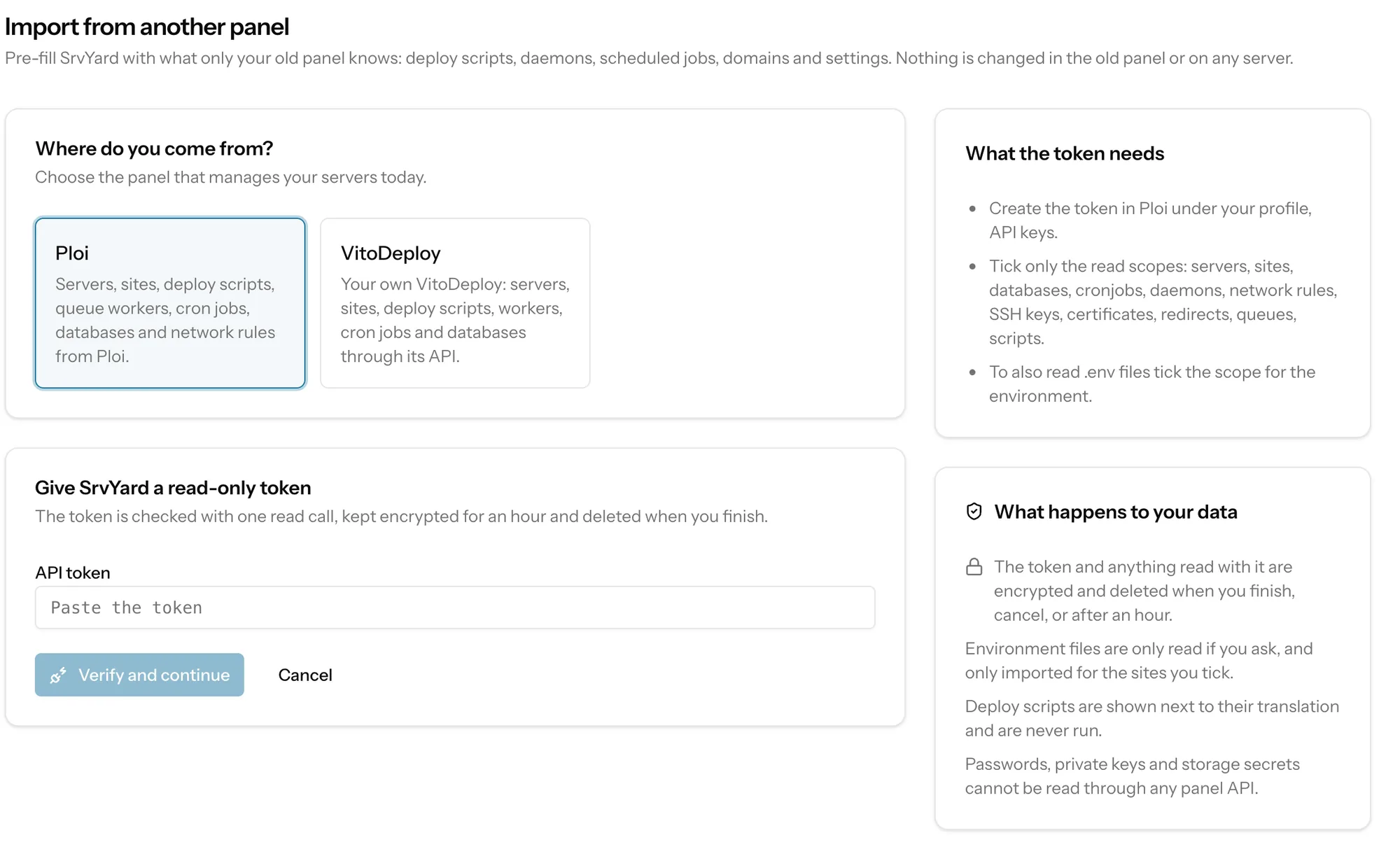
04What the import reads and what it creates
all of it read-only| Read from Ploi | Becomes in SrvYard |
|---|---|
| Servers | Custom servers that await access |
| Sites, domains, repository, status | Sites marked Needs provisioning; a site Ploi reports in an odd state carries a warning |
| Deploy script of each site | A draft script, translated, with a verdict per line |
| Daemons and each site’s queue workers | Daemons |
| Cron jobs | Scheduled jobs |
| Databases | Database records (names only) |
| Network rules | Firewall rules |
| SSH keys, certificates, redirects | Names, metadata and redirects for the review |
| Scripts | Recipes |
The .env of each site, if you asked | Key names, and values only if you tick them per site |
Drafts, not machines
Servers become custom servers awaiting access, sites say Needs provisioning, and daemons, scheduled jobs, databases and firewall rules are records that are applied once the server is connected. Every item is tagged with the panel’s name. Nothing touches a machine and nothing is written to Ploi.
Deploy scripts
Each line is shown with a verdict: unchanged, translated (a variable renamed, or a step SrvYard does itself removed), review (an old absolute path, a variable SrvYard does not have) or unsupported (commented out: anything that needs sudo, or restarts Supervisor). The script is never run by the import; it runs only at a deployment you start.
05What is never copied
because the API will not give it to you- Database passwords and database users: Ploi lists databases only.
- SSH private keys, storage provider secrets and Git tokens.
- Passwords of authentication users.
Environment files are read only if you switch it on, and imported only for the sites you tick; without that, key names alone can be shown. The token and everything read with it are encrypted, expire after an hour and are deleted when you finish or cancel. Delete the token in Ploi too.
How your data is handled during an import is also spelled out on the security page.
06Then scan and adopt the real server
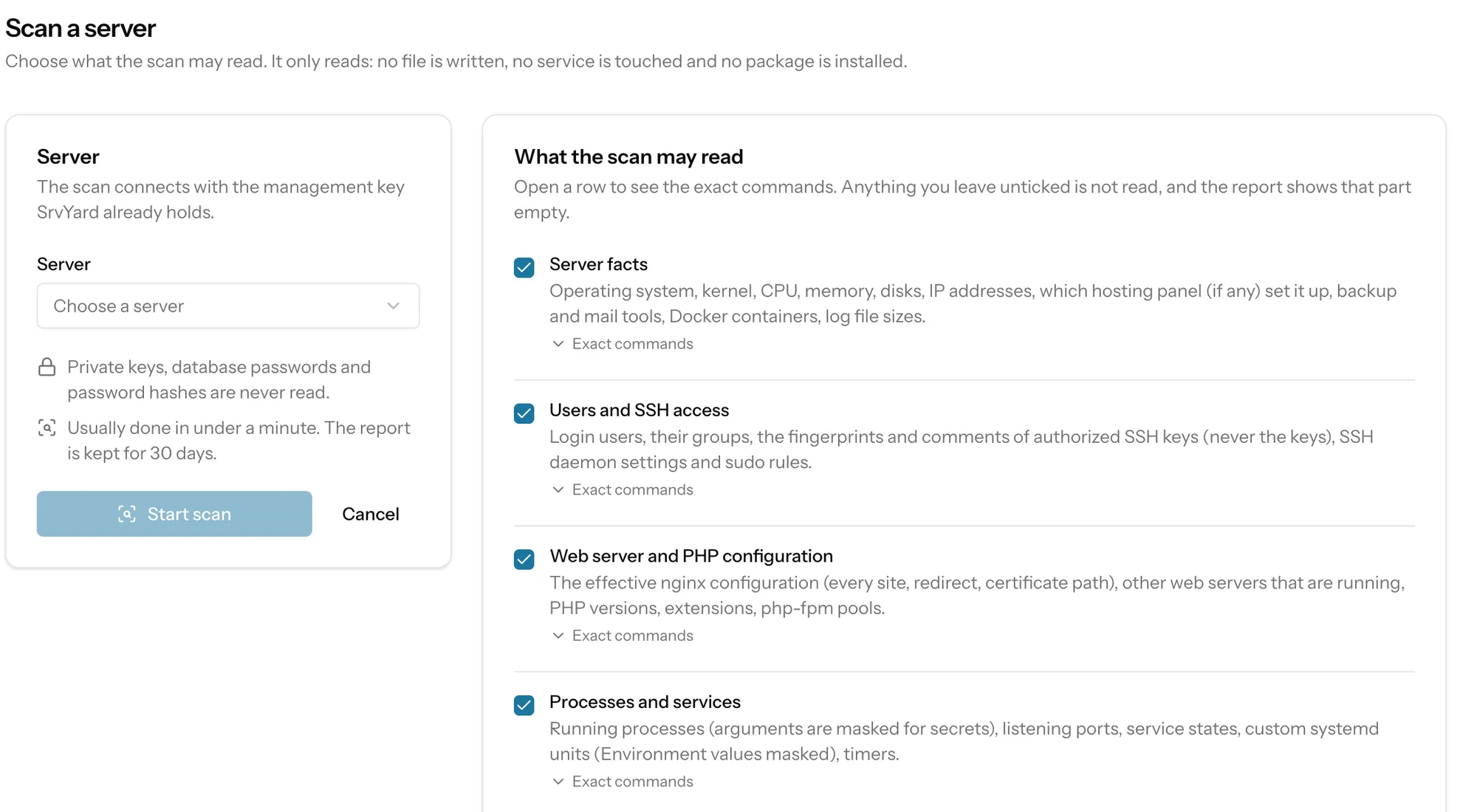
the half that reads the machinePloi’s documentation describes zero-downtime sites as a <domain>-deploy folder of timestamped releases, with the site directory linked to the current one. The scan looks for that layout and for the ploi user; for each site the report says whether it can be adopted without moving files.
The scan is read-only. You choose what it may read, and every consent lists its exact commands. Private keys, database passwords and password hashes are never read. Adopting registers each site where it already is, in observe mode: SrvYard writes nothing to the web server, keeps a restore point, and can roll back.
The Ploi import was written from Ploi’s published API documentation. If your token cannot reach an endpoint, or Ploi has no such record, that part is skipped with a warning under Things to know before you apply, and the rest still imports.
07Switching the old panel off
a guide, never run for youPloi connects over SSH with its own keys and leaves cron lines (certificate renewals, Composer updates, monitoring collectors), sudo rules and helper files. The guide has you remove its keys, look through cron and units, check /etc/sudoers.d and delete the server in Ploi, choosing not to delete it at the provider. Keep the ploi user while sites and daemons run as it.
SrvYard shows a detach guide per panel after adoption. Every command in it is for you to read and run; SrvYard never executes it. Keep the old panel running a few days as a safety net, then cancel it.
Adoption in depth: Adopt a site that is already on your server.
08Questions
answers from the docsWhich Ploi scopes should I tick?
Read scopes only: servers, sites, databases, cronjobs, daemons, network rules, SSH keys, certificates, redirects, queues and scripts, plus the environment scope if you want .env files. See Migrate from Laravel Forge, Ploi or VitoDeploy.
Are database users imported from Ploi?
No. Ploi lists databases only, so SrvYard imports database names without users or passwords.
Import one Ploi site. Keep Ploi running until it works.
Free: 1 server, 3 sites, 100 deploys a month. Read the docs first if you prefer.