Next.js and Nuxt.js behind Nginx, as a Node server or as static files.
Two site types, Next.js and Nuxt.js, each in one of two modes. In server mode SrvYard keeps a Node process alive with Supervisor and points Nginx at it. In static mode Nginx serves the build output. Node 22, 24 or 26, built with npm, pnpm, Yarn or Bun. A plain Node app, such as Express or NestJS, is not a site type.
# the process SrvYard creates (Supervisor, site user)
./node_modules/.bin/next start -H 127.0.0.1 -p 3001
# environment: NODE_ENV=production PORT=3001
# nginx: proxy the domain to 127.0.0.1:3001
# the process SrvYard creates (Supervisor, site user)
node .output/server/index.mjs
# environment: NODE_ENV=production NITRO_PORT=3001
# nginx: proxy the domain to 127.0.0.1:3001# default, runs in the new release folder
npm ci
npm run build
# SrvYard restarts the process once the
# release is live; the script does not01Two modes
chosen when the site is created| Node.js server | Static site | |
|---|---|---|
| What runs | A Supervisor program named after the site, as the site user, started with the server and restarted if it exits. It listens on 127.0.0.1; Nginx proxies the domain to its port. | Nothing. Nginx serves files from the build output. |
| Port | The form starts at 3001. It must be between 1024 and 65535 and not one SrvYard reserves for other services (for example 3306, 5432, 6379, 9200). | None. |
| Start command | Next.js ./node_modules/.bin/next start -H 127.0.0.1 -p <port>; Nuxt.js node .output/server/index.mjs. Replace it with your own in the form. | None. |
| Served files | Everything goes through your app. | Next.js: the /out folder, with .html fallbacks. Nuxt.js: /.output/public, with index.html as the fallback. |
| Default build | npm run build (or the package manager you chose). | The same, except that Nuxt.js starts with generate instead of build. |
Next.js and Nuxt.js sites always deploy with zero downtime: each deploy installs and builds in its own release folder, SrvYard switches current, and then restarts the process. If the restart fails the log says “The application process could not be restarted” and the deployment is not marked failed, so check the Processes tab after a deploy that touched the start command. A Next.js static site needs your app to export static files to out; SrvYard serves the folder, it does not change your Next.js configuration.
02Node and package managers
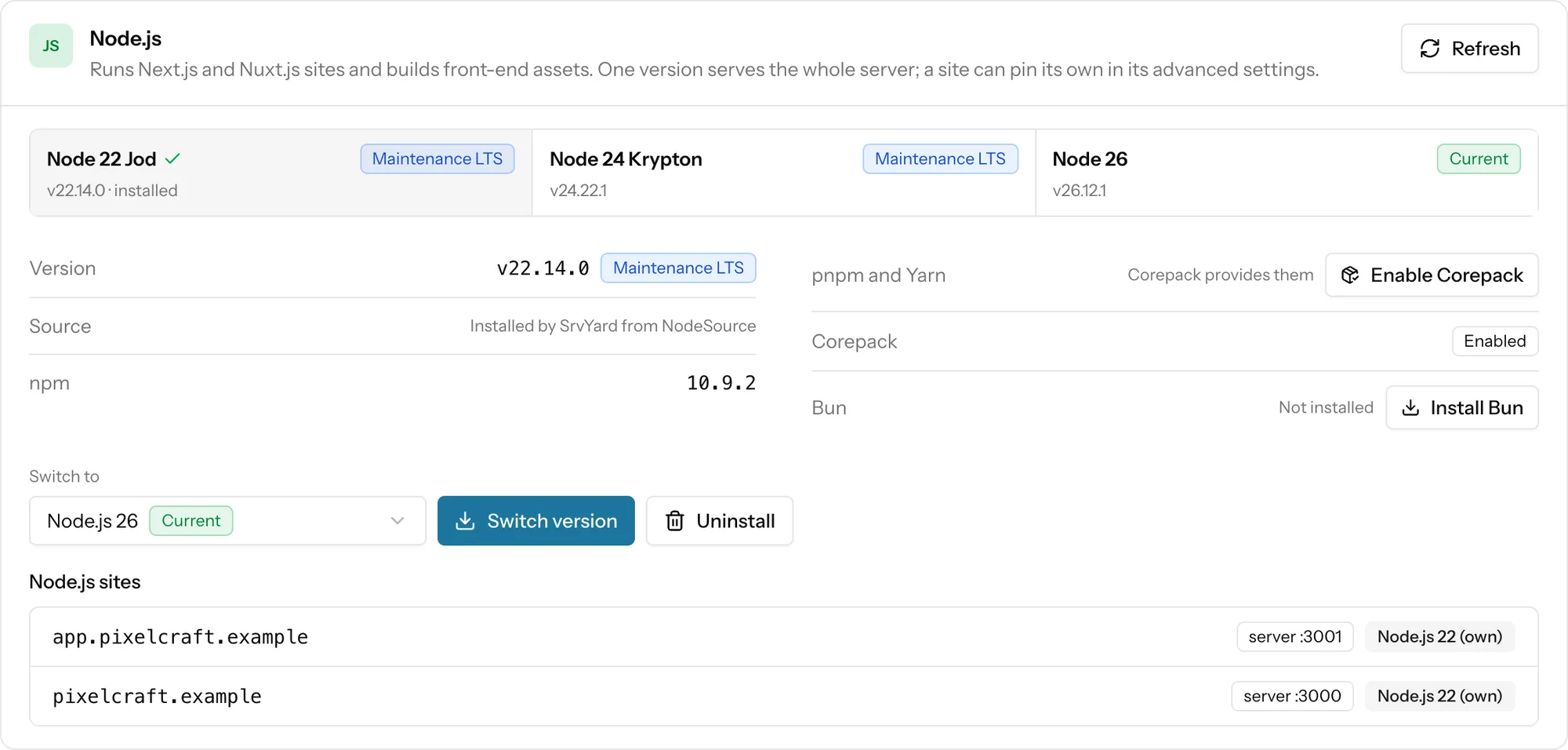
the server's Runtimes tab- Versions. SrvYard offers the Node.js majors 22, 24 and 26 and installs the one you pick from NodeSource. A server holds one major at a time.
- A version of its own. A site can pin another major in its advanced settings. It is installed in the site user’s home with fnm and used to build and run that site only. The server’s Node.js sites list shows which sites use their own.
- npm comes with Node.js. pnpm and Yarn come through Corepack, enabled with one button. Bun is a separate install of a pinned release, checked against its SHA-256 first.
- Strict installs. The generated script uses
npm ci,pnpm install --frozen-lockfile,yarn install --frozen-lockfileorbun install --frozen-lockfile, so the repository needs the lock file and it must matchpackage.json. - Memory. The build runs on the server. A build killed with exit code 137 ran out of memory: add swap, build elsewhere, or use a bigger server.
03Create a Next.js or Nuxt.js site
the New site form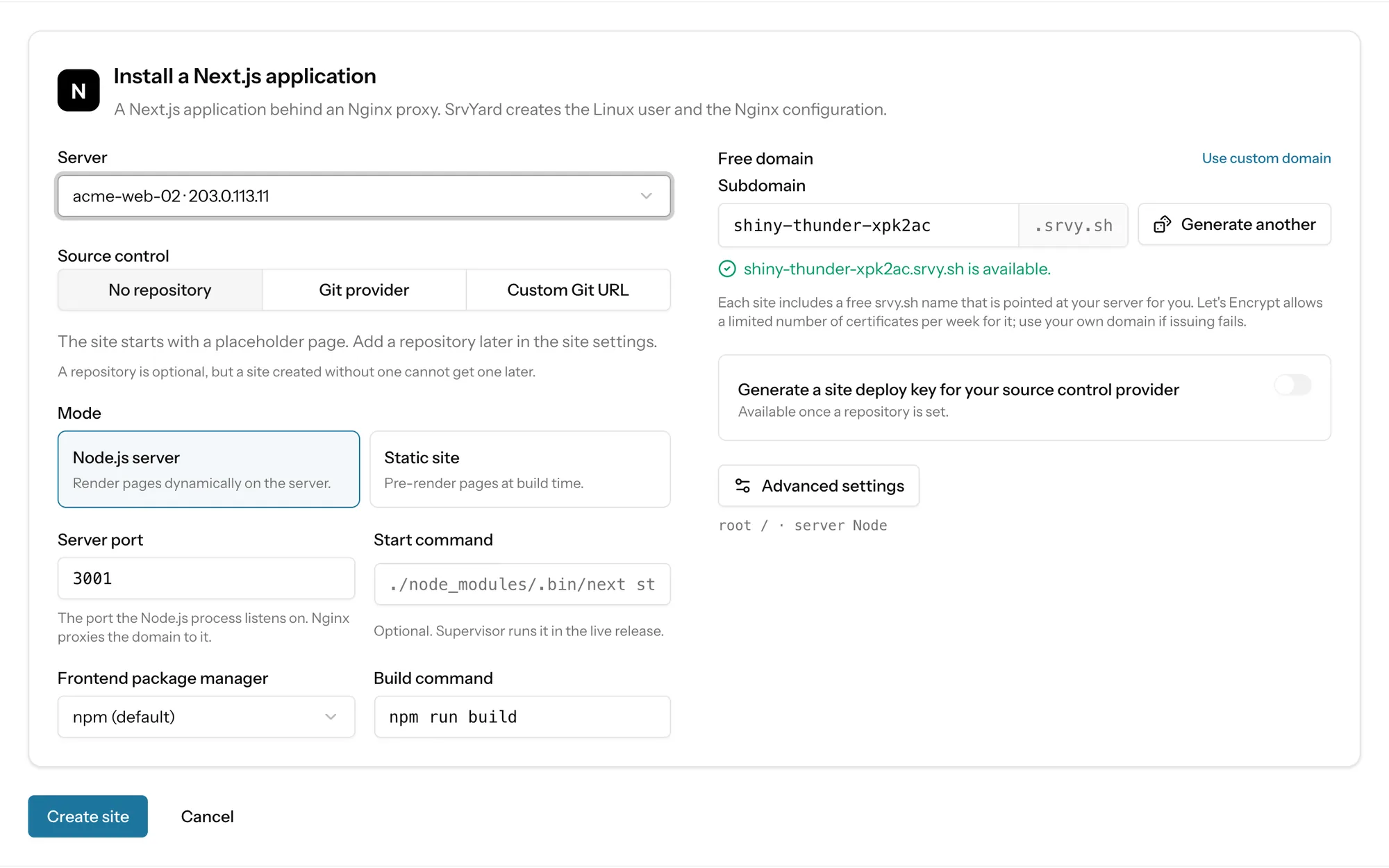
- Server
- A ready server that runs Nginx. If Node.js is not installed there, the form warns you and links to the Runtimes tab; the site will not build until it is, or until you pin a version of its own.
- Source
- GitHub, GitLab or Bitbucket, or a Git URL. A site made without a repository cannot get one later.
- Mode
- Node.js server or Static site, as above.
- Domain
- A free
srvy.shname or your own domain. Wildcards and www redirects are set in the same dialog as for any site. - Fixed once created
- Zero downtime, website isolation and the root directory. Use the root directory for a monorepo where the app is in a subfolder.
04After the first deploy
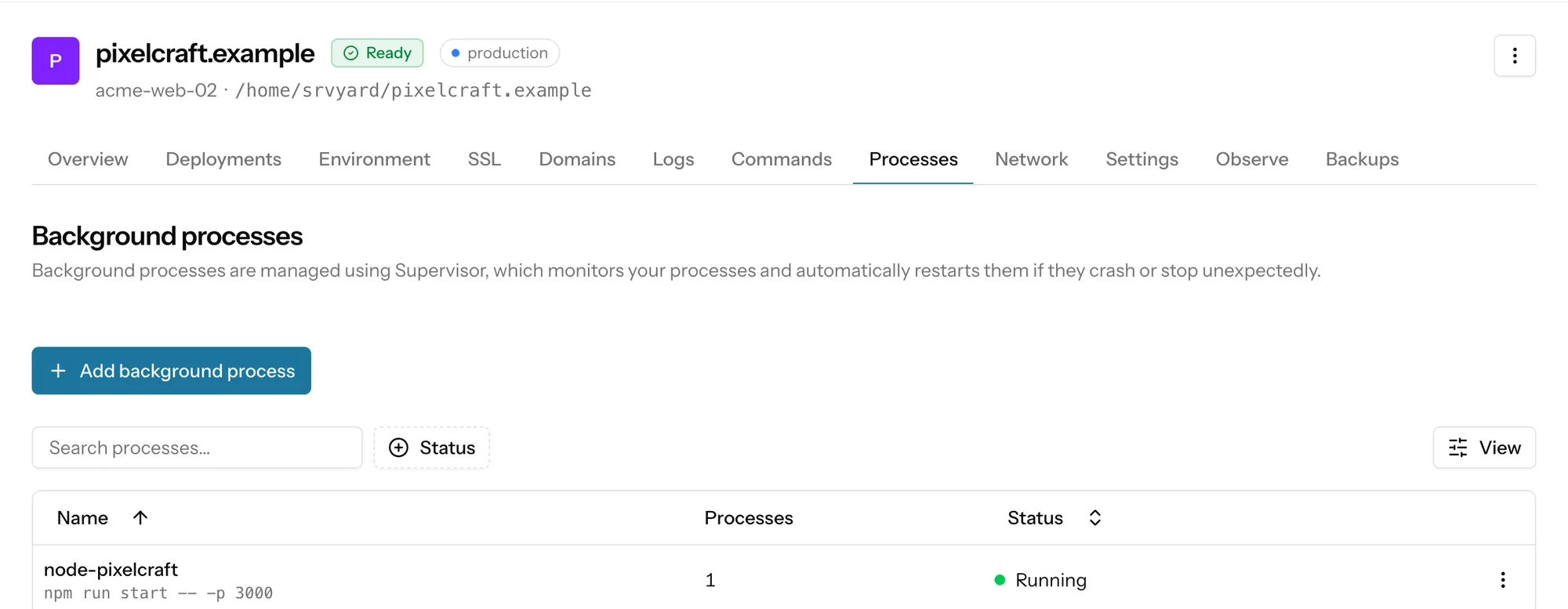
what to look atThe Processes tab shows the program SrvYard created for a server-mode site: its command, number of copies and status. Start, Stop and Restart are on its row menu, and View logs reads what the program wrote. The site has the same tabs as any other: Deployments with push to deploy and the deploy hook, Environment, SSL, Domains, Logs and Commands.
The Logs tab of a Node site shows the two Nginx logs. The application’s own output is under View logs on the Processes tab.
05Not covered
so you can rule it out early- Node applications that are not Next.js or Nuxt.js (Express, Fastify, NestJS, Remix). The Other site type serves PHP or static files; running one is your own setup, not a managed path.
- Docker and Kubernetes, and serverless or edge hosting. The app runs on an Ubuntu server with Nginx that you pay your own provider for.
- Python, Ruby, Go, Java and .NET runtimes.
Each site follows one branch. A staging copy is a second site on the same or another server. Preview deployments per pull request are not offered.
Need a hand deciding? Describe your app.
06Read more
07Node questions
answers from the docsWhich Node frameworks does SrvYard support?
Next.js and Nuxt.js, each as a Node.js server behind an Nginx proxy or as a static site. A plain Node app such as Express or NestJS is not a site type. See What SrvYard supports.
Which Node.js versions can I use?
Node.js 22, 24 and 26. A server has one major installed at a time, and a site can pin its own major, installed with fnm in the site user's home. See Node.js versions and package managers.
Which package managers work?
npm, pnpm, Yarn and Bun. pnpm and Yarn come through Corepack, which you enable once on the Runtimes tab, and Bun is installed from the same card. The default script uses strict, lock-file installs, so the repository needs the lock file. See Build front-end assets with Vite, npm, pnpm, Yarn or Bun.
What keeps my Node process running?
A Supervisor program SrvYard creates for server-mode sites. It runs as the site user, starts with the server, restarts when it exits, and is restarted after each deploy once the new release is live. See Run background processes for a site.
My build is killed with exit code 137. Why?
The server ran out of memory during the build. Add swap, build elsewhere, or use a bigger server. See Build front-end assets with Vite, npm, pnpm, Yarn or Bun.
Can I run Python, Ruby or Go apps?
They are not site types, and SrvYard does not install or manage their runtimes. The Other site type with your own deploy script is possible, but the setup is your own work and not a supported path. See What SrvYard supports.
Deploy a Next.js or Nuxt.js app to a server you control.
Free: 1 server, 3 sites, 100 deploys a month. Read the docs first if you prefer.