An API for what you would click, and signed webhooks for what you would watch.
The REST API covers 376 operations over 250 paths and is described by an OpenAPI 3.1 file. Tokens carry scopes, a token never exceeds the role of its owner, and every change is logged with the token’s name. Webhooks send 45 kinds of event as signed JSON.
# who am I? needs no scope
curl -H "Authorization: Bearer $SRVYARD_TOKEN" \
     -H "Accept: application/json" \
     https://your-srvyard-host/api/v1/token
# scope sites:manage-deploys; answers 202 and a status_url
curl -X POST \
-H "Authorization: Bearer $SRVYARD_TOKEN" \
-H "Idempotency-Key: deploy-$GITHUB_SHA" \
https://your-srvyard-host/api/v1/sites/<site-id>/deployments
# then GET the status_url until status is
# finished, failed or cancelled# X-SrvYard-Signature: t=<unix>,v1=<hex>
const expected = crypto
.createHmac('sha256', secret)
.update(`${t}.${rawBody}`)
.digest('hex');
# compare with every v1 value in constant time,
# reject if t is over 5 minutes from your clock01How every call behaves
the same rules everywhere| Rule | What it is |
|---|---|
| Where | Under /api/v1 on your SrvYard address. JSON in, JSON out, always send Accept: application/json. The token decides the organisation, so no organisation id is in any URL. |
| Description | OpenAPI 3.1 at /openapi.json, also downloadable from the Reference tab of the API tokens page. Import it into Postman, Insomnia or Bruno. |
| Authentication | Authorization: Bearer srv_.... No cookie or session. GET /api/v1/token says which token, organisation and scopes you are using. |
| Ids and dates | UUIDs and ISO-8601. No internal numeric ids. A secret that SrvYard generates (a database password, a backup passphrase) is returned once, in the response that created it. |
| Lists | page, per_page (default 25, at most 100), sort (a leading - is descending) and filter[field]=a,b. An unknown filter or sort field is a 422 that lists the allowed ones. |
| Background work | Anything that needs the server answers 202 Accepted with the resource and a status_url. Poll it until the status is final. |
| Errors | RFC 9457 application/problem+json with a stable code such as missing_scope, plan_required, plan_limit (402) or rate_limited. Every response carries X-Request-Id. |
| Retries | Send Idempotency-Key on POST, PUT, PATCH and DELETE. The same key and body within 24 hours replays the first answer; the same key with another body is a 409. |
| Rate limit | 60 requests a minute per token, 10 for heavy operations (scans, exports, installs). 429 carries Retry-After. |
| Versions | A breaking change would ship as /api/v2. A retired operation gets the Deprecation and Sunset headers and deprecated: true in the file. |
A resource of another organisation answers 404, never 403, so a token cannot be used to find out which ids exist elsewhere. If a team limits the token owner to some servers, lists contain only those.
API conventions, in the docs · Your first calls: servers, sites, deployments
02Tokens and scopes
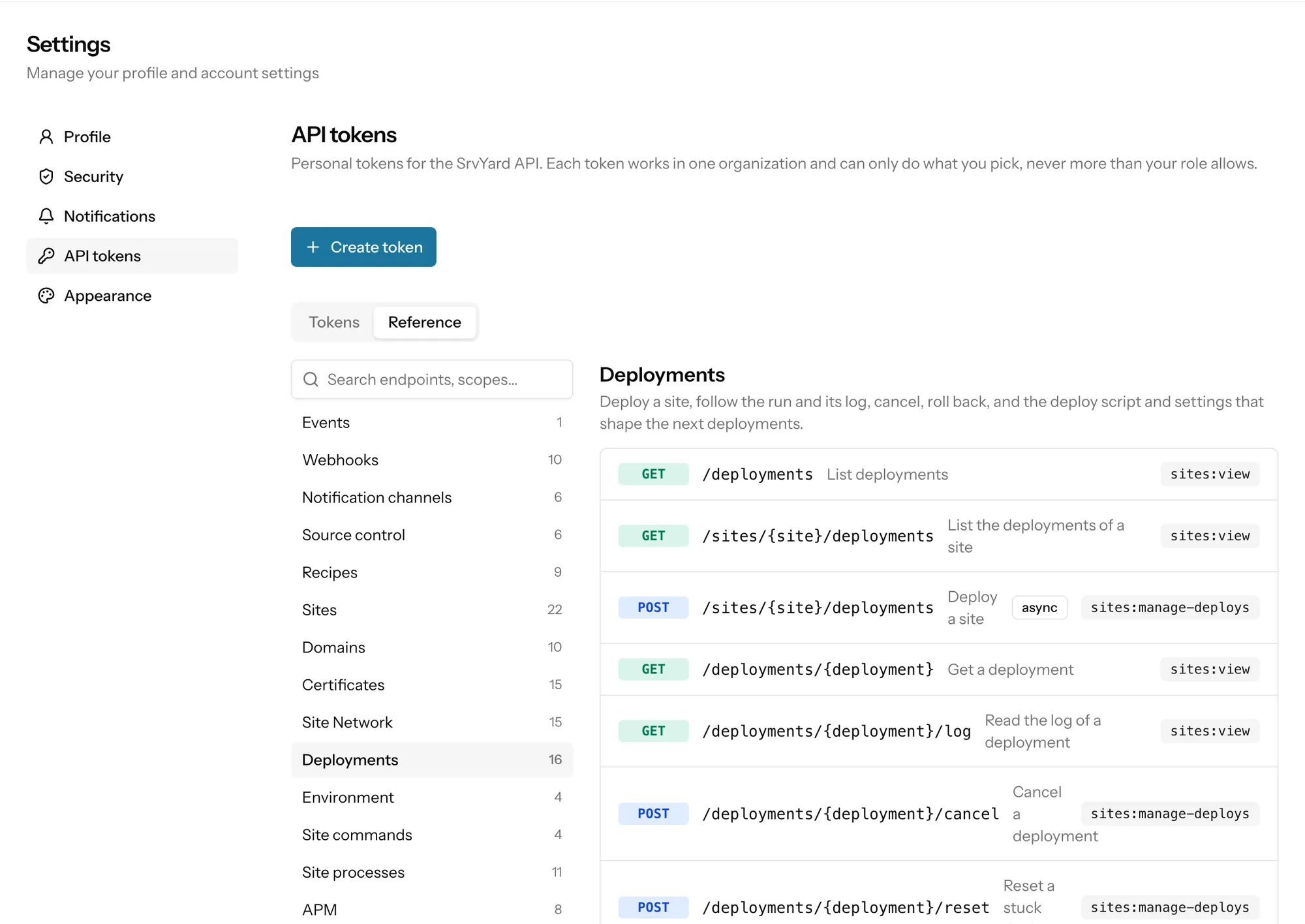
Settings, API tokensA token belongs to you and works in one organisation. Its scopes are permission keys, the same ones the Roles page uses, such as servers:view or sites:manage-deploys. It can use only the scopes you tick and only those your role also holds; demote the owner and the token loses the extra power on its next call.
- Expiry: 30 days, 90 days, 1 year, 10 years (the default) or never.
- Presets: Read-only ticks every
:viewscope, Full ticks everything your role holds. - The secret starts with
srv_and is shown once. SrvYard stores a hash, so nobody can read it back. - Reading or writing a site’s
.envneeds its own scope,sites:manage-environment, so a deploy token does not get secrets by accident. - Revoking is immediate and permanent; the next call gets a 401.
Name a token after the job, not the person: the name is what the activity log records as token:<name>.
| Job | Scopes |
|---|---|
| Deploy one pipeline | sites:view, sites:manage-deploys |
| Show server health on a wallboard | servers:view, resources:view |
| Read and edit a site’s .env | sites:view, sites:manage-environment |
03Webhooks
Settings, Webhooks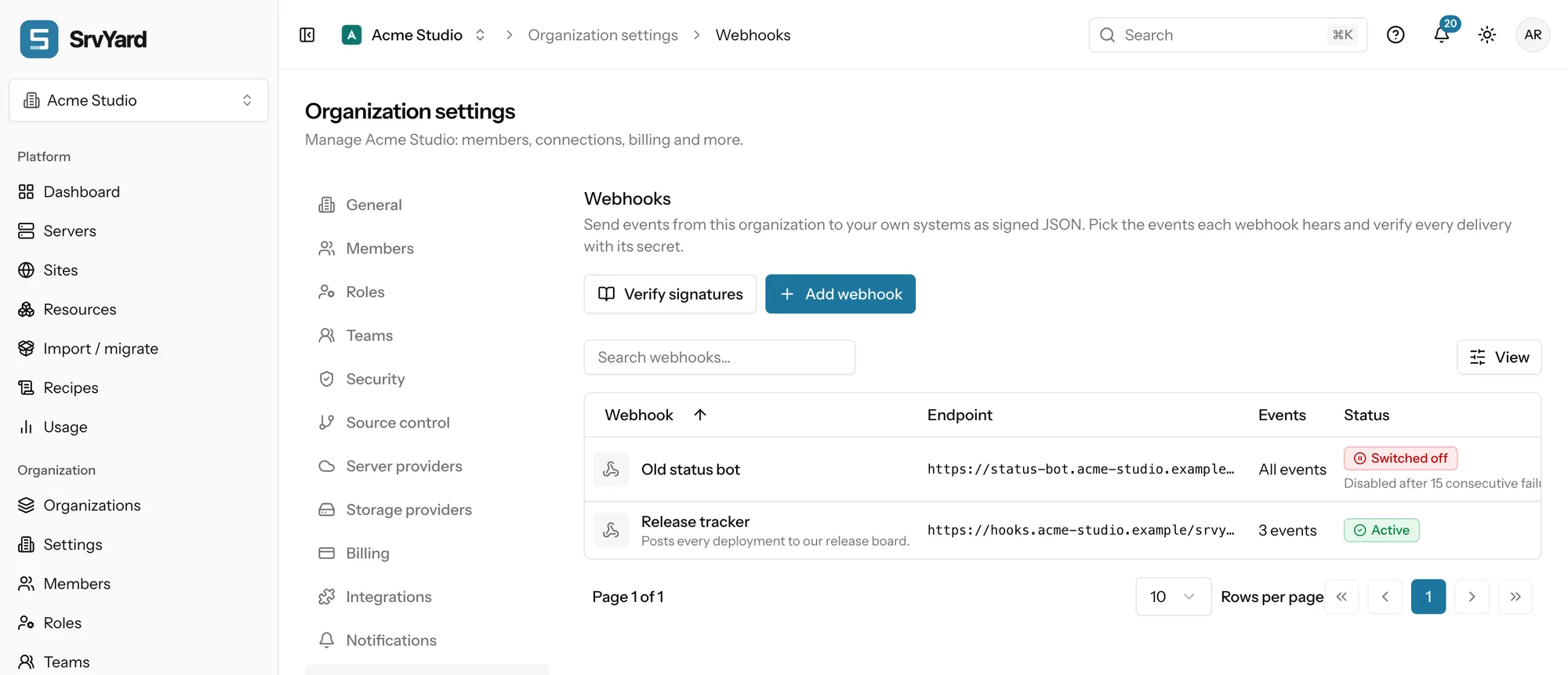
A webhook is SrvYard calling your code when something happens in the organisation: a deployment finishes, a certificate fails to renew, a server disconnects. It sends a POST with a JSON body to an https address you choose, for the events you tick. All events is on by default and includes events added later.
- https only. An address with a user name or password, a blocked port, or one that resolves to a private network is refused. Redirects are not followed. The address is stored encrypted.
- Up to 20 webhooks per organisation. The signing secret (
whsec_...) is shown once; Rotate secret gives a new one and the old one keeps verifying for 24 hours. - Answer with a
2xxwithin 10 seconds. SrvYard keeps the first 2 KB of your answer for the history. - Secrets, passwords, tokens and
.envvalues are never in a payload.
| Header | Content |
|---|---|
X-SrvYard-Event | The event key, for example deployment.finished. |
X-SrvYard-Delivery | The id of this delivery. A redelivery gets a new one. |
X-SrvYard-Timestamp | Unix seconds at which the request was signed. |
X-SrvYard-Signature | t=<timestamp>,v1=<hex>: HMAC-SHA256 of <timestamp>.<raw body> with the signing secret. While a rotated secret is valid there are two v1 values; accept either. |
The body is always the same envelope: id (evt_..., identical across retries, so use it to skip duplicates), type, created_at, the organization and a data object. To verify: read the raw body before anything parses it, compute the HMAC for each v1, compare in constant time, and reject a timestamp more than five minutes from your clock. The usual reason a correct secret fails is a body that was re-encoded before hashing.
04The 45 events
the same keys notifications use| Group | Events |
|---|---|
| Servers (8) | server.created, server.provisioned, server.failed, server.disconnected, server.reconnected, server.rebooted, server.archived, server.deleted |
| Sites (5) | site.created, site.installed, site.failed, site.deleted, site.down |
| Deployments (5) | deployment.started, deployment.finished, deployment.failed, deployment.cancelled, deployment.rolled_back |
| Certificates and domains (7) | certificate.issued, certificate.failed, certificate.expiring, certificate.renewed, domain.added, domain.removed, domain.dns_verified |
| Backups and snapshots (5) | backup.finished, backup.failed, backup.restored, snapshot.created, snapshot.failed |
| Monitoring (4) | monitor.alert, monitor.recovered, heartbeat.missed, heartbeat.recovered |
| Databases (2) | database.created, database.deleted |
| Recipes and imports (3) | recipe.finished, migration.scan_finished, migration.adoption_finished |
| Team and access (6) | member.invited, member.joined, member.removed, api_token.created, api_token.revoked, credentials.downloaded |
GET /api/v1/events returns the same list with an example data for each. Send test event on a webhook posts a webhook.test event so you can see your code work without waiting for a real deployment.
05When your endpoint fails
retries and switch-offSuccess
Any
2xxwithin 10 seconds. Anything else is a failed attempt.Retried
A timeout, a
5xx,408or429: after 1 minute, 5 minutes, 30 minutes, 2 hours, 6 hours, 12 hours and 24 hours, eight attempts in all. A longerRetry-Afteron a 429 or 503 wins.Not retried
Any other
4xx. It is a “no” from your code and would get the same answer.Switched off
After 10 failed deliveries in a row, the first of them at least three days old, the webhook is switched off and the owners and admins are told by email and in the app. Fix the endpoint, choose Switch on, and the counters restart.
History
Each webhook keeps its deliveries for 30 days: status, HTTP code, duration, attempts, the request that went out and the first 2 KB of the answer. Redeliver sends the same event again as a new delivery.
06Plans and limits
from the plan catalogueAPI access is on Pro and Business; webhooks are on Pro and Business. Without them every API call answers 403 with plan_required and the Webhooks page says it is not in the plan. Tokens keep existing after a downgrade but stop working until the plan has the API again. Compare plans.
What is not here: there is no command line tool (use the dashboard or the API), and webhooks are per organisation. A site can also have channels of its own, including a signed webhook for that site’s deployment events (up to 10 channels per site). For messages to people rather than JSON for programs, see notifications.
07Read more
08API and webhook questions
answers from the docsWhich plans include the API and webhooks?
Pro and Business. On Hobby every API call is answered 403 with the code plan_required, and the Webhooks page says it is not in your plan. See Compare plans and know your limits.
Is there an OpenAPI file?
Yes, OpenAPI 3.1, served at /openapi.json on your SrvYard address and downloadable from the Reference tab of the API tokens page. Import it into Postman, Insomnia or Bruno. See Create an API token and pick scopes.
Can a token do more than I can?
No. A token carries scopes you pick, and it can never do more than the role of its owner allows in that organisation. If the owner is demoted, the token loses the extra power on its next call. See Create an API token and pick scopes.
How do I deploy from CI and wait for the result?
Call POST /api/v1/sites/{site}/deployments with a token that has sites:manage-deploys. It answers 202 with a status_url; poll it until the status is finished, failed or cancelled. A deploy hook is simpler when you do not need to wait. See Deploy from GitHub Actions and other CI.
How do I check that a webhook really came from SrvYard?
Compute an HMAC-SHA256 of <timestamp>.<raw body> with the webhook's signing secret and compare it with each v1 value in the X-SrvYard-Signature header in constant time. Reject a timestamp more than five minutes from your clock. See Receive event webhooks and verify their signatures.
What happens when my endpoint is down?
A timeout, a 5xx, 408 or 429 is retried up to eight attempts in all, from one minute to 24 hours apart. After ten failed deliveries in a row, the first at least three days old, the webhook is switched off and the owners and admins are told. See Receive event webhooks and verify their signatures.
What are the API rate limits?
A token may make 60 requests a minute, and 10 a minute for heavier operations such as scans, exports and installs. A 429 answer carries a Retry-After header. See API conventions for authentication, pages, errors and rate limits.
Create a token with one scope and call it from a script.
Free: 1 server, 3 sites, 100 deploys a month. Read the docs first if you prefer.