Create Vultr instances from the same form you deploy from.
Connect a Vultr account with an API key, pick a region and a plan, and SrvYard asks Vultr for the instance, waits for it to boot, logs in with a key it generated and installs what the server type needs. Vultr bills you directly. One setting trips most people up: the key’s access control.
# Settings, Server providers, Vultr
name        Vultr (production)
api key     enable the API, copy the key
access      allow SrvYard’s IP, or all IPv4
verify      checked with GET /account
stored      encrypted, never shown again
# without the access rule Vultr rejects every call01What you need
| Item | Detail |
|---|---|
| Account | A Vultr account with the API enabled (my.vultr.com, Settings, API). |
| API key | The key from that page. Access Control under it must allow SrvYard’s server IP address, or all IPv4 addresses. Otherwise Vultr rejects every request and SrvYard reports that the key was rejected. |
| Operating system | Ubuntu 24.04 LTS or 26.04 LTS (the x64 images). |
| Server types | App, web, load balancer, database, cache, worker and Meilisearch servers. The type decides what is installed and cannot be changed afterwards. |
| Plan | Hobby 1, Pro 10, Business unlimited servers. Archived servers do not count. |
02What SrvYard asks of Vultr
and nothing else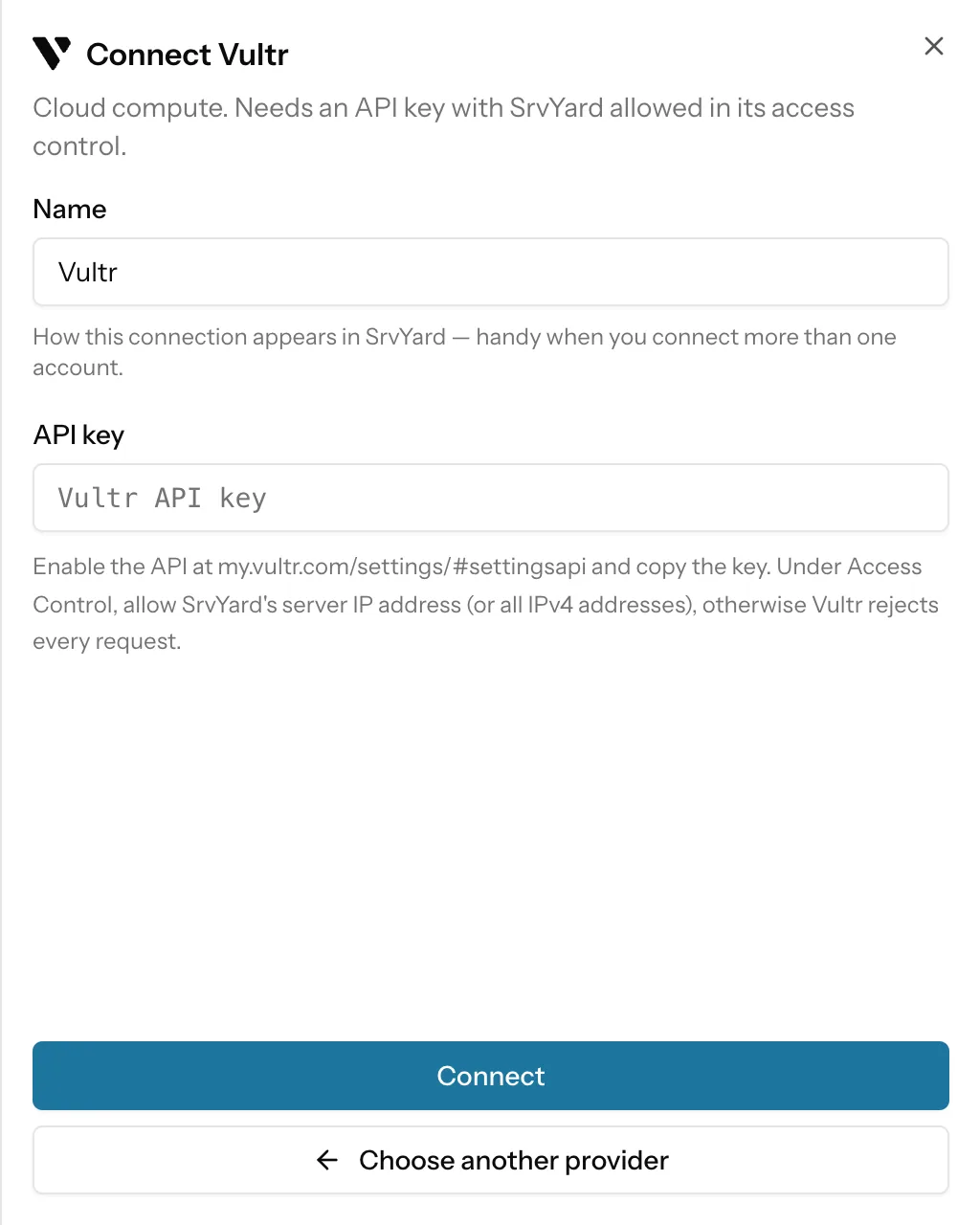
SrvYard asks for regions, plans, Ubuntu images and VPCs, and for creating, rebooting, snapshotting and deleting the instances it made. It does not manage your Vultr billing, DNS, block storage, load balancers or other instances.
Instances are created with the tag srvyard.
You can connect several Vultr accounts, each under its own name. If Vultr later rejects the key (revoked, or the access control no longer matches), the connection shows Needs reconnecting; existing instances keep running.
Already have an instance? Use Connect an existing server: one command as root, no key.
03Create a server
the Add server formName and provider
A name up to 60 characters, which becomes the label and hostname, and your connected Vultr account.
Server type
App server if you are unsure: sites, queue workers and a database on one machine.
Region and plan
Every Vultr region is listed with city and country. Plans come from five families (below), each with its monthly price. A plan not sold in the chosen region is shown but cannot be selected.
Create
SrvYard creates the instance, waits for it to run with an address, provisions it over SSH and shows Ready when it is done.
04What works on a Vultr instance
read from the integration| Capability | Vultr |
|---|---|
| Plan families | Cloud Compute, Dedicated Cloud, High Frequency, High Performance and Optimized Cloud. Bare metal and GPU plans are not offered. |
| Provider backups | An option in Advanced settings. The form notes that Vultr automatic backups add 20% of the plan price per month. |
| IPv6 | On by default, can be switched off. |
| Private network | The instance can be attached to a VPC of the chosen region. |
| Restart | A reboot through Vultr’s API. There is no separate hard reset. |
| Snapshots | Taken at Vultr (Backups, Snapshots; a plan with backups: Pro or Business). Vultr captures a running server as it is. Vultr snapshots are account wide and do not record which instance they came from, and a server can be created from one in another region. |
| Delete | Deleting the server in SrvYard destroys the instance too, unless you switch Preserve on. Archiving never touches the instance. |
| Open in | The Actions menu links to the instance in the Vultr customer portal. |
05Limits
so you can rule it out early- No Vultr Kubernetes, managed databases, bare metal or GPU instances.
- No Docker or Docker Compose, even on a Vultr Docker marketplace image.
- Only Ubuntu 24.04 and 26.04 are created.
If you are not sure what address to allow in Vultr’s access control, ask us before you connect, or allow all IPv4 addresses for the key and restrict it later.
The article Add a server provider and its API token has the troubleshooting list.
06Provider questions
answers from the docsVultr rejects my API key. What is wrong?
Almost always the key's Access Control: it must allow SrvYard's server IP address, or all IPv4 addresses, otherwise Vultr rejects every request. Fix it at Vultr, then reconnect. See Add a server provider and its API token.
Which Vultr plans can I pick?
Cloud Compute, Dedicated Cloud, High Frequency, High Performance and Optimized Cloud, with the monthly price. Bare metal and GPU plans are not offered.
Can SrvYard take Vultr snapshots?
Yes, on a plan with backups (Pro or Business). Vultr snapshots are account wide and do not record which instance they came from. See Provider snapshots.
Connect a Vultr account and create the first server.
Free: 1 server, 3 sites, 100 deploys a month. Read the docs first if you prefer.