Access is a role and a team, not a shared key.
Everyone signs in as themselves. A role says what they may do, a team says which servers and sites they see, two-factor can be required, and every change is recorded with who made it. This page is about the access side of running servers with several people.
role    Developer        # deploys, edits .env, no new servers
team    Storefront       # shares 2 servers and 4 sites
sees    those, and what they created
cannot  create or reboot servers, read server credentials,
manage members, teams or channels01Who can do what
roles, every planFive built-in roles come with every organisation: Owner, Admin, Manager, Developer and Viewer, of 102 permissions each holding from 22 to all of them. Admin keeps everything except what stays with the owner; Manager runs servers and people but not billing; Developer ships to servers and sites without creating them; Viewer reads everything, secrets included, and changes nothing.
Two permissions are kept apart on purpose: sites:manage-environment (the .env file) and servers:view-credentials (sudo and database administrator passwords). A deploy-only person does not get them by accident.
- Custom roles
- Business. Built from the permission list, or cloned from a built-in role.
- Changes apply
- On the person’s next request. Nobody needs to sign in again.
- Invitations
- By email, with a role, valid for seven days.
02Where they can do it
teams, Business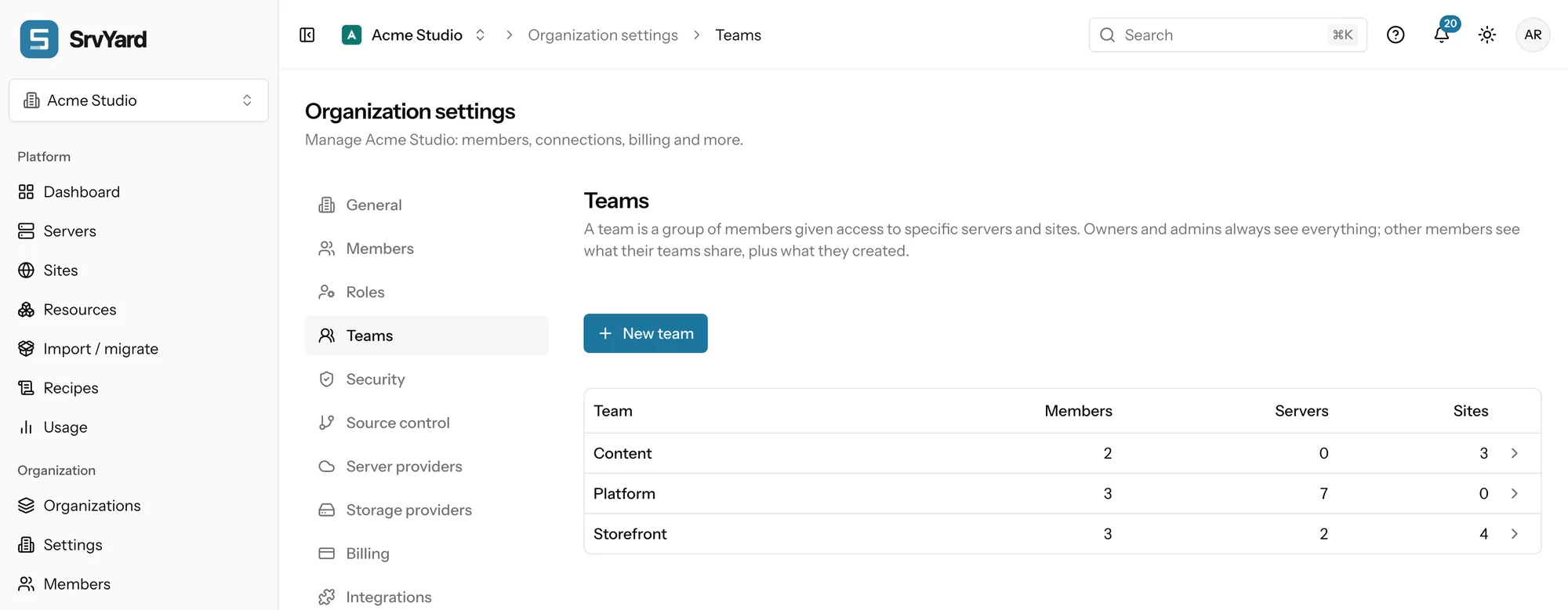
A team shares whole servers or single sites. The people who run the machines get the server; the people who only build on an application get its site and never see the server list. Owners and admins see everything; a member in a team sees what the team shares plus what they created; anything else answers “not found”, in the dashboard and in the API.
Teams narrow what a role allows and never widen it.
03What is recorded and who is told
traceability| Question | Where the answer is |
|---|---|
| Who changed this server or site? | The Activity tab of the server or site: type, what happened, who (a member, or SrvYard), when. Fourteen days are kept; the API (activity:view) lets you copy it elsewhere. |
| Who started this deploy? | The Deployments history shows the commit, its author, the trigger (manual, push, hook, API or rollback) and the duration of each deployment. |
| Which script did that? | API changes carry the actor token:<name>. Name tokens after the job. |
| How does the team find out? | Notification channels to Slack, Discord, Telegram or email for failed deployments, expiring certificates, missed heartbeats and member changes such as member.removed and api_token.created. |
| Who signed in? | Each person has their own sign-in log under their account security. |
04When someone leaves
a short checklistBan first
Access stops at once, the history keeps their name, and nothing that depended on them breaks while you look.
Check their tokens
A member’s API tokens stop working when the member is removed.
Check SSH keys
Keys that were added to servers stay on those servers until you remove them on the server’s SSH keys tab. This is the step people forget.
Remove
When you have checked, remove them. To bring them back, invite them again.
05Plans and limits
from the plan catalogueMembers per organisation: Hobby 3, Pro 10, Business unlimited. Roles, invitations, bans, two-factor policy and the activity feed are on every plan; teams and custom roles are Business. Compare plans.
Not offered: single sign-on with SAML and automatic provisioning with SCIM. People sign in with a password or a social account (GitHub, Google, GitLab or Apple), optionally with two-factor or a passkey, and are invited by email.
06Read more
07Team questions
answers from the docsWhat can each built-in role do?
Owner has all 102 permissions, Admin 98, Manager 84, Developer 67 and Viewer 22. Admin cannot manage billing or delete the organisation, Manager cannot touch organisation settings, Developer cannot create servers, and Viewer cannot change anything. See Choose and create roles for your team.
How do I limit someone to one project?
Put them in a team that shares that project's site (or its server), with a role such as Developer. Teams are part of the Business plan. See Limit members to certain servers and sites with teams.
Can I require two-factor for everyone?
Yes. An owner or admin can switch on Require two-factor authentication in the organisation's general settings; members without it can only open their security settings until they turn it on. See Turn on two-factor authentication and manage your sessions.
What do I do when someone leaves?
Ban them first, which cuts access at once, then check their API tokens and the SSH keys they added to servers: keys stay on the servers until you remove them. Remove the member when nothing depends on them. See Give people the least access they need and audit what they do.
Does SrvYard support single sign-on?
People sign in with a password or a social account (GitHub, Google, GitLab or Apple), optionally with two-factor or a passkey. SAML single sign-on and SCIM provisioning are not offered. See Turn on two-factor authentication and manage your sessions.
Invite a colleague with the lowest role that lets them work.
Free: 1 server, 3 sites, 100 deploys a month. Read the docs first if you prefer.