One site per application, with its own domains, environment file and PHP version.
Choose a type, a server and a domain. SrvYard creates the site folder and the Nginx configuration (and, with website isolation, a Linux user and PHP-FPM pool of its own), and starts the first deployment when you connected a repository. Laravel, Symfony, Statamic, WordPress, plain PHP, Next.js, Nuxt.js and static sites are covered; anything else is yours to wire up.
user          srvyard, or its own with website isolation
directory     /home/srvyard/<domain>
php-fpm       the server's pool for that PHP version, or its own pool with isolation
nginx         a server block per domain
placeholder   served until the first deploy
database      optional, created with the site
certificate requested by itself on a free srvy.sh name01Site types
New site| Type | What it is |
|---|---|
| Laravel, Symfony, Statamic | PHP frameworks that serve /public. Composer install is added to the deploy script, the environment file is shared between releases, and the Laravel type gets a panel with the scheduler, Horizon, Octane, Reverb and Inertia SSR. |
| WordPress | Downloaded and installed for you, with its own database. No repository needed. |
| phpMyAdmin | A site type for the databases of a server: pinned release 5.2.3, MySQL or MariaDB only, HTTP Basic authentication in front by default. |
| PHP | Any PHP application served through PHP-FPM. |
| Next.js, Nuxt.js | Nginx as a proxy to your Node application, or the static build. They always deploy with zero downtime and can pin their own Node.js major. |
| Static HTML | HTML, CSS and JavaScript served straight by Nginx. |
| Other | You choose PHP or static files and the web directory, and write the deploy script. This is not a managed path for Python, Ruby, Go, Java or .NET: the language, its process and the Nginx wiring are your own work. |
02Creating one
about ten minutes with a repositoryServer
A server that is Ready and runs Nginx. Database and cache servers do not. The PHP versions and database engines the form offers come from this server.
Code
No repository, a Git provider connection (GitHub, GitLab or Bitbucket) with owner, repository and branch pickers, or a custom Git URL: public over HTTPS, or SSH with a deploy key SrvYard creates. A site made without a repository cannot get one later.
Domain
A free
srvy.shname, or your own, with thewwwbehaviour and wildcards. A database can be created and written into the environment file in the same step.Advanced
Root directory and web directory, PHP version, website isolation, package manager and build command, zero-downtime on or off, and credentials for private Composer and npm registries.
Create
Watch it install. With a repository the first deployment starts by itself. If installation fails, Retry installation skips the steps that finished.
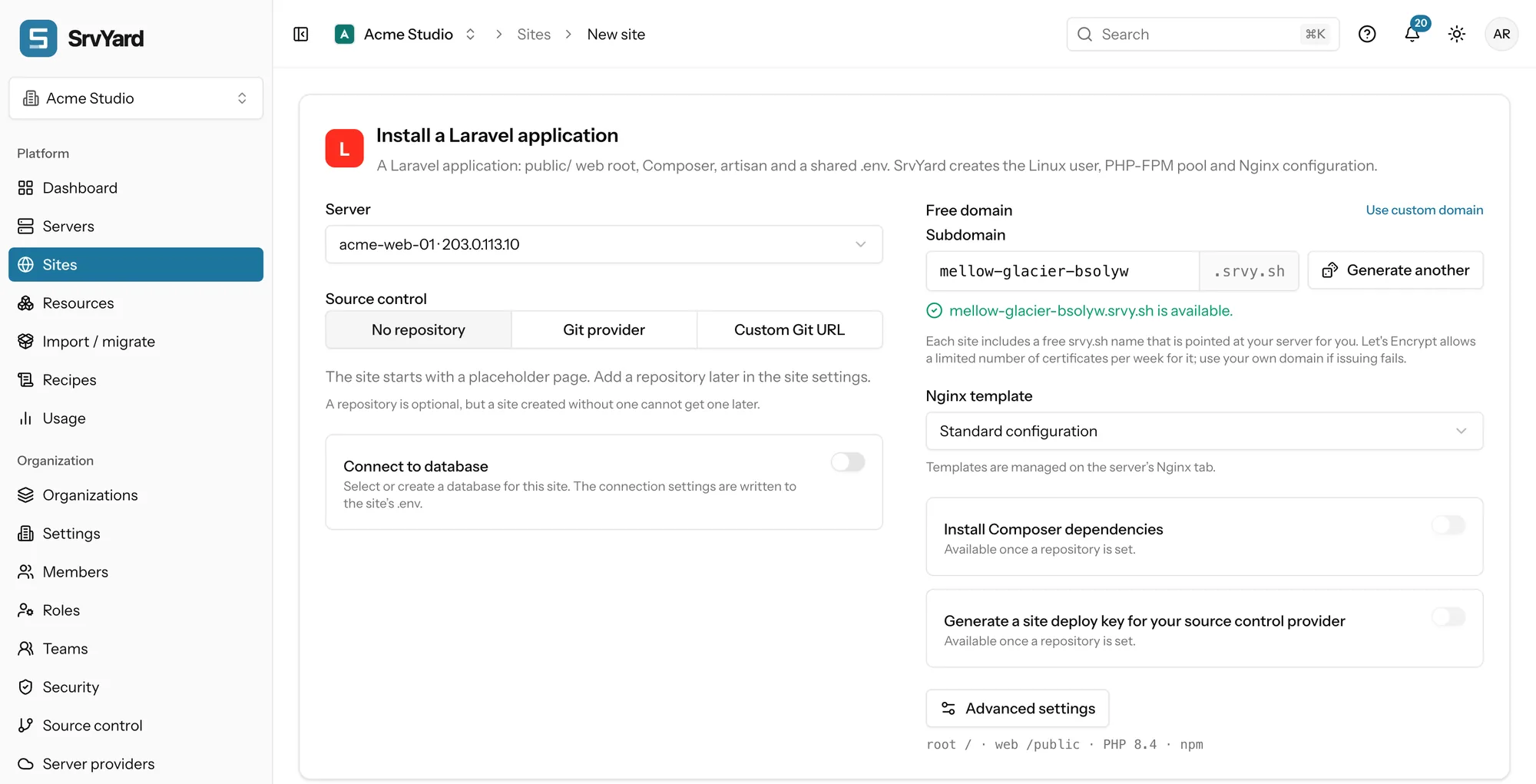
Four choices are final: the type, the root directory, website isolation and zero-downtime releases. Decide them on the form. Isolation gives the site its own Linux user and PHP-FPM pool, so one site cannot read another’s files; without it every site on the server runs as the same user.
03Domains and DNS
the Domains tab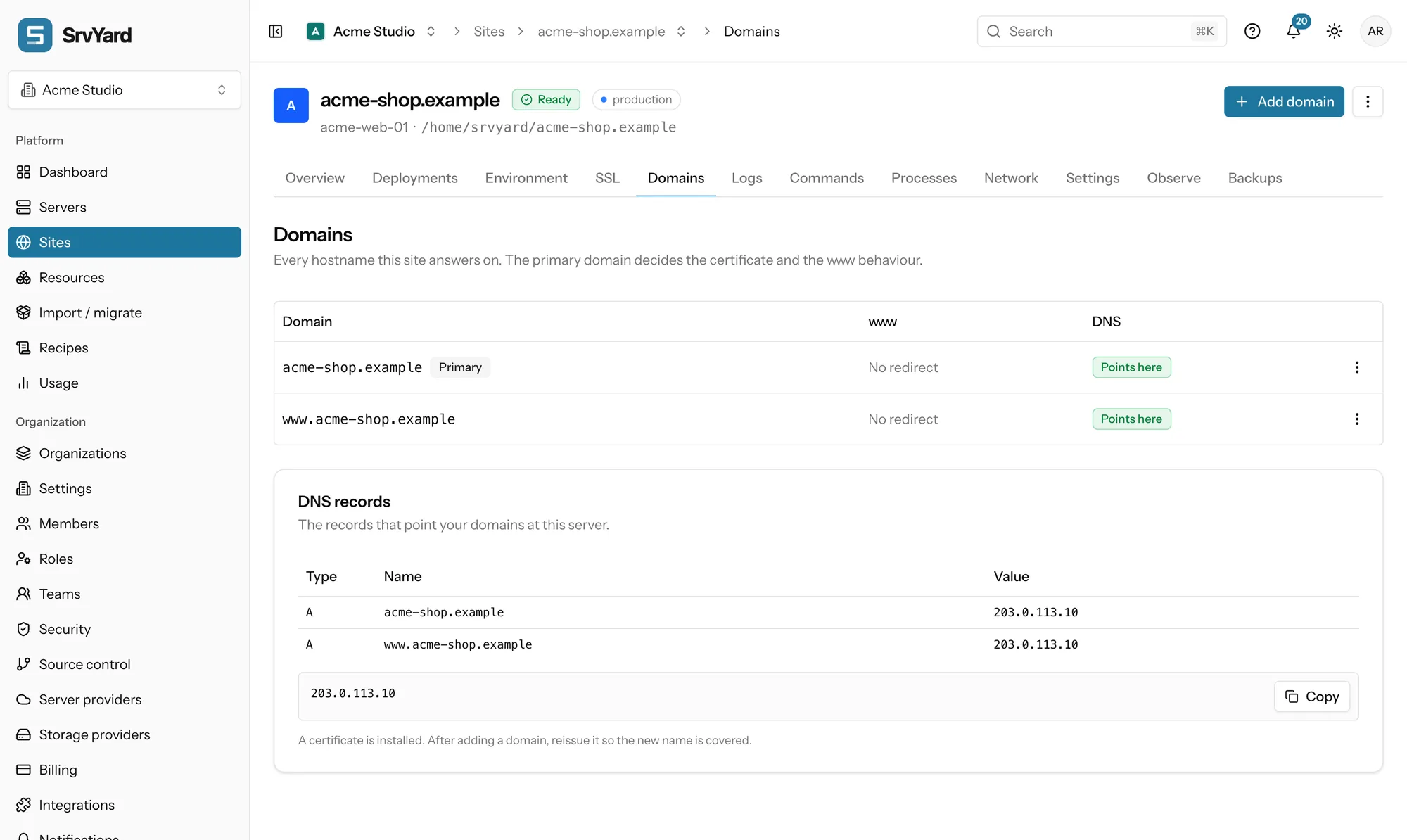
- A site answers on every domain you list, up to 25. One is primary: it decides the certificate and the
wwwbehaviour. wwwcan be left alone, redirected to the bare name, or the other way round. A wildcard answers on every subdomain, and needs a wildcard certificate.- A domain is served as soon as Nginx accepts the change. DNS is yours: create an
Arecord at your DNS host. SrvYard shows Points here or DNS pending with what it found, and re-checks pending names every five minutes for the first day. - Behind a CDN proxy the name resolves to the proxy, so it shows DNS pending although the site works.
- After adding a name, reissue the certificate so it covers it.
Domains and DNS records, in the docs · Free subdomains · SSL
04The environment file
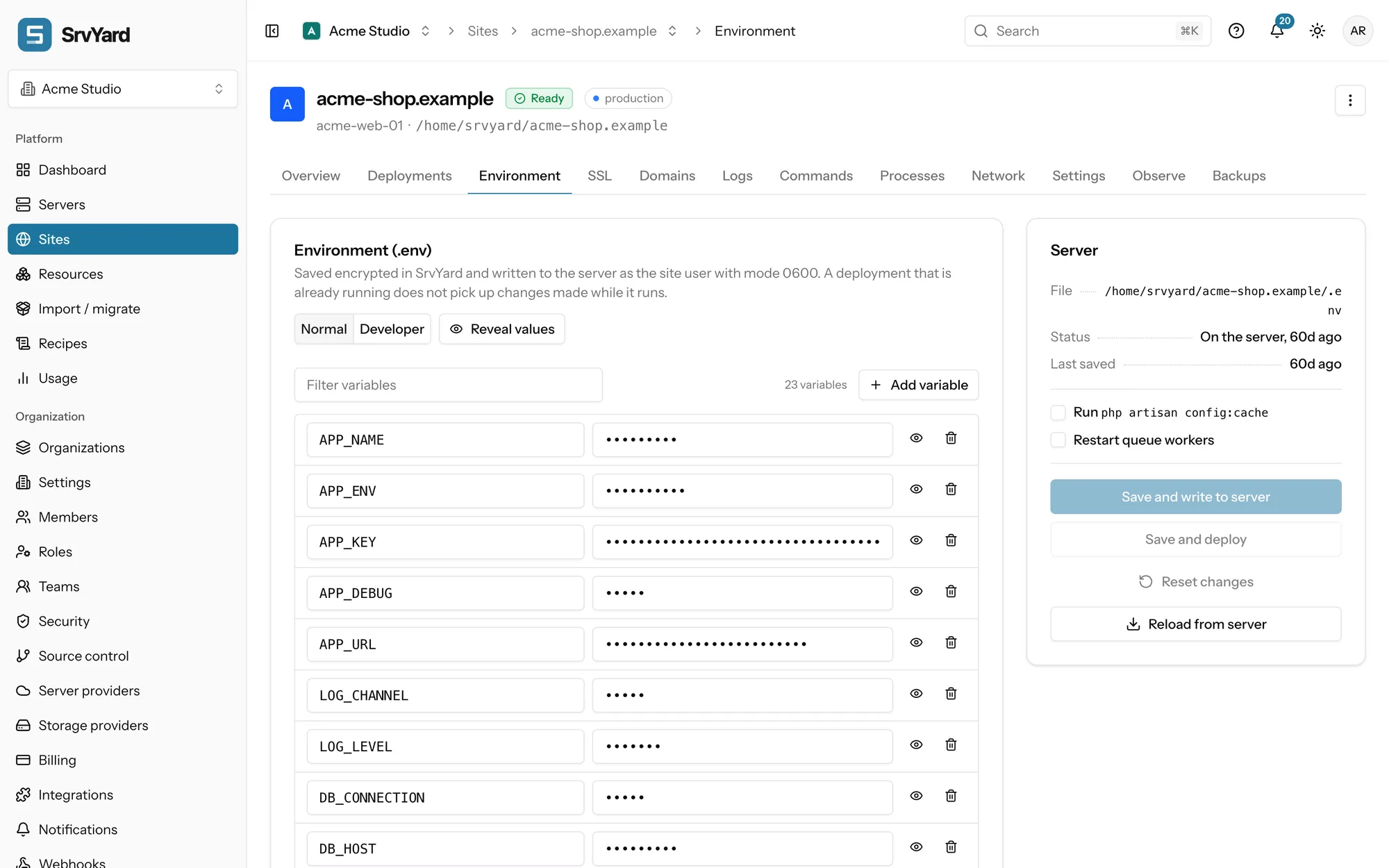
the Environment tabSrvYard keeps an encrypted copy of the site’s .env and writes it to the server as the site user with mode 0600. The file lives once at the site root (/home/srvyard/<domain>/.env on a site created today) and is linked into every release, so every release sees the same one.
- A Normal editor with masked values and a Developer editor for the whole file.
- On save you choose what follows: run
php artisan config:cache, restart queue workers, or save and deploy. A deployment already running does not see a change made while it runs. - Only owners, admins and roles with the environment permission can read or write it. Everyone else sees a Restricted notice.
- Reload from server pulls the file back if someone changed it over SSH.
05What else a site has
one tab each| Tab | What it does |
|---|---|
| Deployments | Release folders, rollback, push to deploy, the deploy hook, a health check. Deployments. |
| Logs and Commands | Read the Nginx, Laravel and PHP logs. Run a one-off command such as artisan or composer as the site user, with a history and a prompt before risky commands. |
| Processes | Queue workers and any other long-running command, kept alive by Supervisor. Scheduler and daemons. |
| Network | HTTP Basic authentication for the whole site or one path, and 301 or 302 redirect rules, including a CSV import. These do not apply to a site whose Nginx text you replaced completely. |
| Settings | Repository and branch, root and web directory, PHP version (switching creates a new pool and removes the old), Nginx configuration, notifications, and deleting the site. |
| Observe | Heartbeats, the post-deployment health check, logs and 14 days of activity of the site in one place. |
| Backups | File backups of the site’s own folders. Backups. |
06Sites that already exist
adopt, move, deleteAdopt what is already there
A read-only scan finds the sites on a connected server and registers them where they are, without moving or restarting anything. You then take over one capability at a time, and each step can be rolled back. On an adopted server the firewall is observe-only. See migrate and adopt an existing site.
Move or remove one
There is no one-click move to another server. You build the site on the new server, check it, and then switch DNS; switch off queue workers and the scheduler on the old one. Deleting a site removes its files, Nginx configuration, certificates, processes and scheduled jobs, and releases a free subdomain. It does not drop databases, delete backups already taken or touch DNS records at your own provider.
07Plans and limits
from the plan catalogueSites per organisation: Hobby 3, Pro unlimited, Business unlimited. When you reach the limit the form says Site limit reached and Create site stays disabled. Every site type is on every plan.
Not covered
- Python, Ruby, Go, Java and .NET as site types.
- Docker, Docker Compose and Kubernetes.
- Adding a repository to a site created without one.
- Changing a site’s type, isolation or zero-downtime choice after creation.
08Site questions
answers from the docsWhich site types can I create?
Laravel, Symfony, Statamic, WordPress, phpMyAdmin, PHP, Next.js, Nuxt.js, static HTML and Other. Python, Ruby, Go, Java and .NET are not site types: the Other type lets you write your own deploy script, but the language and its process are your own work. See What SrvYard supports.
Can I add a repository to a site I created without one?
No. The form warns that a site created without a repository cannot get one later. Create a new site with the repository and move the domain across. See Create a site on your server.
What cannot be changed after a site is created?
The site type, the root directory, website isolation and zero-downtime releases. The repository and branch, web directory, PHP version, domains and environment can all be changed later. See Create a site on your server.
Can one site answer on several domains?
Yes, up to 25. One is primary and decides the certificate and the www behaviour; the others are aliases. DNS stays with you: create an A record for each name, and SrvYard shows Points here or DNS pending. See Add a domain, a free subdomain and DNS records.
Can I move a site to another server?
There is no one-click move. You build the site on the new server, check it, then switch DNS, and switch off queue workers and the scheduler on the old server. See Delete, rename or move a site.
What does deleting a site remove?
Its files, Nginx configuration, certificates, processes and scheduled jobs, and it releases a free subdomain. It does not drop databases, delete backups already taken or change DNS records at your own provider. See Delete, rename or move a site.
Create a site and read the first deploy log.
Free: 1 server, 3 sites, 100 deploys a month. Read the docs first if you prefer.