WordPress on a server you own, with its own database, PHP version and certificate.
SrvYard downloads WordPress from wordpress.org, checks it against the checksum wordpress.org publishes, creates the database and a matching wp-config.php, and puts Nginx and PHP-FPM in front of it. After the install it is an ordinary WordPress site: updates, themes and plugins stay in WordPress.
/home/<user>/<domain>/
  index.php  wp-admin/  wp-includes/
  wp-content/uploads/
  wp-config.php      # written by SrvYard, mode 0640
nginx
  try_files $uri $uri/ /index.php?$args
  deny  /wp-config.php
  deny  *.php under /uploads/
deny /xmlrpc.php # only if you tick Block XML-RPC01What the installer does
the WordPress site type| Piece | What SrvYard does |
|---|---|
| Download | The latest release from wordpress.org. The archive is compared with the SHA-1 file wordpress.org publishes next to it; a difference aborts the install before anything is unpacked. |
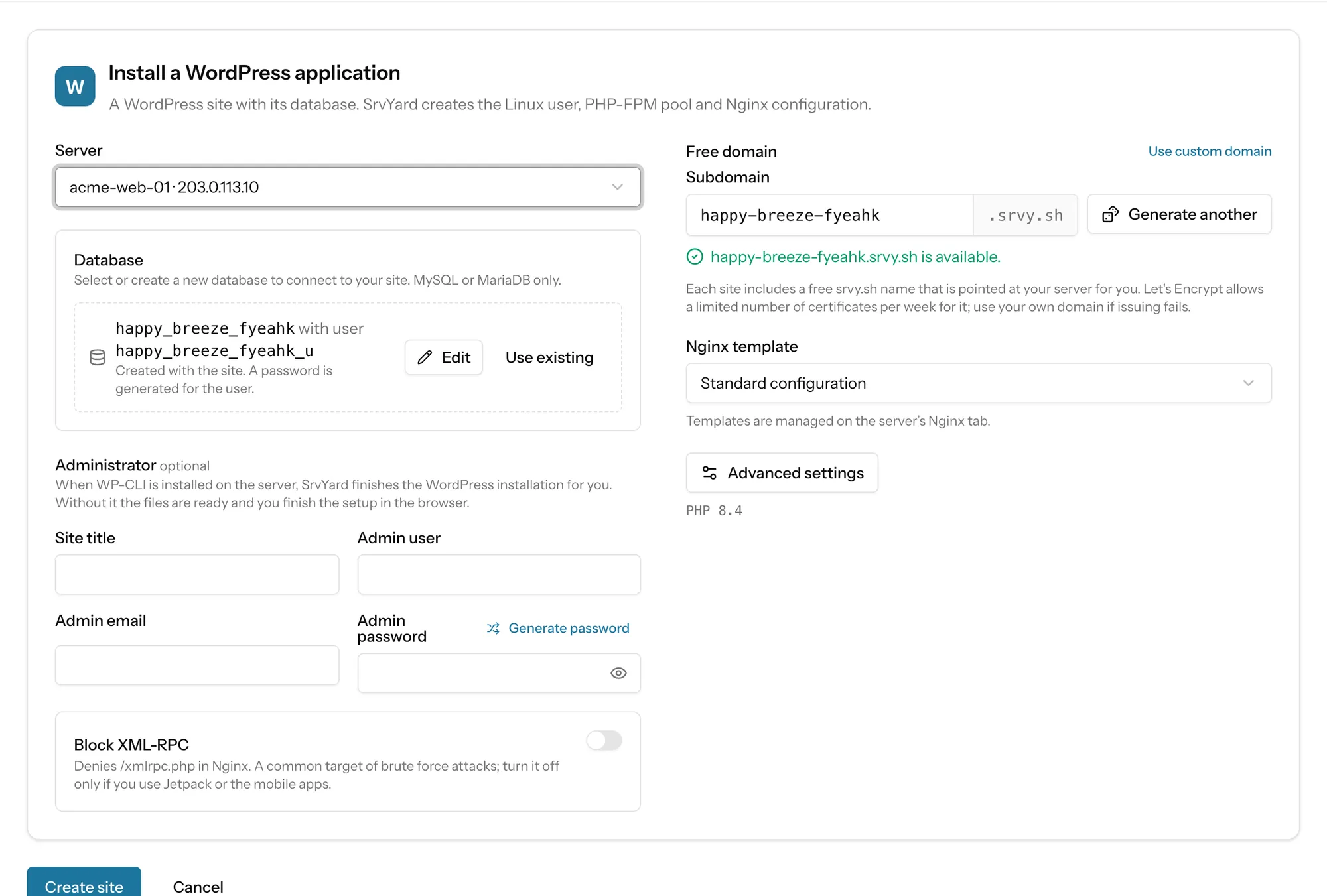
| Database | A database and user created with the site (or an existing one you pick), MySQL or MariaDB only, with a generated password. On a server that has neither, the form warns you and points to the Services tab. |
| wp-config.php | Written with the database details, eight random keys and salts, the wp_ table prefix, WP_DEBUG off and DISALLOW_FILE_EDIT on, so the theme and plugin editors in the admin are disabled. |
| Permissions | Folders 755, files 644, wp-config.php 640. |
| Administrator | Optional fields: site title, admin user, email and password. When WP-CLI is installed on the server, SrvYard runs wp core install for you. Without WP-CLI the files are ready and you finish in the browser at /wp-admin/install.php. SrvYard does not install WP-CLI. |
| Nginx | Requests fall back to index.php; images, CSS, JavaScript and fonts are cached for 30 days; wp-config.php and PHP files under uploads are denied. A switch blocks /xmlrpc.php; leave it off if you use Jetpack or the mobile apps. |
| PHP | One of the versions installed on the server, PHP-FPM, with the usual per-site switch for website isolation (its own Linux user and pool). |
02From nothing to a WordPress site
no repository involvedA server with MySQL or MariaDB
Install one from the server’s Services tab if it has none.
New site, WordPress
Pick the server, a free
srvy.shname or your own domain, and the administrator details if you want the install finished for you.Wait for Ready
The site shows Creating, then Installing with the current step, then Ready. A failure shows the error and Retry installation skips the steps that finished.
Certificate
A site with a free domain asks for its Let’s Encrypt certificate by itself once the name resolves. For your own domain, point its A record at the server first.
03After the install
what SrvYard keeps doing, and what it leaves to WordPress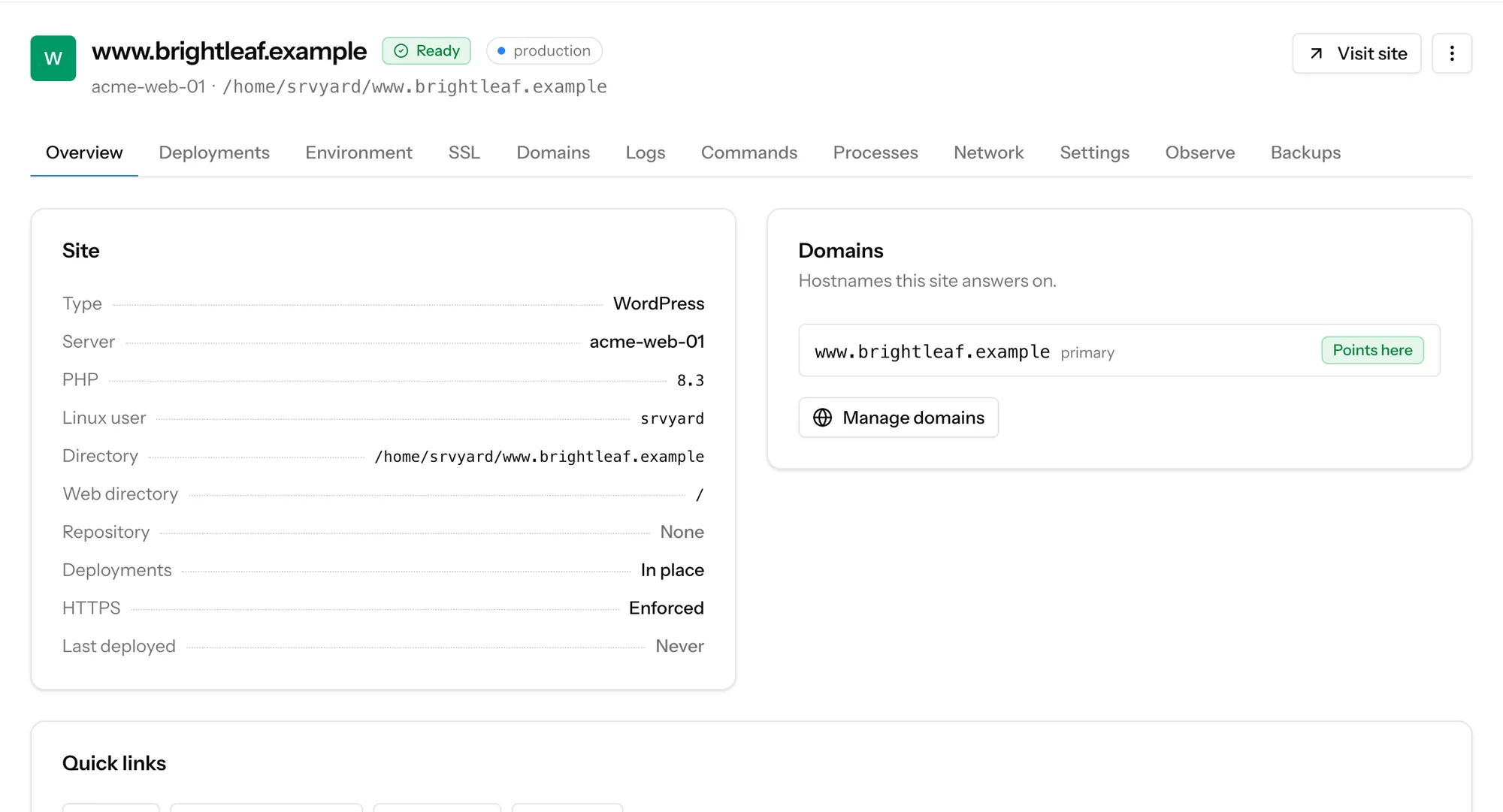
- Deploys
- None. The site has no repository, so there is no deploy button, history or rollback. The folder is the site.
- Updates
- WordPress core, themes and plugins are updated in WordPress. SrvYard does not touch them.
- Certificates
- Let’s Encrypt with renewal handled for you, DNS-01 for wildcards, custom certificates, and a force-HTTPS switch.
- Backups
- Database backups and file backups (for example
wp-content/uploads) to S3-compatible storage you own, on a schedule. Plan dependent, see below. - Logs
- The Nginx access and error logs and the PHP error log, from the Logs tab.
- Timers
- Anything WordPress needs on a timer can be a scheduled job on the server. SrvYard does not add one for WordPress.
04Not covered
so you can rule it out early- Moving a WordPress site in. There is no migration plugin or one-click import of content. Copy the files into the site folder and load a database dump yourself; the Databases tab has no import button, the docs say how to do it.
- Page caching, object caching and CDN configuration. SrvYard sets none up for WordPress.
- Staging copies. A second site on the same or another server is a new site.
A WordPress site that already runs on a server SrvYard can reach does not need to be rebuilt: a read-only scan finds it and adopts it where it is, one capability at a time. Adopt a site that is already on your server.
Backups are on Pro and Business, not on the free plan. Compare plans.
05Read more
06WordPress questions
answers from the docsWhat does SrvYard install for a WordPress site?
It downloads WordPress from wordpress.org, checks the archive against the checksum wordpress.org publishes, creates a database and user, writes wp-config.php with fresh keys and salts, and sets up Nginx and PHP-FPM. See Create a site on your server.
Does SrvYard update WordPress, themes and plugins?
No. After the install it is an ordinary WordPress site; you update core, themes and plugins in WordPress. SrvYard keeps the server side: PHP versions, certificates, backups and logs. See What SrvYard supports.
Do I have to finish the WordPress installer in the browser?
Only if WP-CLI is not installed on the server. SrvYard runs wp core install when WP-CLI is there and you filled in the administrator fields; otherwise the files are ready and you finish at /wp-admin/install.php. See Create a site on your server.
Can I back up my uploads and database?
Yes, on plans that include backups: scheduled database backups and file backups of folders such as wp-content/uploads, to S3-compatible storage you own. See Back up site files.
Can I move an existing WordPress site into SrvYard?
There is no content importer. Copy the files into the site folder and load a database dump yourself, or, if the site already runs on a server SrvYard can reach, adopt it where it is. See Import and export a database and Adopt a site that is already on your server.
Which databases work with WordPress?
MySQL and MariaDB. WordPress and phpMyAdmin need a MySQL-family database, and the form asks for one. See Connect from your app.
Install a WordPress site on a server you control.
Free: 1 server, 3 sites, 100 deploys a month. Read the docs first if you prefer.