Backups go to a bucket you own, and a restore asks before it overwrites anything.
Scheduled database dumps and site-file archives are compressed on the server and uploaded straight to S3-compatible storage with a short-lived link, so the server never holds your storage keys. Provider snapshots cover the whole machine. Backups need Pro and Business.
databases  all, including new ones, or a list
schedule   hourly, daily, weekly or custom cron
            # in the server’s timezone
storage    one of your verified buckets
keeps      the last N (1 to 365), and anything
            newer than D days (1 to 3650)
on failure owners and admins, plus up to five
more addresses01Storage that is yours
Settings, Storage providersBackups never stay on the disk they came from. Add a bucket once for the organisation: Amazon S3, DigitalOcean Spaces, Hetzner Object Storage, OVHcloud Object Storage, Scaleway Object Storage, Backblaze B2, Cloudflare R2, Wasabi, or any S3-compatible endpoint (public https:// address only).
SrvYard uploads, reads back and deletes a small test object, and saves the provider only if that worked. Keys are stored encrypted and never shown again. For Amazon S3 you can have SrvYard assume an IAM role instead of holding a user’s permanent keys.
| Good to know | |
|---|---|
| Different place | Use another account, region or provider than your servers where you can; a billing problem there should not take both. |
| Removing a provider | Refused while a configuration or stored backup uses it. It never deletes your bucket or the files in it. |
| Permissions | The keys need to write, read, delete and list objects, and abort multipart uploads. |
| Bucket rules | Versioning or object lock at the bucket protects you from a mistake or a stolen key. |
02Database backups
server, Backups, Databases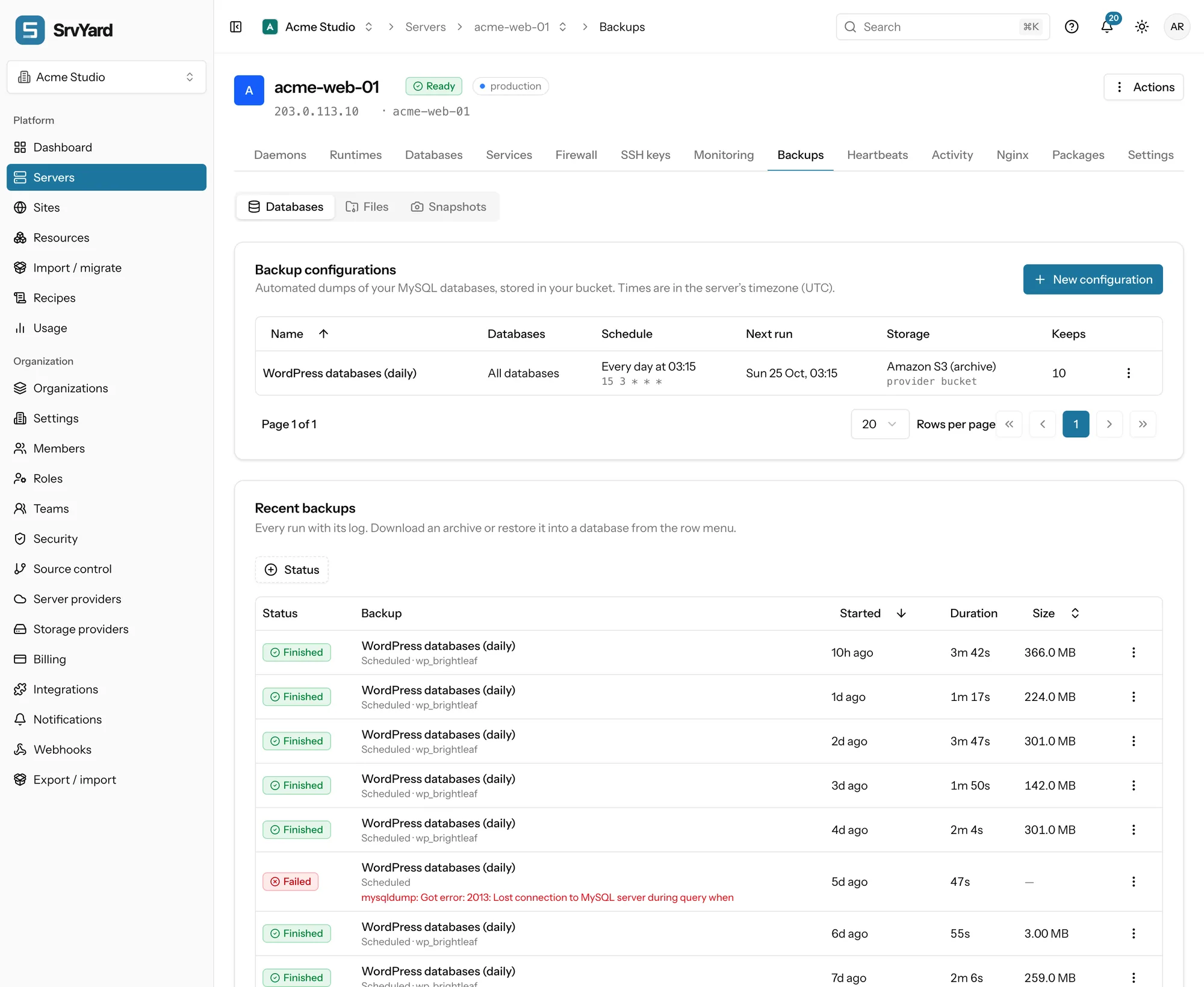
- MySQL, MariaDB and PostgreSQL. Each database becomes one
.sql.gz, checked with a SHA-256 sum. - The dump is compressed on the server and uploaded with a one-time address. Archives above 4 GiB go up in parts; one archive can be up to 1 TiB.
- Up to 20 configurations per server. Back up now, edit, pause and resume from the row menu. Deleting a configuration leaves its archives where they are.
- Each dump, upload or restore step is limited to 25 minutes. A run still Running after two hours is marked failed.
- The dump waits in
.srvyard/backupsin the server user’s home, so keep free disk of at least your largest compressed database.
03Site files
server, Backups, Files| Setting | What it does |
|---|---|
| Paths | Up to 20, all inside the site user’s home. Quick buttons add the site directory, the shared storage folder or the whole home. Symbolic links are stored as links, never followed. |
| Leave out | One pattern per line. Starts with node_modules, vendor, .git, .env, storage/logs and storage/framework/cache. The .env is left out on purpose: SrvYard keeps its own encrypted copy on the Environment tab. |
| Encryption | Optional AES-256, applied on the server before upload, so the bucket only sees ciphertext. Generated or typed (12 characters or more). SrvYard keeps an encrypted copy of the passphrase so schedules and restores work, and shows a generated one once. Keep your own copy: restoring elsewhere needs it. |
| Made by | The site user, with tar. A busy folder can report that a file changed as it was read; the next run usually succeeds. |
04Retention and alerts
in every configurationKeep the last N finished backups, and optionally anything younger than D days; the rule that keeps more wins. A nightly clean-up at 04:40 UTC deletes the older archives from your bucket and marks those runs Expired: they stay in the list as history but cannot be restored. Failed runs are forgotten after 30 days.
A lifecycle rule in the bucket is a second layer worth adding.
Owners and admins are always told of a failure, in the app and by email. Add up to five more addresses, and optionally a short message to them after every good run. Organisation channels (Slack, Discord, Telegram, email) can listen to Backup finished, Backup failed, Backup restored, Snapshot created and Snapshot failed.
05Restore
a separate permission| What | Choices and checks |
|---|---|
| A database | Over an existing database: you type its name to confirm; tables in the backup replace the live ones, tables only in the live database stay. Or into a new database (suggested <name>_restored): nothing existing is touched, the safe way to check a backup. The archive is downloaded to the server and checked against its SHA-256 first, and the engine must match. |
| Files | Into another directory (a new or empty folder in the site user’s home) or over the original files, where you type the site user. Before anything is written every member of the archive is inspected: absolute paths, .., device nodes and links that escape the home are refused. Files come back owned by the site user. |
| Only finished runs | Expired runs cannot be restored. A restore needs the server to be Ready. |
| After | Clear caches, restart queue workers, check migrations if the backup predates the last deploy. The docs have the list. |
Restore one into a new database now, and again every few months. Write down how long it took: that is your real recovery time. Restore a database or files, in the docs
06Provider snapshots
server, Backups, SnapshotsA snapshot is a full image of the machine, taken by your provider and stored and billed in your provider account: Hetzner, DigitalOcean, Akamai (Linode), Vultr, Amazon EC2 or Lightsail. Take one by hand before a risky change, or schedule a daily or weekly one that keeps the newest few (hand-made ones are never removed). A server can keep up to 20.
Servers added as Custom VPS and Proxmox servers cannot be snapshotted; use database and file backups.
A snapshot is not rolled back onto the running server. Create server from snapshot opens the new-server form with the provider, region and type filled in, and you switch DNS once the copy checks out. DigitalOcean, EC2 and Lightsail images exist in one region only, and Linode saves the main disk as an image, which Akamai limits in size. The copy comes with its sites, certificates and scheduled jobs, so switch the old one off if both would run the same jobs.
07Plans and limits
from the plan catalogueDatabase backups, file backups and snapshots are on Pro and Business. Hobby cannot take new ones; snapshots you already have stay listed. Compare plans
Not covered
- Hosting your backups: the bucket and its bill are yours.
- Point-in-time recovery. The shortest schedule is hourly dumps.
- File paths outside a site user’s home.
- Snapshots of Proxmox servers and custom servers.
08Backup questions
answers from the docsWhere are my backups stored?
In a bucket you own, at Amazon S3, DigitalOcean Spaces, Hetzner Object Storage, OVHcloud, Scaleway, Backblaze B2, Cloudflare R2, Wasabi or any S3-compatible service. SrvYard never keeps them on the server they came from. See Add an S3-compatible storage provider.
Does the server ever see my storage keys?
No. SrvYard gives the server a short-lived signed address for each upload, and keeps the keys encrypted on its side. See Schedule database backups.
Are file backups encrypted?
Optionally, with AES-256 on the server before upload. SrvYard keeps an encrypted copy of the passphrase so schedules and restores work, and shows a generated one once, so keep your own copy. See Back up site files.
Does a restore overwrite my data?
Only if you choose that. You can restore into a new database or a new directory, which touches nothing existing, or over the original, where you must type the database name or site user to confirm. See Restore a database or files.
Can I back up a whole server?
With provider snapshots, for servers created at Hetzner, DigitalOcean, Akamai (Linode), Vultr, Amazon EC2 or Lightsail. Custom servers and Proxmox have no snapshot support in SrvYard. A snapshot is restored by creating a new server from it. See Provider snapshots.
Which plans include backups?
Pro and Business. Hobby does not include database backups, file backups or new snapshots; snapshots you already have stay listed. See Compare plans and know your limits.
How long are backups kept?
As long as your retention rule says: the last N finished backups, plus anything younger than an optional number of days. A nightly clean-up deletes the older archives from your bucket. See Retention, failure alerts and testing a restore.
Add a bucket, run one backup, and restore it into a new database.
Free: 1 server, 3 sites, 100 deploys a month. Read the docs first if you prefer.