A failed deploy gets a short explanation next to the raw log. It is a hint, and it says so.
On Business, SrvYard sends the end of a failed deployment’s output to an AI model, with secrets removed, and shows what comes back: a summary, the likely cause, fix steps, a confidence level and buttons to the right pages. The full log stays underneath. When the two disagree, believe the log.
site      type, PHP and Node version, package manager,
          branch, zero-downtime on or off
server    names and status of installed services
env       variable NAMES only, never values
script    your deploy script, first 3,000 characters
error     the recorded error and the commit message
output    last 200 lines, at most 12,000 characters
# every text above goes through a scrubber first01What you get on the deployment page
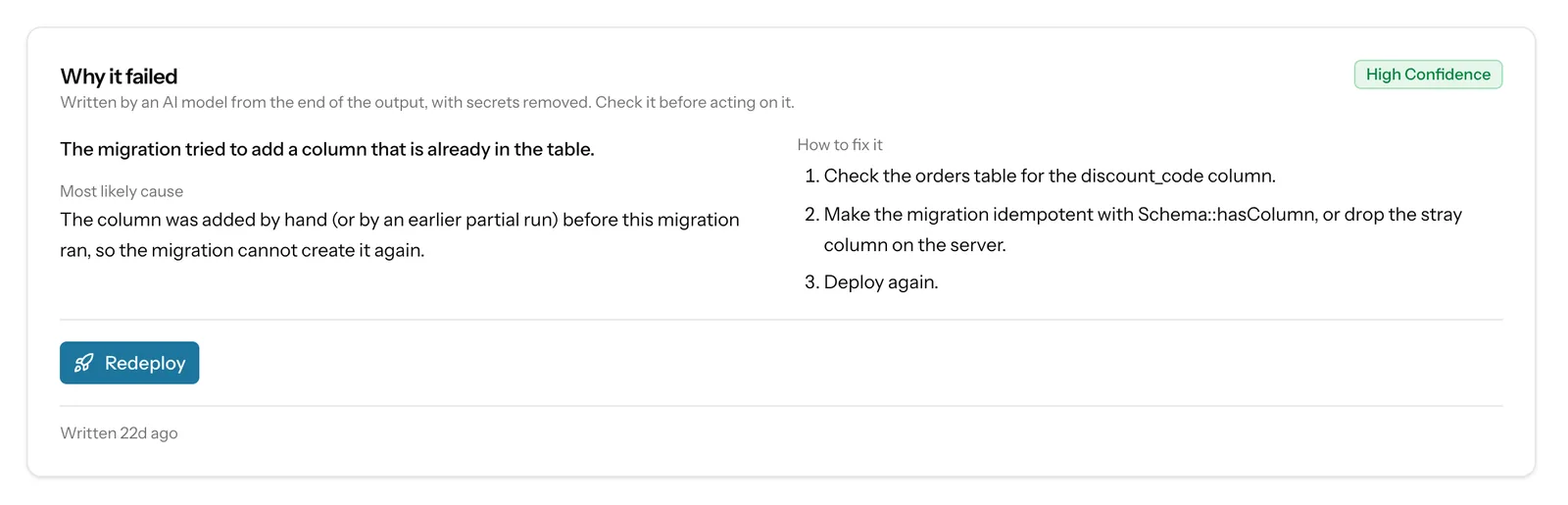
the Why it failed card- A summary of what went wrong, in plain words.
- The most likely cause, in one to three sentences.
- How to fix it: numbered steps, phrased for SrvYard, naming the page where you act (the server’s Services or Runtimes tab, the site’s Environment, Domains or SSL tab, the deploy script).
- A confidence label: low, medium or high. High is meant for output that states the cause directly; the model is told to lower it when the output does not show the cause.
- Buttons that open the page the steps mention. They come from a fixed catalogue, so the model cannot invent a link. Only your role’s permitted pages are offered, and a service is not offered for install when the server already has it.
The card is labelled: “Written by an AI model from the end of the output, with secrets removed. Check it before acting on it.”
02What leaves your server
and what does not| Sent | Not sent |
|---|---|
| The end of the deploy output: the last 200 lines, at most 12,000 characters, with colour codes removed. | The rest of the log, your source code and your repository. |
| The deploy script (first 3,000 characters), the recorded error text and the commit message (first 200 characters). | The values of environment variables. Only their names are sent (up to 80), so the model can see that REDIS_HOST exists without seeing what it is. |
| Site type, PHP and Node versions, package manager, branch, whether the site deploys with zero downtime, the names and status of the services installed on the server. | Anything from sites that did not fail: the explanation is written only for a failed deployment. |
Before anything is sent, a scrubber replaces secrets in the log, script, error and commit message with [redacted], including the values of the site’s own environment file. The text goes to Anthropic’s API; the organisation switch says so next to the checkbox. Scrubbing cannot promise that no sensitive word survives in a free-text log line, which is why the switch is per organisation and you can turn it off.
03When it runs
all of these must be trueThe deployment failed
Cancelled deployments and successful ones get no explanation. A failed health check counts as a failure.
The plan includes it
Business. On other plans the card shows See plans instead.
The organisation switch is on
Settings, General: Explain failed deployments with AI. It is on by default for an organisation on a plan that includes the feature, and then runs on every failed deployment without asking. Switched off, a failed deployment shows a note instead.
Under the hourly limit
Each organisation is limited per hour. Past that the card says so and the raw log is still there.
Written in the background
The card shows a pending state while it is written. If the model answers something unreadable or fails, the card says so and offers Try again. Nothing about the deployment itself changes.
A failed deployment that has no explanation yet, for example one that failed before your plan included the feature, shows an Explain this failure button to members who may manage deployments.
04Use it like a colleague who skimmed the log
limits- It sees the end of the output, not your code. A cause earlier in a long log can be missed.
- It only acts through buttons that open pages, plus Redeploy, which asks for confirmation first. It never changes a server, a site or the environment by itself.
- It is not a monitor: it explains a deployment after it failed and says nothing about a site that is slow or down.
The raw log is always the record: a failed deployment keeps its full output, and the steps SrvYard itself writes (Preparing, Fetching, Running the deploy script, Activating, Health check) show how far it got. Read the first error line, not the last.
How to read a deployment log · A deployment failed: a checklist
05Plan and switch
from the plan catalogueAI explanations are included on Business only. They also need the switch in the organisation’s general settings, which is on by default. Everything else about a failed deployment, the full log, the error box, Redeploy and the failure notifications, works on every plan. Compare plans.
06Explanation questions
answers from the docsWhat is sent to the AI model?
The end of the deploy output (the last 200 lines, at most 12,000 characters), the deploy script, the error text, the commit message, the site type and versions, the services installed on the server and the names, never the values, of the environment variables. Secrets in the text are replaced before it leaves. See Read a deployment log and find the failing step.
Which plan includes it, and can I turn it off?
AI explanations are part of the Business plan. They also need the switch Explain failed deployments with AI in the organisation's general settings, which you can turn off. See Create, rename and switch organizations.
Can I trust the explanation?
Treat it as a hint. The model sees only the end of the output, not your code, and the card says so: check it before acting on it. The raw log is always kept, and when the two disagree believe the log. See Read a deployment log and find the failing step.
Does it change anything on my server?
No. Its buttons open the page the fix steps mention, and Redeploy asks Deploy again? before it starts a new deployment. See Find out why a deployment failed and fix it.
Why is there no explanation on my failed deployment?
The plan does not include it, the organisation switched it off, the deployment was cancelled, or the hourly limit of the organisation was reached. The red failure box and the full log are still there. See Read a deployment log and find the failing step.
Break a deploy on purpose in a test site and read both the log and the card.
Free: 1 server, 3 sites, 100 deploys a month. Read the docs first if you prefer.