Any fresh Ubuntu server, connected in one command or created at your provider.
SrvYard logs in over SSH, installs what the server type needs, closes every port except SSH, HTTP and HTTPS, and then keeps showing what runs on it. The machine stays yours and its provider keeps billing you.
1 check the operating system   # Ubuntu 24.04 or 26.04
2 create the management user   # srvyard, root is no longer used
3 secure SSH                    # key logins only
4 updates and base packages    # ufw: SSH, 80, 443 open
5 Nginx, PHP and Composer
6 Supervisor
7 database, Redis, Memcached # only if you asked01Two ways to get a server
Add server| Way | What you do |
|---|---|
| A machine you already have | Choose Custom VPS, enter its public address and SSH port, and run one command as root (the provider’s web console is enough) that adds SrvYard’s key. SrvYard checks the login every few seconds and shows what it finds. Then press Start provisioning. Afterwards SrvYard works as its own srvyard user. The machine needs a fresh Ubuntu 24.04 LTS or 26.04 LTS, 1 CPU, 1 GB of memory and 10 GB of disk. |
| A machine SrvYard creates | Connect a provider account once with an API token or access key: DigitalOcean, Hetzner Cloud, Akamai (Linode), Vultr, Amazon EC2 and Lightsail, or Proxmox VE 8.1 or newer. The form reads regions and sizes live (cached for six hours) and shows the provider’s own monthly price beside each size. Providers. |
| Behind a router | Switch on This server is behind a NAT and give the public port that forwards to SSH. Private and reserved addresses such as 192.168.0.10 are refused, because SrvYard connects from the internet. |
| Address already used | An address and port can be registered once. A second registration is refused. |
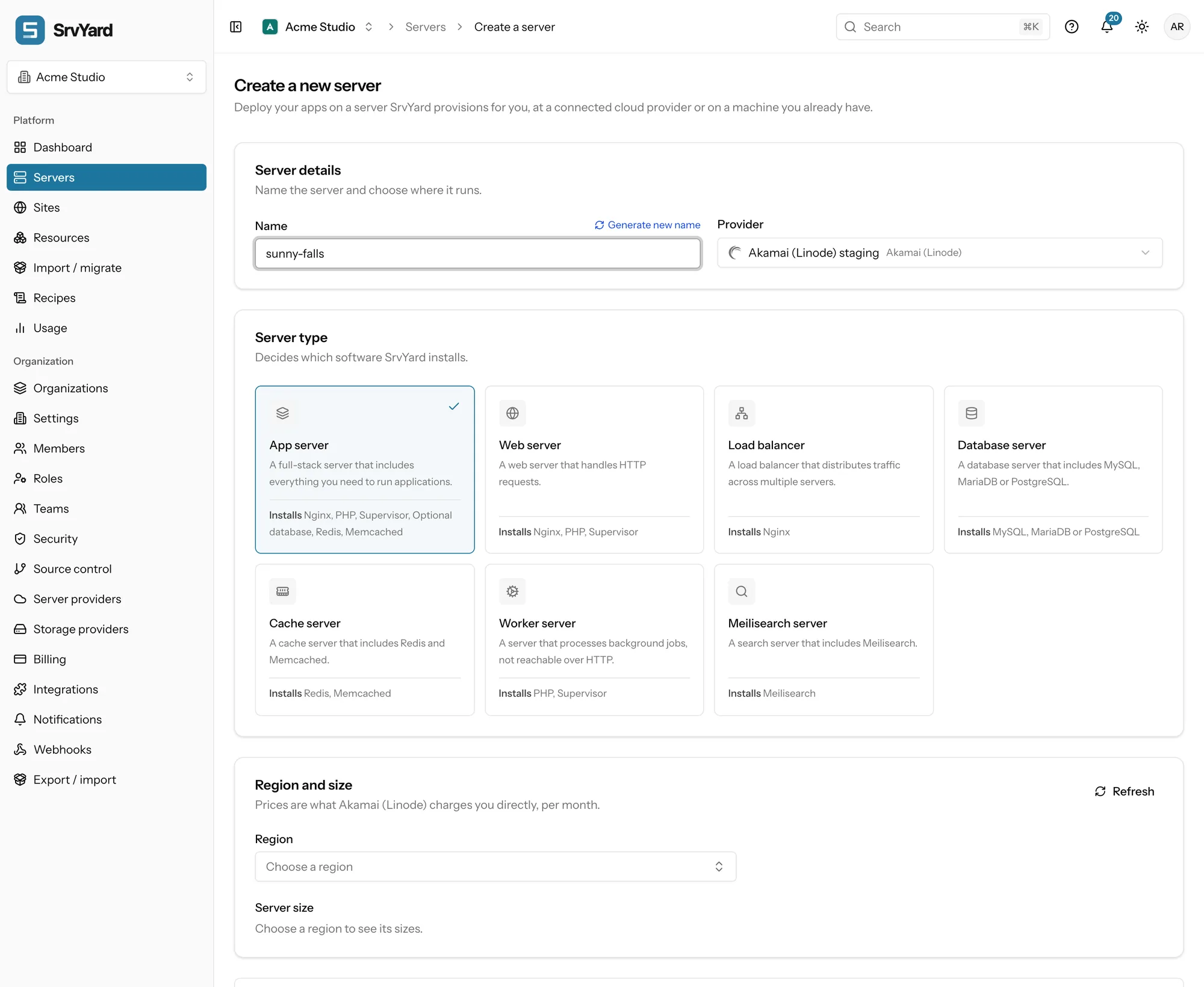
The server type decides what is installed
It is chosen on the form and cannot be changed later. If you are not sure, take the app server: sites, queue workers and a database on one machine. Split roles over several servers when one part needs to scale alone.
| Type | Installed |
|---|---|
| App server | Nginx, PHP, Supervisor and, if you ask, a database, Redis and Memcached. |
| Web server | Nginx, PHP and Supervisor. |
| Load balancer | Nginx only. |
| Database server | MySQL, MariaDB or PostgreSQL, whichever you choose. |
| Cache server | Redis and Memcached. |
| Worker server | PHP and Supervisor, for queue workers and scheduled jobs. Not meant to answer web requests. |
| Meilisearch server | Meilisearch, with a generated master key. |
02From the form to Ready
several minutes, depending on the machineDescribe it
A name of up to 60 characters, which becomes the hostname, and the type. Advanced settings: the default PHP version and up to five more, a database engine and version, Redis, Memcached, timezone (UTC by default), and whether your organisation SSH keys go on the machine.
Authorise or create
A custom machine waits for the one command. At a provider SrvYard asks for the machine, waits up to five minutes for it to boot and get an address, and logs in with a key it generated.
Provision
It installs updates and the software for the type, locks SSH down to keys and turns on the firewall. The page streams the log and keeps updating if you leave and come back.
Ready
The page now shows resources, usage and a Git access key: the server’s own public key, to add as a deploy key at your Git host so it can pull private repositories.
If it fails
The status becomes Installation failed and the page shows the reason, for example a provider quota or a machine that is not Ubuntu 24.04 or 26.04. Fix the cause and press Retry provisioning; steps that already finished are skipped, and a machine SrvYard already created is not created twice.
03One page per server
the Overview tab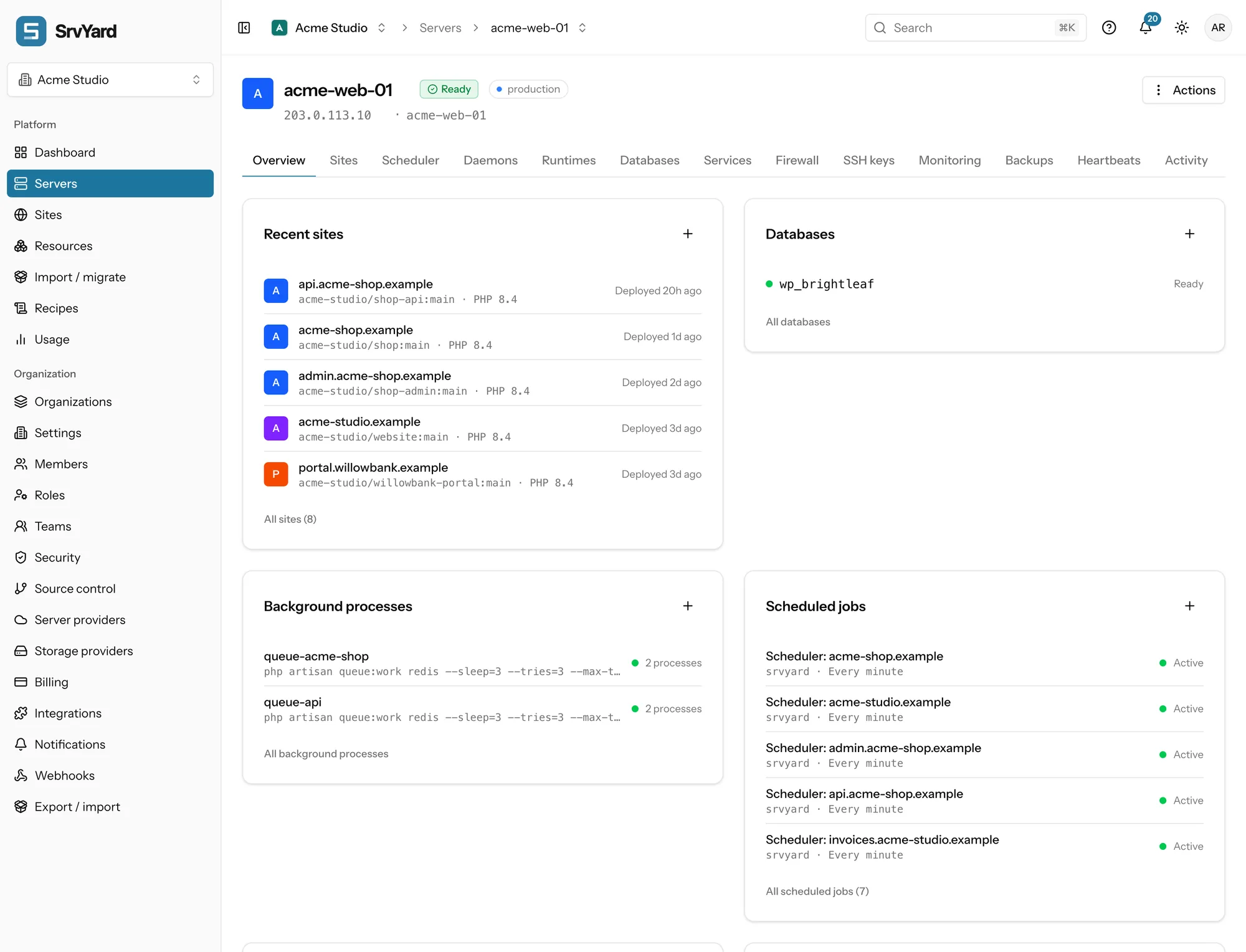
Tabs
Overview, Sites, Scheduler, Daemons, Runtimes, Databases, Services, Firewall, SSH keys, Monitoring, Backups, Heartbeats, Activity, Nginx, Packages and Settings.
States
Awaiting access, Creating, Installing, Ready, Disconnected, Installation failed, Rebooting, Deleting and Archived. A server SrvYard can no longer log in to is Disconnected; the page shows the last error, a checklist and the commands that put the key back.
Reboot
Through the provider (recommended, works when SSH does not answer), a hard reset through the provider for a machine that does not respond, or reboot over SSH.
04Running it afterwards
Services, Packages, Nginx, Settings| Area | What you can do |
|---|---|
| Services | See Nginx, each PHP-FPM version, databases, Redis and Supervisor with their state. Restart, reload, stop or start one, change whether it starts at boot, read its journal and edit its configuration. Saving a config checks it first where the service has a checker (Nginx runs nginx -t) and puts the old file back if the service will not start. You can install Nginx, MySQL, MariaDB, PostgreSQL, Redis, Memcached, Meilisearch and Supervisor. MySQL and MariaDB cannot share a server; PostgreSQL can sit next to either. |
| Updates | Automatic security updates are switched on at provisioning, and the machine is not rebooted for you. SrvYard shows how many packages can be upgraded and a Reboot required badge when an update needs one. There is no button that runs apt upgrade: updates and extra packages go through a recipe. |
| Nginx templates | Write your own server block, check it with nginx -t, and pick it for new sites on that server. |
| Credentials | A sudo password for the management user and an administrator password for each database engine. You get them once, as a download; they are not stored. Generated on demand. |
| Private network | Allow another server of the same provider and region to reach this one on a port, for example a web server reaching a database server. SrvYard opens the matching firewall rule for that peer only. |
| Access | Tags to filter the list, and teams: tick which teams may see the server. Owners, admins and the creator always can. |
05Resize, archive, transfer, delete
Settings, Danger card| Action | What happens to the machine and to SrvYard |
|---|---|
| Resize | There is no resize button. Resize at the provider; the server shows Disconnected until the machine is back and you press Check connection. The size on the Overview card is what SrvYard ordered. |
| Archive | Reversible. SrvYard stops monitoring and managing the server; the machine keeps running and keeps billing you at the provider. An archived server does not count towards the plan limit. Unarchive reconnects with the key SrvYard left on the machine. |
| Transfer | Moves the server and its sites to another organisation you own. Tags, team access, saved Git connections, library SSH keys and backup configurations stay behind. The destination plan must have room. |
| Delete | For a cloud server you choose: Preserve (on by default) removes it from SrvYard and leaves the machine, still billing; off destroys the machine and its disks at the provider, which cannot be undone. A custom server is only forgotten, never touched. Its sites are forgotten with it. |
06Plans and limits
from the plan catalogueServers per organisation: Hobby 1, Pro 10, Business unlimited. Archived servers do not count, so archiving one frees a place. Every plan can connect custom servers and every provider; the limit is the only difference.
Compare plans · Connect an existing server · Provision at a cloud provider
Not covered
- Windows, and Linux other than Ubuntu 24.04 and 26.04.
- Docker, Docker Compose and Kubernetes: sites run directly on the server.
- Hosting. The servers are always yours; SrvYard does not run any for you.
- Domain registration and email hosting.
07What lives on a server
Laravel, WordPress, Next.js and the other types, with domains and an environment file.
MySQL, MariaDB and PostgreSQL, plus Redis.
Which ports are open and who can log in.
CPU, memory and disk once a minute, with thresholds.
Database and file backups to your own bucket, and provider snapshots.
Several PHP versions side by side, and Node.js.
08Server questions
answers from the docsWhat does a server need before SrvYard can use it?
A fresh Ubuntu 24.04 LTS or 26.04 LTS machine with a public address, root access over SSH once, at least 1 CPU, 1 GB of memory and 10 GB of disk. Private addresses such as 192.168.x.x are refused unless a router forwards a public port, in which case you switch on the NAT option. See Connect an existing server.
Does SrvYard keep logging in as root?
No. You run one command as root to authorise a key SrvYard generated for that server. After provisioning SrvYard works as its own management user, srvyard, and SSH is limited to key logins. See Connect an existing server.
What happens if I provision a server that already runs sites?
Provisioning can overwrite Nginx, PHP, the firewall and SSH settings, so use a clean machine where you can. For a server that is already busy, use the read-only scan under Import / migrate, which registers the sites where they are and changes nothing. See Adopt a site that is already on your server.
Can I resize a server from SrvYard?
No. Resize the machine in your provider's console. The server shows Disconnected until it is back, and Check connection on its page brings it back. The size on the Overview card is what SrvYard originally ordered. See Rename, resize, delete or forget a server.
If I delete a server in SrvYard, is the machine deleted too?
For a cloud server you choose: with Preserve on, the server is only removed from SrvYard and keeps billing you at the provider; with it off, the machine is destroyed there as well. A server you connected yourself is never touched, and archiving never touches the machine. See Rename, resize, delete or forget a server.
How many servers can I have?
The limit depends on your plan, and archived servers do not count, so archiving one frees a place. When you reach it the form says Your plan's server limit is reached. See Compare plans and know your limits.
Connect a server or create one, and watch it provision.
Free: 1 server, 3 sites, 100 deploys a month. Read the docs first if you prefer.