Failed deploys, expiring certificates and missed heartbeats go where your team already looks.
Email and the bell menu work out of the box. Channels add Slack, Discord, Telegram or a shared mailbox, filtered by event, severity and by the servers, sites or tags they concern. Each one has a Test button and a log of what it sent.
# one channel per destination
type        Slack | Discord | Telegram | Email
name        #ops-alerts
address     incoming webhook URL, on the provider’s own host
            # stored encrypted, shown only as a hint
events      All events, or a list you pick
severity    Everything | Warnings and errors | Errors only
limit to servers, sites or tags (empty: the whole organisation)01The four kinds of channel
what each needs| Type | You provide | Notes |
|---|---|---|
| Slack | An incoming webhook URL from a Slack app (hooks.slack.com). | A formatted Block Kit message with the event, the server or site, and a link that opens it in SrvYard. |
| Discord | A webhook URL of a channel (discord.com). | The same message as an embed. @everyone and @here in names or error text are made harmless. |
| Telegram | A bot token from @BotFather, the chat ID (-100... for a group, or @channelname) and, for forum groups, a topic ID. | Add the bot to the chat first. A revoked token shows as Failed with Telegram’s answer. |
| Up to 20 addresses. | Addresses of organisation members work at once. Any other address gets a confirmation email and receives nothing until the person opens the link. |
An organisation can have 20 channels. The address of a Slack, Discord or Telegram channel is stored encrypted and never shown again, only a short hint. Replace it by editing the channel; leave the field empty to keep the stored one.
02Say what a channel hears
events, severity, scope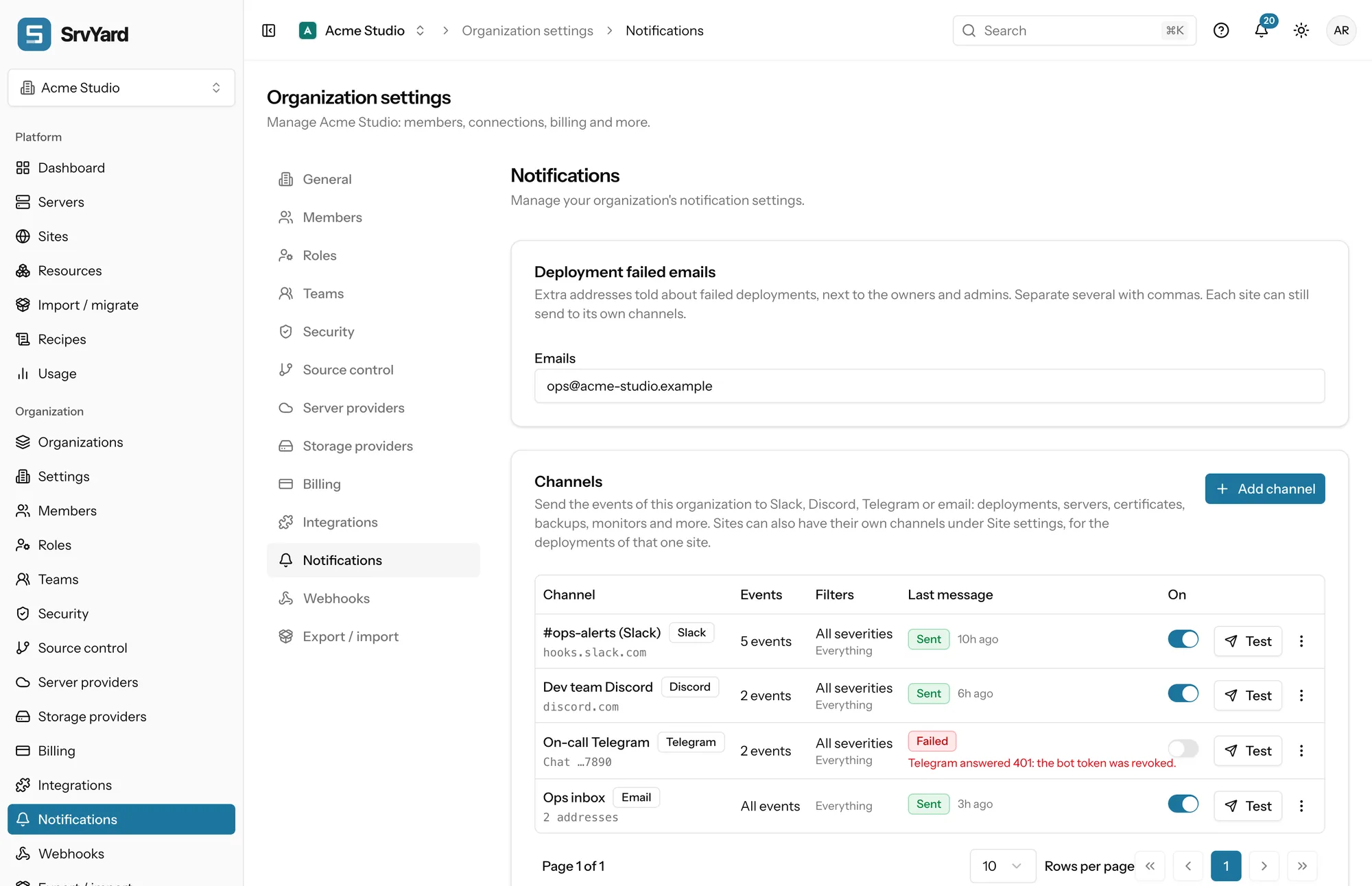
- Events
- All events (including ones added later) or a pick from 45, grouped as servers, sites, deployments, certificates and domains, backups and snapshots, monitoring, databases, recipes and imports, team and access.
- Severity
- Each event has one: a failed deployment is an error, an expiring certificate a warning, a finished deployment a success. Choose Everything, Warnings and errors, or Errors only.
- Limit to
- Servers, sites or tags. An event reaches the channel when its server, its site or one of their tags is ticked.
- Test
- Sends a test message now, whatever the filters say, and shows the result next to the row.
- Recent messages
- What each channel sent and the result of each delivery, kept for 30 days.
Two channels beat one noisy one: Errors only from everything to the team room, Everything for one important production site to its own.
03What a message is
and what it never containsOne per event
A formatted message with a link back to the server or site. Names and error text are escaped for each platform and cut to its length limits.
No secrets
Names, links, statuses and times. Passwords, tokens and environment values are never included.
Bursts are summarised
More than 20 messages a minute to one channel are combined into one digest message.
Retried, then reported
A rate limit (429) or a server error (5xx) is retried up to three times. Any other error, such as a revoked token, is not retried and shows as Failed with the reason.
04People, sites and channels
three separate layersMembers
Each member gets email and in-app notifications (the bell menu and the notification centre) from a table of events. The organisation sets the defaults; every member can change their own. Failed deployments also go to the owners and admins, and you can add extra addresses under Deployment failed emails.
Organisation channels
The channels above. They hear the whole organisation, narrowed by the filters you set.
Site channels
A site can send its own deployment events to channels of its own: Slack, Discord, Telegram, a signed webhook or a list of emails, up to 10 per site. The site’s failure email goes to whoever started the deployment and to the owners and admins, health-check failures included; there is no email for successful deployments.
An organisation channel and a site channel can both announce the same failure. If you get two messages for one event, narrow the organisation channel with Limit to, or remove one.
05Plans and limits
from the plan catalogueChannels, member notifications and the notification centre work on every plan. Some events only exist when their feature is on: monitor alerts need server monitoring and backup events need backups, which are on Pro and Business. If you want signed JSON for your own software instead of a chat message, that is a webhook (Pro and Business); see API and webhooks.
What is not offered: channel types other than Slack, Discord, Telegram and email. For anything else, such as an on-call tool or a Teams room, point a webhook at a small receiver of your own. Filters are the event, the severity and the servers, sites or tags: there is no schedule such as office hours. Silencing is per monitor (Mute keeps checking and sends nothing) and per person (mute a server for yourself, or switch your own email or in-app notifications off); a channel is switched off with its On switch.
06Read more
07Notification questions
answers from the docsWhere can SrvYard send notifications?
To Slack, Discord, Telegram and email channels, plus an email and in-app notification for each member. A site can also send its deployment events to channels of its own. See Send alerts to Slack, Discord, Telegram or email.
Do channels cost extra or need a paid plan?
Channels and member notifications work on every plan. Some events only exist when their feature does: monitor alerts need server monitoring and backup events need backups, which are on Pro and Business. See Compare plans and know your limits.
Nothing arrives, but the Test button works. Why?
The channel's filters are too narrow. Check Events, Severity and Limit to: an event only reaches a channel when its server, its site or one of their tags is in the scope. See Send alerts to Slack, Discord, Telegram or email.
Can a message leak a secret?
Messages carry names, links, statuses and times. Passwords, tokens and environment values are never included, and the webhook address of a channel is stored encrypted and not shown again. See Send notifications to Slack and Discord.
How many channels can I have?
An organisation can have 20 channels, an email channel up to 20 addresses, and a site up to 10 channels of its own. See Send alerts to Slack, Discord, Telegram or email.
I want JSON for my own software, not a chat message.
That is a webhook, available on Pro and Business: signed JSON for the events you choose, with retries and a delivery history. See Send events to your own systems with outgoing webhooks.
Add one channel, press Test, then break a deploy on purpose.
Free: 1 server, 3 sites, 100 deploys a month. Read the docs first if you prefer.