Several PHP versions on one server, and each site picks its own.
PHP comes from the ondrej/sury repository with one PHP-FPM service per version. Node.js 22, 24 or 26 builds and runs your front end, with npm, pnpm, Yarn or Bun. Extensions, limits and php.ini are switches and an editor with a safety net, not an SSH session.
# the command line uses the CLI default
php -v
# ask for a version by name
php8.3 -v
# each site has its own PHP-FPM service
systemctl status php8.3-fpm
systemctl status php8.4-fpm01PHP versions
the Runtimes tab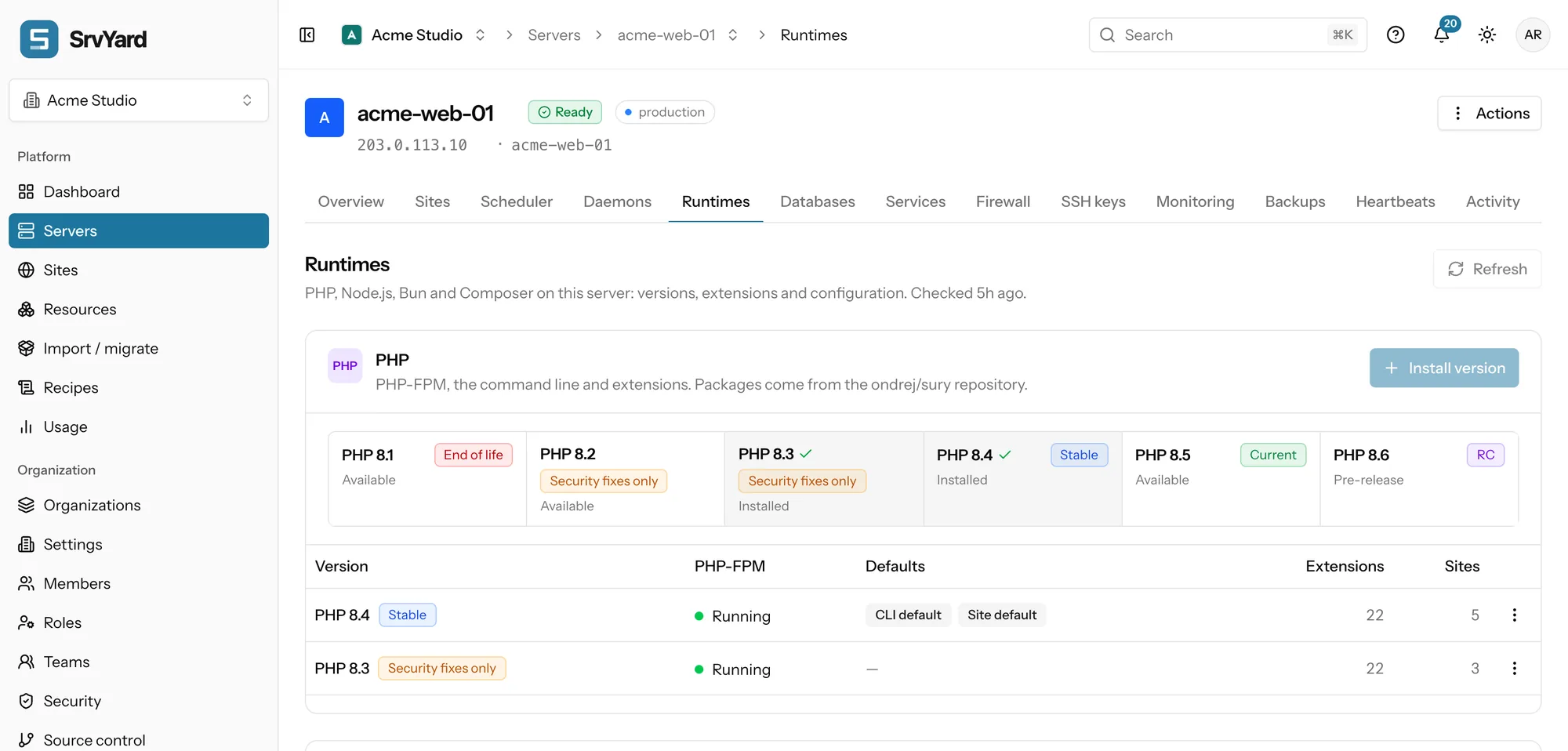
- PHP 8.1 to 8.5, plus the release candidate of the next version while there is one. Labels follow the official PHP support calendar: Current, Stable, Security fixes only, End of life.
- Installing a version installs PHP-FPM, the command line and the standard extensions. Your defaults stay as they are.
- Two defaults: the CLI default answers
phpin a terminal and in scripts; the site default is preselected for new sites. - A pre-release asks for an extra confirmation. Keep it off production.
- Uninstall is refused while the version is the CLI default, the site default, busy, or still has sites on it. Reload, restart and package update are per version.
02Move a site to another version
site Settings, PHP versionInstall the version
On the server, from the Runtimes tab. Nothing changes for existing sites.
Try a copy first
Check
composer.jsonand the extensions the new version has. Move a staging site and run your tests.Switch the site
The site is moved to the PHP-FPM of the new version and Nginx is reloaded to use it. A site with website isolation gets a fresh pool of its own.
Watch the logs
A 502 right after usually means the pool did not start or an extension is missing for that version. The old version is still installed, so switching back is the same action.
03Extensions, limits and php.ini
per version, or all at once| Where | What you can change |
|---|---|
| Extensions | Fourteen switches per version: BCMath, Bzip2, GD, GMP, ImageMagick, Intl, LDAP, Memcached, MongoDB, OPcache, Redis, SOAP, SQLite3 and Xdebug. On installs the package, off removes it, and PHP-FPM is reloaded for that version. Built-in extensions such as curl, mbstring and pdo_mysql are listed but not switchable. Anything else you install over SSH with apt and pick up with Refresh. Keep Xdebug off in production. |
| Global settings | Max upload size (1 to 4096 MB, sets upload_max_filesize and post_max_size), max execution time (1 to 3600 s, sets PHP, the FPM request_terminate_timeout and Nginx fastcgi_read_timeout together) and OPcache for production. Applied to every installed version. If PHP-FPM or Nginx rejects the result, SrvYard restores the previous files and says which refused. |
| php.ini and pool | Edit the FPM php.ini, the CLI php.ini or the pool file www.conf of a version. The current file is backed up, the new one is checked, and the backup comes back if PHP rejects it. FPM and CLI are separate files. |
| OPcache for production | Faster PHP, but PHP-FPM must be reloaded after every deploy so new code is seen. The generated deploy script ends with that reload; keep it if you write your own. |
04Node.js and package managers
the Node.js cardOne major per server, or one per site
The server holds one Node.js major at a time (22, 24 or 26, from NodeSource), because the system package cannot hold two. A Next.js or Nuxt.js site can pin a major of its own: SrvYard installs it with fnm in the site user’s home, so it does not touch other sites. Sites that pin their own are unaffected when you switch the server.
What builds your assets
Node.js runs Next.js and Nuxt.js sites, and builds the front end of PHP sites during a deploy. pnpm and Yarn come through Corepack (press Enable Corepack once). Bun is a pinned release, checked against its SHA-256 before it is unpacked.
| Package manager | Install step | Default build |
|---|---|---|
| npm | npm ci | npm run build |
| pnpm | pnpm install --frozen-lockfile | pnpm build |
| Yarn | yarn install --frozen-lockfile | yarn build |
| Bun | bun install --frozen-lockfile | bun run build |
| none | The front-end step is skipped. | For PHP sites without assets. |
The install step is the strict kind, so the repository needs the matching lock file and a build fails when package.json and the lock disagree. Choose a package manager under the site’s Settings; it only changes the script SrvYard generated, not one you edited. Node.js versions and package managers, in the docs
05Composer and private packages
Packages tab, site SettingsComposer is installed once, globally, as /usr/local/bin/composer, and the generated deploy script runs composer install --no-interaction --prefer-dist --optimize-autoloader --no-dev. There is no button to update Composer itself; run sudo composer self-update over SSH, or keep a composer.phar in the repository.
For private repositories, credentials are encrypted in SrvYard and written to auth.json (Composer) or .npmrc (npm) with mode 0600. Put them on the site for one site, or on the server for a Linux user, in which case every site running as that user can use them. With sites for different clients on one server, turn on website isolation and add credentials per site. Composer and global tools, in the docs
06Plans and limits
every planRuntimes are on every plan. PHP and Node.js changes run one at a time on a server: a second one waits until the first finishes, and Recent operations at the bottom of the tab keeps each one’s output.
Not covered
- Python, Ruby, Go, Java and .NET: SrvYard does not install or manage their runtimes.
- Two Node.js majors installed system-wide on one server.
- Updating Composer from the panel.
- Docker images as a way to pick a runtime.
07Runtime questions
answers from the docsWhich PHP versions can I install?
PHP 8.1 to 8.5, and the release candidate of the next version while one exists. Each version runs as its own PHP-FPM service and each site picks one. Versions that no longer get fixes are labelled End of life. See Choose and switch PHP versions.
Why does my site say an extension is missing?
Extensions belong to one PHP version. Check which version the site runs on under Settings, then switch the extension on for that version on the Runtimes tab. SrvYard offers fourteen switchable extensions; anything else can be installed with apt and picked up with Refresh. See PHP extensions and php.ini settings.
Why was my PHP uninstall refused?
A version cannot be removed while it is the CLI default, the default for new sites, busy, or still used by a site. The menu says which. Move the sites and change the defaults first. See Choose and switch PHP versions.
Can a server run two Node.js versions?
The server holds one major version at a time (22, 24 or 26). A Next.js or Nuxt.js site can pin its own major, which SrvYard installs for that site user, without affecting other sites. See Node.js versions and package managers.
Why does a deploy say `pnpm: command not found`?
pnpm and Yarn come through Corepack. Press Enable Corepack on the Node.js card of the Runtimes tab, then deploy again. See Node.js versions and package managers.
Can I run Python, Ruby or Go sites?
Not as a supported site type. SrvYard installs and manages PHP and Node.js only. See What SrvYard supports.
Install a second PHP version and move one site to it.
Free: 1 server, 3 sites, 100 deploys a month. Read the docs first if you prefer.