MySQL, MariaDB or PostgreSQL on your server, with a login for each app.
Create a database and a user from the server page. The password is generated and shown once. The engines listen on the loopback address by default, so you reach them from your own computer through an SSH tunnel and open nothing to the internet. Redis, Memcached and Meilisearch install the same way.
# 1. open the tunnel on your computer
ssh -N -L 3306:127.0.0.1:3306 YOUR_USER@203.0.113.10

# 2. point your client at the tunnel
mysql://USER:[email protected]:3306/DATABASE01What can be installed
Services tab, or the server form| Service | How SrvYard runs it |
|---|---|
| MySQL | Installed on a database or app server, or later from the Services tab. Listens on 127.0.0.1. |
| MariaDB | The same, as an alternative: a server runs MySQL or MariaDB, not both. |
| PostgreSQL | Can run beside either. Reachable locally through the postgres superuser. The versions on offer are read from the server’s Ubuntu release. |
| Redis, Memcached | Cache services on localhost only. Redis can have a password (Settings tab, stored encrypted, every reveal in the audit log). Restarting Memcached empties it. |
| Meilisearch | The only search engine SrvYard installs: a pinned release with a generated master key, bound to localhost or the private IP. No Elasticsearch, OpenSearch or Typesense. |
02A database and a user
Databases tab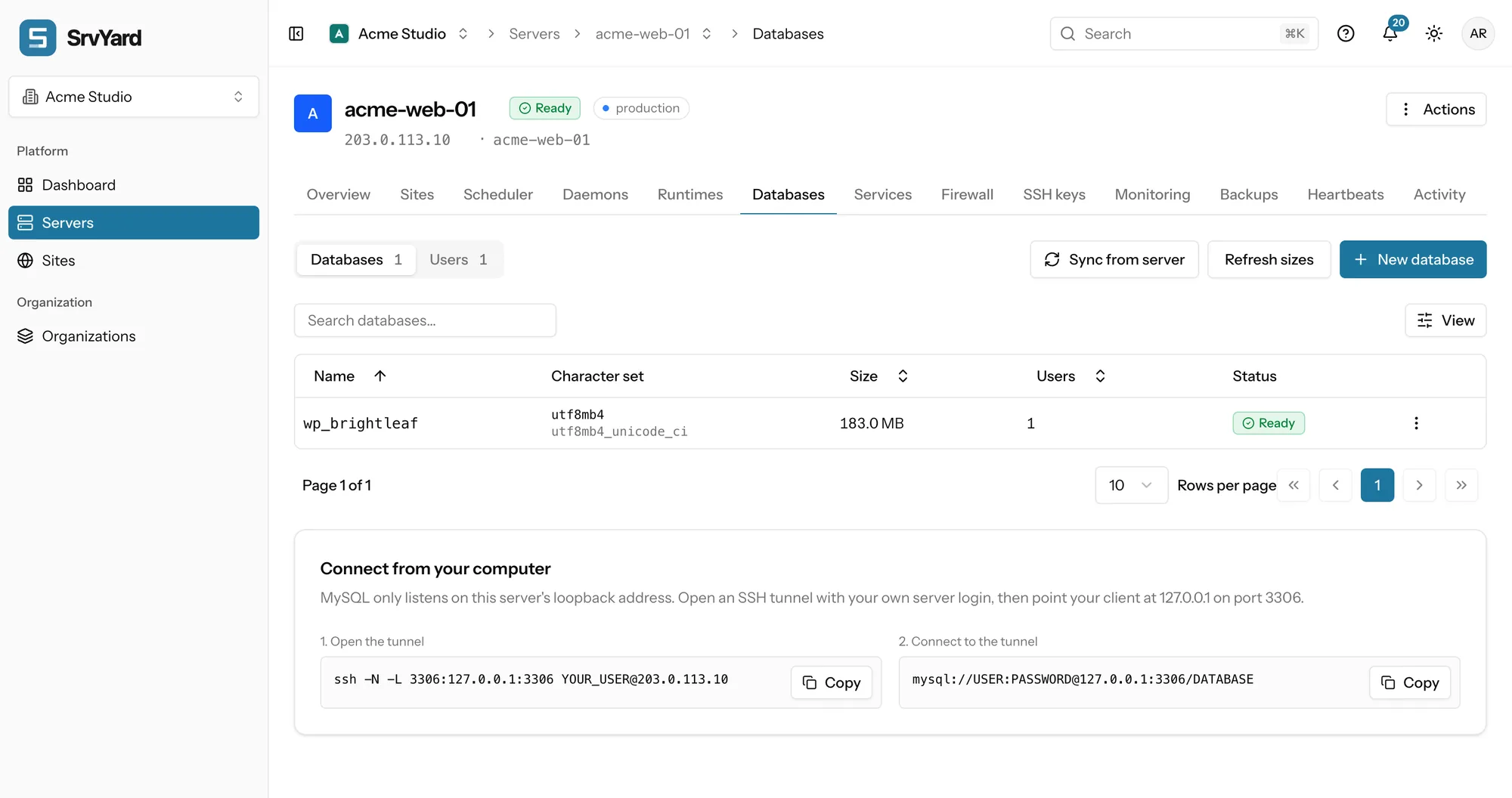
- Name: letters, numbers and underscores, up to 48. Names the engines use themselves (
mysql,sys,postgresand so on) are refused. Character setutf8mb4by default. - Also create a user in the same step: up to 32 characters, with a preset of Read only, Read and write, or Full access to that database.
- Remote access is off unless you switch it on for one host or pattern.
- The password appears once in a dialog. You can show it again later only after confirming your own SrvYard password, and the reveal is written to the audit log. Reset generates a new one.
- Sync from server adopts databases made by hand. SrvYard never reads the passwords of users it did not create.
03Connecting a site
Connect to database, on the new site formSwitch it on
The new-site form has Connect to database for PHP sites. For WordPress and phpMyAdmin it is part of the form.
Pick or create
Choose a database that exists on the server, or create one: the name is pre-filled from the site, with a user that has full access to it.
Create the site
Nothing is created until you press Create site. Then SrvYard creates the database and user, or reuses a local user that already reaches the database, and keeps the details encrypted until the site’s
.envis written.
The form is offered only when the server has an engine. If it has none, it sends you to the Services tab to install one. Use one user per application with the permission it needs, so a compromised app cannot reach the others and one password can be reset alone. Connect a site to its database, in the docs
04Reaching it from outside
safest first| Route | How it works |
|---|---|
| SSH tunnel | Copy the command from the Databases tab, replace YOUR_USER with your server login, leave it running, and connect your client to 127.0.0.1. Traffic is encrypted, the port stays closed, and the database user can stay local. Your key must be on the server’s SSH keys tab. |
| phpMyAdmin | A site type with its own PHP and Nginx configuration, HTTP Basic authentication in front by default, release 5.2.3. MySQL and MariaDB only, not PostgreSQL. Delete the site when you no longer need it. |
| Another server | Allow remote access for one user from one address or range, and put both servers in the same provider and region. SrvYard never opens the port for you: the engine is installed with bind-address = 127.0.0.1 in a file that overrides mysqld.cnf, so listening on another address is a deliberate step over SSH, and the firewall rule for that one source is another. Settings, Server network creates the rule for a peer. |
05Export and import
no buttons, on purposeExport
An export is a backup run. Create a backup configuration, press Back up now, and download the finished run: one .sql.gz per database, from a signed link that is valid for five minutes and recorded in the audit log. It goes through a bucket you own, so a storage provider is required. Each dump, upload or restore step is limited to 25 minutes; for a huge database use your own tools through the tunnel.
Import
SrvYard does not take an upload. Load a dump through the tunnel or on the server with gunzip < dump.sql.gz | mysql ... (or psql) into a database you created with a full-access user. An import adds to what is there and does not empty the database first. To check a backup, restore it into a new database; nothing existing is touched.
06Plans and limits
from the plan catalogueCreating, managing and tunnelling to databases is on every plan. Scheduled database backups, which are also how you export, need Pro and Business. Compare plans
Not covered
- A managed database service. The engine runs on your server, with your server’s memory and disk.
- MySQL and MariaDB together on one server.
- Other engines such as MongoDB servers, and search engines other than Meilisearch.
- Uninstalling an engine deletes its data. Back up first.
07Database questions
answers from the docsWhich database engines can SrvYard install?
MySQL, MariaDB and PostgreSQL, plus Redis and Memcached as caches and Meilisearch for search. A server runs MySQL or MariaDB, not both; PostgreSQL can run beside either. See Create a database and a user.
How do I connect to a database from my computer?
Through an SSH tunnel. The Databases tab shows the command, you leave it running and point your client at 127.0.0.1. The database port stays closed to the internet. See Remote access, phpMyAdmin and SSH tunnels.
Can I see a database password again?
Only by confirming your own SrvYard password, and the reveal is written to the audit log. For a user that SrvYard did not create, there is no stored password to show: reset it instead. See Create a database and a user.
Can I upload or download a database in SrvYard?
There are no import or export buttons. You export by downloading a finished backup run, and import through the tunnel or on the server with mysql or psql. To check a backup, restore it into a new database. See Import and export a database.
Does deleting a site drop its database?
No. SrvYard leaves databases and database users in place when a site is deleted. Remove them from the server's Databases tab when you are sure. See Delete, rename or move a site.
Does SrvYard install Elasticsearch or OpenSearch?
No. Meilisearch is the only search engine it installs and manages. The others can be installed by hand over SSH, but SrvYard will not manage them. See Meilisearch and other search services.
Create a database, a user, and connect a site to them.
Free: 1 server, 3 sites, 100 deploys a month. Read the docs first if you prefer.