No API import for SpinupWP: connect the server and scan it, or start fresh.
SrvYard has no SpinupWP importer. A SpinupWP server runs stock Nginx and PHP-FPM with one system user per site, which a scan can read. The scan recognises the panel, and the adoption wizard says per site whether it can be adopted. SpinupWP is built around WordPress, and SrvYard has a WordPress site type with its own database.
# honest status
api import    none
scan          read-only, needs a connected server
recognised    /etc/spinupwp, /opt/spinupwp
detach guide  yes (stop agent, remove its SSH key)
adopt in place per site, the report says if it can
spinupwp untouched01Where this stands
| Question | Answer |
|---|---|
| Is there an import from the SpinupWP API? | No. Only Laravel Forge, Ploi and VitoDeploy have one. |
| Does the scan recognise SpinupWP? | Yes, from the marks it looks for (/etc/spinupwp, /opt/spinupwp and a /sites folder), and it shows the panel in the report. |
| Can I adopt a SpinupWP site in place? | SpinupWP uses the stock Nginx and PHP-FPM paths, so the scan can read the web server configuration and the sites’ folders. Each site in the report has a confidence and, where it cannot be adopted, the reason. We have not documented an end-to-end SpinupWP adoption, and the docs describe in-place adoption for panels other than Forge, Ploi and Vito as only partly supported. Treat the first one as a trial. |
| What is the safe route? | A fresh SrvYard server and a WordPress site per domain (section 3), with DNS switched last. |
| Does the old panel change? | Never. SrvYard does not talk to SpinupWP. |
02The scan, to see what is there
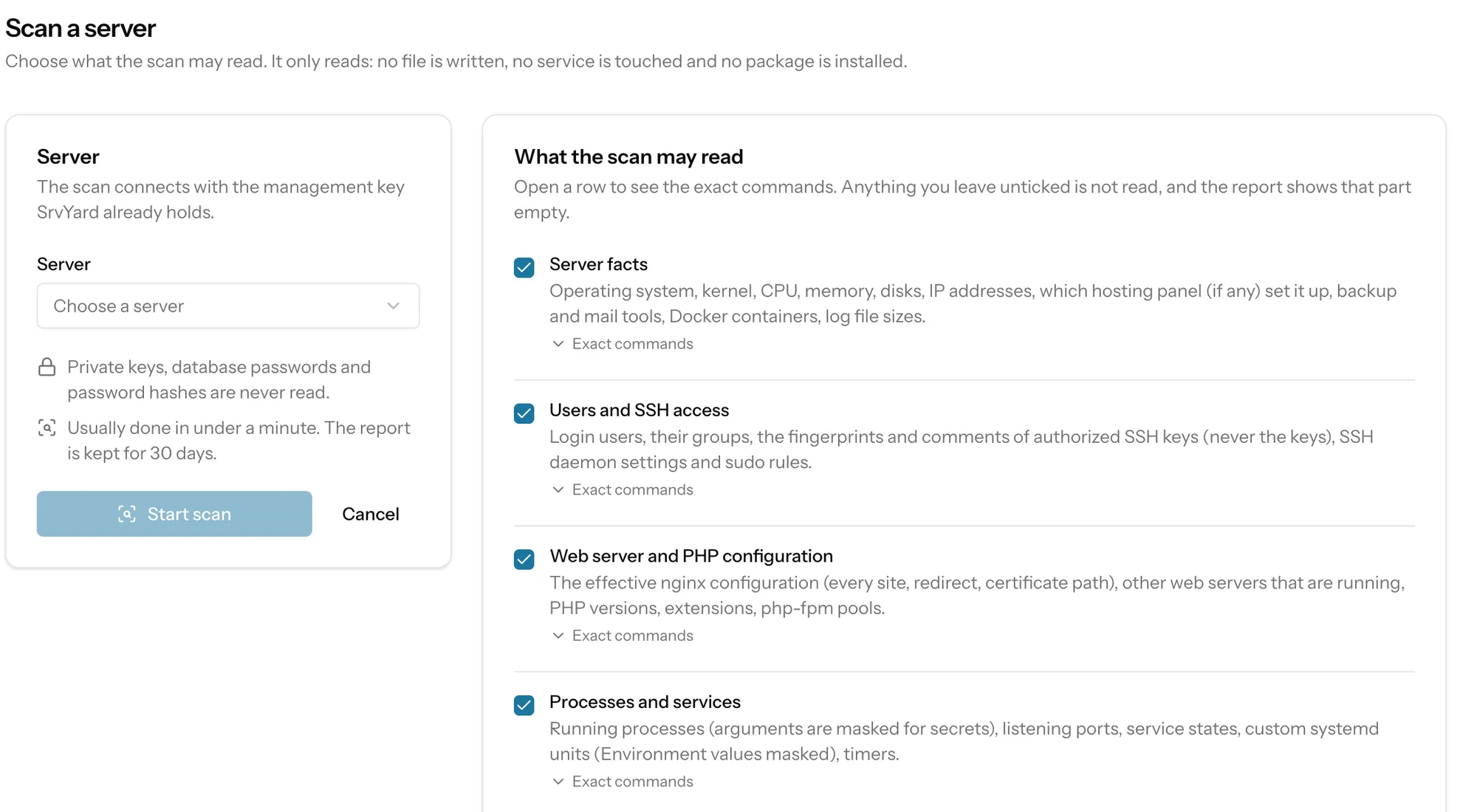
read-onlyConnect the server (see the note), then Import / migrate, Scan a server. The report lists sites, scheduled jobs (including the real cron entry SpinupWP uses in place of WP-Cron), databases (metadata only), certificates, firewall and application folders.
03Moving to a fresh server
steps that use ordinary SrvYard featuresWrite down what SpinupWP knows
Per site: domain and aliases, PHP version, public folder, Git repository and branch if used, the deploy script, the cron interval, and which backups and storage it uses. SrvYard cannot read these from SpinupWP.
Create the new server
Add a server at a provider SrvYard supports, or connect a fresh Ubuntu machine.
Create each site
Create a WordPress site (it gets its own database) or a PHP site. Copy the site files and the database across with your own tools and update
wp-config.php. Test on a free srvy.sh address before any DNS change.Set up what the panel did
Certificates (Let’s Encrypt), a scheduled job for WordPress cron, and backups to your own S3-compatible storage.
Switch DNS, then retire SpinupWP
Change records per site once it works, and keep SpinupWP running for a few days.
04What the scan reads
read-only, and you choose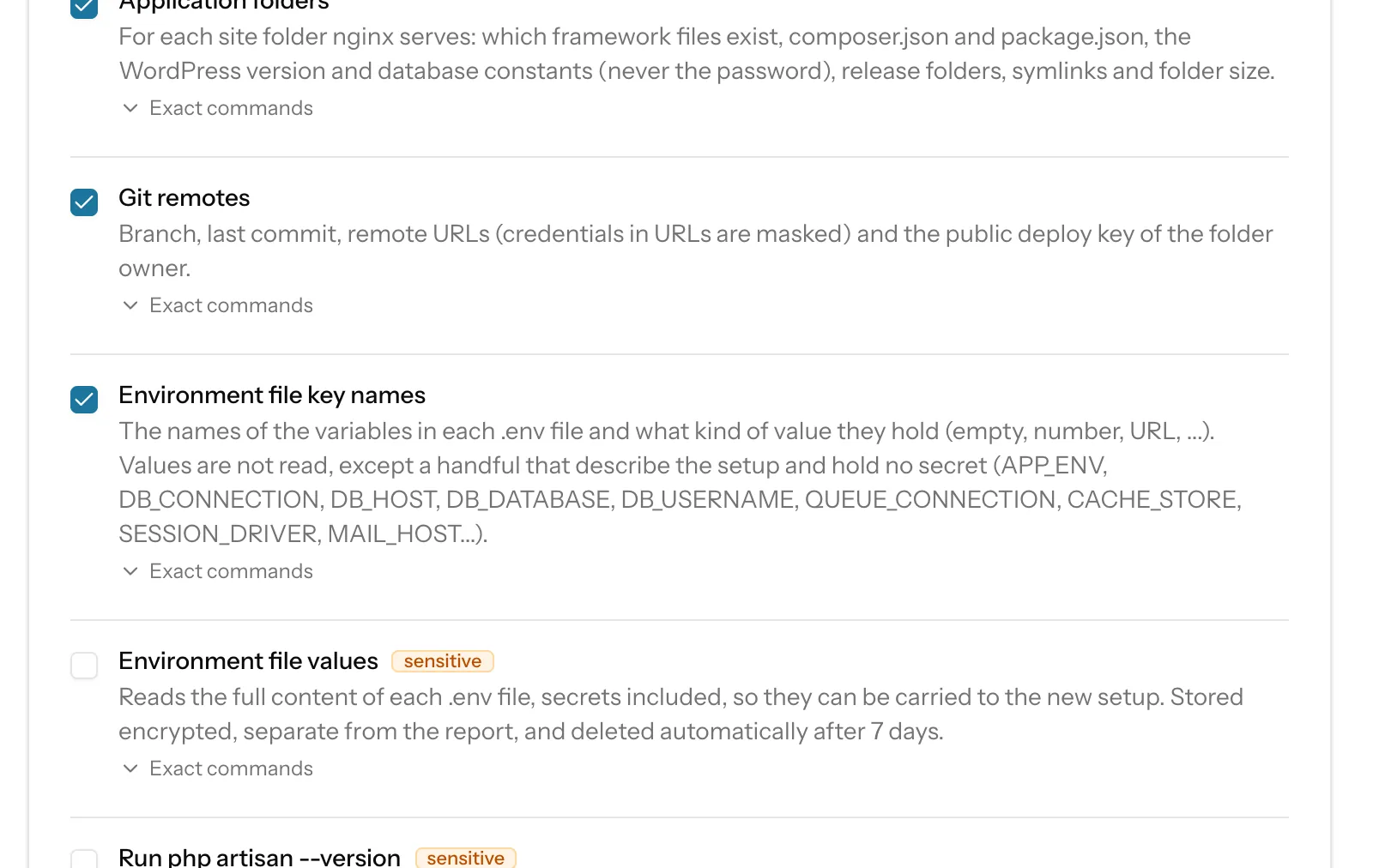
Server facts, users and SSH access, web server and PHP configuration, processes and services, background workers and scheduled jobs, databases (metadata only), TLS certificates (metadata only), the firewall, application folders and Git remotes. Each consent opens the exact commands that will run on your machine.
Private keys, database passwords and password hashes are never read. Environment file key names reads variable names only. Environment file values is off by default, stored encrypted apart from the report and deleted after seven days. Run php artisan --version runs your application’s code once per Laravel site and is also off by default.
The report is kept for 30 days and can be downloaded as redacted JSON. A scan writes nothing, touches no service and installs no package.
05Adopting a scanned site
in place, reversibleRestore point
Before anything is registered, SrvYard stores a tarball of the Nginx, PHP-FPM, Supervisor, cron and certbot renewal settings, with a manifest and a restore script. The originals are only read.
Register in place
Sites, domains, processes, cron lines, databases, certificates and firewall rules are recorded in SrvYard and flagged adopted. Nothing is moved, rewritten or restarted. Processes and cron lines are external: you can see them, start, stop, restart and read logs, but SrvYard does not rewrite them.
Verify
SrvYard records how each site answers before, and checks again afterwards that every site answers the same and the configuration is unchanged.
Take over, one thing at a time
The Nginx file stays the old one until you press Take over the vhost, with a diff and an automatic restore if a domain stops answering. Deploys from SrvYard start from a suggested script that keeps migrations and the build step commented out until you review it.
Undo
Roll back removes what the adoption registered and, if a vhost was taken over, puts the captured files back first. Deleting an adopted site only forgets it.
06Switching SpinupWP off on a server you keep
a guide, never run for youThe detach guide has you stop the panel’s agent and cron entries (it shows commands to find them) and remove its SSH key from authorized_keys. Keep the panel’s Nginx and PHP packages and each site’s system user, because the sites still run on them.
Every command is for you to read and run; SrvYard never executes the guide. Delete the server in SpinupWP without deleting it at the provider, and cancel the subscription last.
07Questions
answers from the docsIs there a SpinupWP import?
No. Only Laravel Forge, Ploi and VitoDeploy have an API import. For SpinupWP, connect the server and scan it, or create the sites fresh. See Adopt a site that is already on your server.
Scan one SpinupWP server, or deploy one site fresh.
Free: 1 server, 3 sites, 100 deploys a month. Read the docs first if you prefer.