Cron jobs and Supervisor daemons, kept as a list instead of edited by hand.
SrvYard writes the crontab and the Supervisor configuration from a list, captures the output of each run and can tell you when a job did not run. Every Laravel site gets its scheduler job and its queue workers without an SSH session.
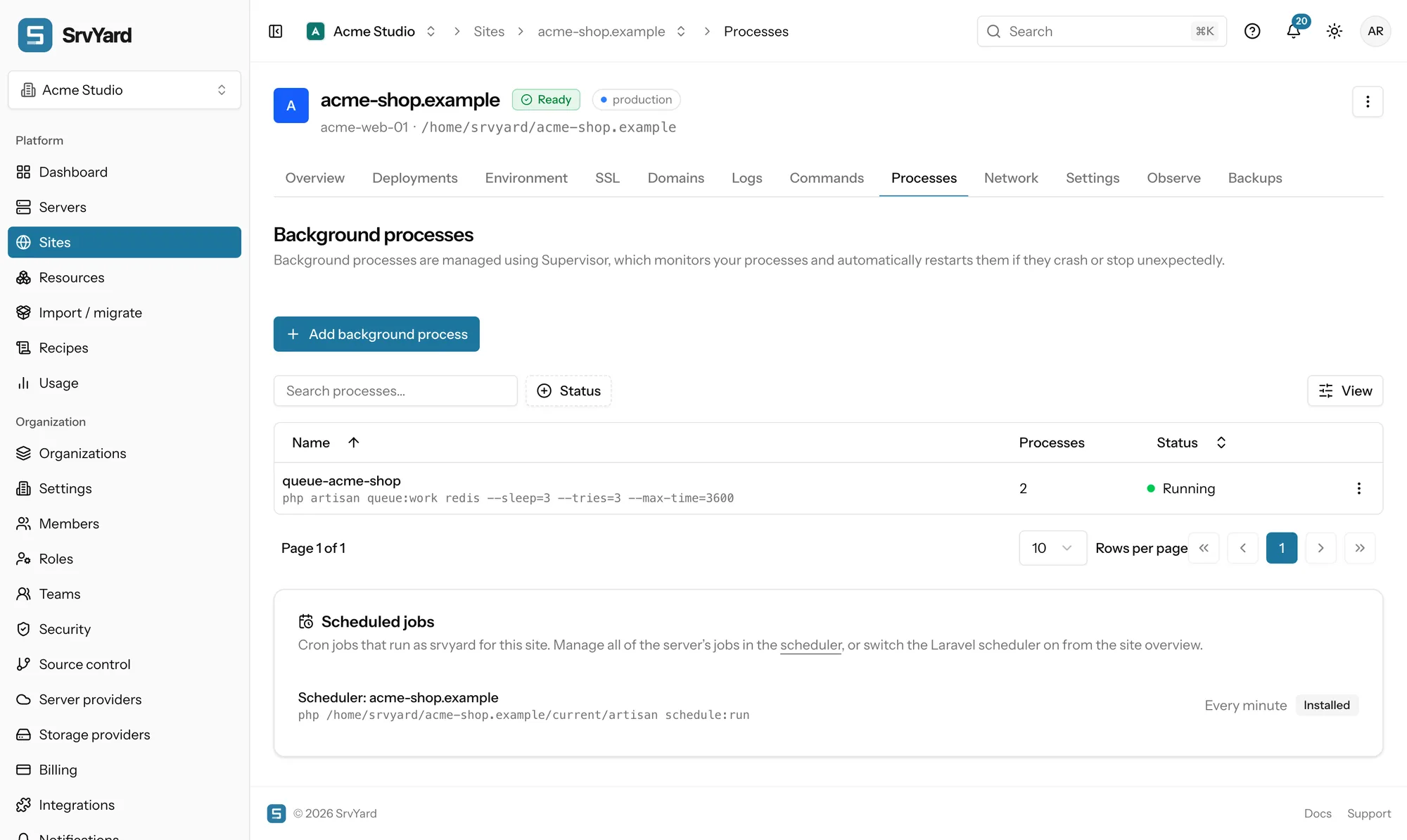
queue-acme-shop     2 processes   running
  php artisan queue:work redis --sleep=3 --tries=3 --max-time=3600

Scheduler: acme-shop.example   every minute, as srvyard
php /home/srvyard/acme-shop.example/current/artisan schedule:run01Scheduled jobs
server, Scheduler tab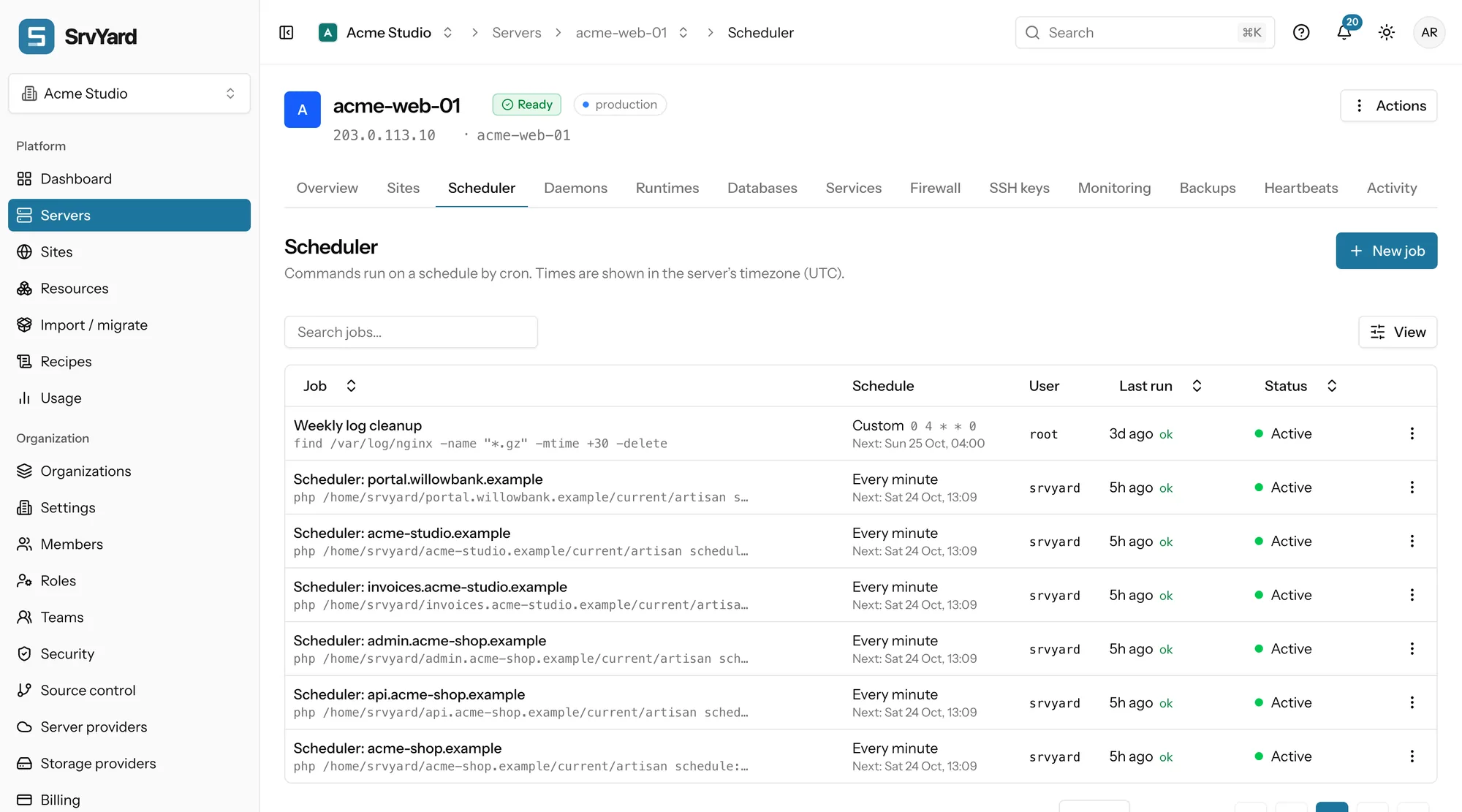
- Command: one line, run by bash from the user’s home. Line breaks become spaces, so chain steps with
&&and use full paths: cron has no login shell. - Run as
srvyard, the user your sites run as, orrootfor work that needs it. - Frequency: every minute, hourly, nightly (00:00), weekly (Sunday 00:00), monthly (the 1st, 00:00), on reboot, or custom with five cron fields. As you type, SrvYard shows the next five run times and rejects an invalid expression.
- Times follow the server’s timezone, UTC unless you changed it.
| Row menu | What it does |
|---|---|
| Run now | Starts the job outside its schedule and opens the output as it runs: the way to test a command exactly as cron will run it. |
| Show output | The last 20 KB of the job’s log, which lives in ~/.srvyard/cron of the user. Logs of deleted jobs are cleaned up. |
| Pause, edit, delete | A paused job stays in the list and leaves the crontab. Status shows Active, Applying, Failed (hover for the reason) or Paused. |
| Monitor with heartbeats | Pings a URL after every successful run and notifies you when a ping is missed. Monitoring and alerts. |
SrvYard only rewrites the block between the BEGIN SRVYARD and END SRVYARD comments of a user’s crontab. Lines you added by hand outside it are kept but do not appear in the list. Cron starts a new run even if the last is still going; wrap long jobs in flock -n /tmp/job.lock your-command so a second copy skips.
02Daemons
server, Daemons tab, and a site’s Processes tabA daemon is a command that should run all the time: a queue worker, a WebSocket server, a script that listens. Supervisor starts it with the server, restarts it if it crashes, and can run several copies. SrvYard writes the configuration and applies it.
- Name in lowercase letters, digits, dashes and underscores; a one-line command up to 1,000 characters; a working directory (for a site, its
currentfolder); run assrvyardorroot. - Processes: 1 to 50 copies, each with its own memory.
- Start automatically and restart when it exits are on by default. Start seconds (1), stop wait (10 s), the stop signal (
TERMby default) and up to 50 environment variables are in the form too. - Start, stop, restart, view logs, view status, edit and delete from the row menu. Status runs from Creating to Running, Stopped or Failed.
Queue worker helper
Fill in the PHP version, connection, queues in priority order, timeout, sleep, rest, backoff, tries, memory and environment, and it writes the queue:work line. Keep the timeout shorter than the connection’s retry-after, or a slow job can be picked up twice.
After a deployment
Workers keep your code in memory. Add php artisan queue:restart to the deploy script, or restart the daemon from its row. Deleting a worker stops it at once, and a job that was running may be retried, so make jobs safe to run twice.
03On a Laravel site
the Laravel card and the Processes tab| Switch | What SrvYard adds |
|---|---|
| Scheduler | One job: php artisan schedule:run every minute, as the site user, in the application folder, with the site’s PHP version. No package needed. One per site is enough: Laravel decides what is due. |
| Queue workers | A Supervisor process built with the form. The site must be deployed first, and QUEUE_CONNECTION must not be sync. |
| Horizon | A process for php artisan horizon and horizon:terminate in the deploy script. Enabled only when laravel/horizon is in composer.lock. Do not run it and plain workers on the same queue. |
| Reverb, Inertia SSR | A process each, with the Nginx proxy for Reverb, enabled when the package is in the lock file. |
| Octane | A process on a local port with Nginx pointing at it. Not available on zero-downtime sites. |
The processes a switch creates belong to the Laravel card: you can start, stop, restart and read their logs, but editing or deleting them happens from the card. Queue workers and the scheduler, in the docs · Laravel
04Plans and limits
every planScheduled jobs and daemons are on every plan. Supervisor comes with app, web and worker servers; on a database or cache server install it from Services first, or the Daemons tab says it is missing. Compare plans
Not covered
- Cron expressions with seconds: five fields only.
- A history of every run. You get the last 20 KB of the log of each job.
- systemd services and timers as a managed item. Daemons are Supervisor programs.
- Stopping overlapping runs for you. Use
flockyourself.
05Scheduler and daemon questions
answers from the docsHow do I keep a queue worker running?
Add it as a background process, which Supervisor keeps alive, restarts when it crashes and starts with the server. The site needs a first deployment and QUEUE_CONNECTION must not be sync. See Run queue workers and the Laravel scheduler.
Is the Laravel scheduler set up for me?
Switch it on from the Laravel card on the site overview. It adds one job that runs php artisan schedule:run every minute as the site user. One per site is enough. See Use the Laravel panel.
Will my own crontab lines be kept?
Yes. SrvYard only rewrites the block between its own BEGIN SRVYARD and END SRVYARD lines. Lines you added by hand outside the block stay but do not appear in the list. See Scheduled commands on a server.
Why does Run now fail when the command works in my terminal?
Cron has no login shell. Use absolute paths for php, node and your files, and cd into the project first. See Scheduled commands on a server.
Why does my worker run old code after a deploy?
Queue workers keep the application in memory. Add php artisan queue:restart to the deploy script, or restart the daemon from its row menu. See Keep long-running processes alive with daemons.
How do I find out a job did not run?
Turn on Monitor with heartbeats for the job. It pings a URL after every successful run and notifies you when a ping is missed. See Get told when a scheduled task stops running.
Add a queue worker and the scheduler to a Laravel site.
Free: 1 server, 3 sites, 100 deploys a month. Read the docs first if you prefer.