Create droplets from the form you deploy from.
Connect a DigitalOcean account with an API token (or the Connect with DigitalOcean button, where your SrvYard offers it), pick a region and a droplet size, and SrvYard creates the droplet, logs in with a key it generated and installs what the server type needs. DigitalOcean bills you directly.
# Settings, Server providers, DigitalOcean
name        DigitalOcean (agency)
api token   a personal access token, read and write
verify      checked with a call to GET /account
limit       the account’s droplet limit is read and enforced
stored encrypted, never shown again01What you need
| Item | Detail |
|---|---|
| Account | A DigitalOcean account, and permission to create a personal access token at cloud.digitalocean.com/account/api/tokens. |
| Token | A personal access token with read and write scope. Create one only for SrvYard and give it a name you will recognise, so you can revoke it without touching anything else. |
| Or OAuth | Where your SrvYard has a DigitalOcean app configured, the connect panel offers Connect with DigitalOcean instead of a pasted token. The access token is refreshed before it expires, and if the refresh fails the connection shows Needs reconnecting. |
| Operating system | Ubuntu 24.04 LTS or 26.04 LTS, if DigitalOcean has the image for it. |
| Server types | App, web, load balancer, database, cache, worker and Meilisearch servers. The type decides what is installed and cannot be changed afterwards. |
| Plan | Hobby 1, Pro 10, Business unlimited servers. Archived servers do not count. |
02What SrvYard asks of DigitalOcean
and nothing else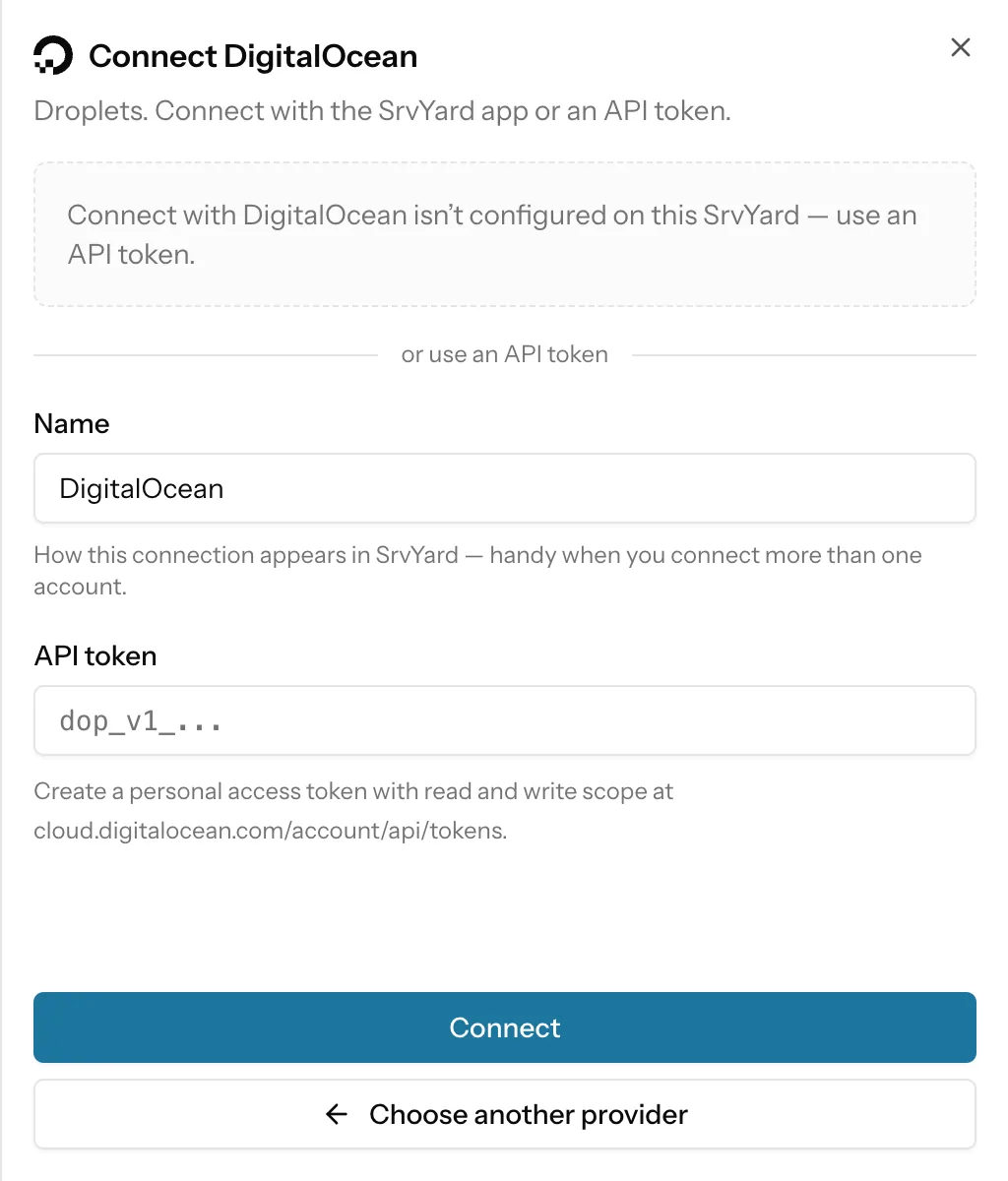
SrvYard asks for regions, droplet sizes, images and VPC networks, and for creating, rebooting, snapshotting and deleting the droplets it made. It does not manage your DigitalOcean billing, domains, firewalls, volumes or other resources.
Every droplet it creates carries the tag srvyard, and SrvYard asks DigitalOcean to switch droplet monitoring on.
You can connect several accounts or teams, each under its own name. A token that DigitalOcean later rejects shows as Needs reconnecting; existing droplets keep running, and the form greys that account out until you paste a new token.
Already have a droplet? Use Connect an existing server: one command as root, no token.
03Create a server
the Add server formName and provider
A name up to 60 characters, which becomes the droplet’s hostname, and your connected DigitalOcean account.
Server type
App server if you are unsure: sites, queue workers and a database on one machine.
Region and size
Regions are the ones DigitalOcean marks available. Four cards give the cheapest size for each memory tier; Show more sizes opens the full list with the monthly price. GPU droplets are not listed, and a size that is not sold in the chosen region is shown but cannot be selected.
Create
SrvYard asks for the droplet, waits for it to be active with a public address, provisions it over SSH and shows Ready when it is done.
04What works on a droplet
read from the integration| Capability | DigitalOcean |
|---|---|
| Droplet limit | Read from your account when you connect. When SrvYard already runs that many droplets on the connection, the form says You cannot create more servers for the given provider before it asks DigitalOcean. |
| Provider backups | An option in Advanced settings. The form notes DigitalOcean’s terms: weekly backups, four kept, 20% of the droplet price. |
| IPv6 | On by default, can be switched off for an IPv4-only droplet. |
| Private network | The droplet can join a VPC of the chosen region; the default VPC is listed first. |
| Restart | From the server’s Actions menu, a graceful reboot or, when the machine no longer answers, a power cycle. Both are issued as DigitalOcean actions, so they appear in the droplet’s action history. |
| Snapshots | Taken at DigitalOcean from the server’s Backups, Snapshots section (a plan with backups: Pro or Business). A snapshot lives in one region, so a server made from it is created in that region. DigitalOcean recommends powering a droplet off for a consistent image. |
| Delete | Deleting the server in SrvYard destroys the droplet too, unless you switch Preserve on. Archiving never touches the droplet. |
| Open in | The Actions menu links to the droplet in the DigitalOcean control panel. |
05Limits
so you can rule it out early- SrvYard does not create DigitalOcean App Platform apps, managed databases, Kubernetes clusters or volumes. Sites run on the droplet with Nginx and PHP or Node, and databases run on the droplet or on a database server you create.
- Docker and Docker Compose are not supported, whether or not the droplet comes from a Docker image.
- Only Ubuntu 24.04 and 26.04 are created.
Resizing or rebuilding a droplet at DigitalOcean while SrvYard is installing it is not supported. Afterwards a resize or power cycle is fine; the server shows Disconnected until it is back.
The article Provision a server at a cloud provider walks through the form field by field.
06Provider questions
answers from the docsCan I connect DigitalOcean without pasting a token?
Only where your SrvYard has a DigitalOcean OAuth app configured: the connect panel then offers Connect with DigitalOcean. Otherwise paste a personal access token with read and write scope. See Add a server provider and its API token.
What happens when I reach my DigitalOcean droplet limit?
SrvYard reads the limit when you connect the account. When it already runs that many droplets on the connection, the form says You cannot create more servers for the given provider and does not ask DigitalOcean. See Provision a server at a cloud provider.
Does SrvYard create App Platform apps, managed databases or Kubernetes at DigitalOcean?
No. It creates droplets, and installs Nginx, PHP or Node and the database on them. Docker and Kubernetes are not supported.
Connect a DigitalOcean account and create the first server.
Free: 1 server, 3 sites, 100 deploys a month. Read the docs first if you prefer.