Clone virtual machines on your own Proxmox cluster.
SrvYard creates a server on Proxmox VE by cloning a cloud-init template you prepared once. It sets the CPU, memory, disk and SSH key through cloud-init, starts the VM, reads its address from the guest agent and installs what the server type needs. The hardware is yours, so there is no provider bill.
# Settings, Server providers, Proxmox VE
api url     https://pve.example.com:8006
token id    user@pve!srvyard
secret      shown once by Proxmox
storage     local-lvm
template    9000  Ubuntu 24.04 cloud-init template
bridge      vmbr0 (optional, DHCP)
verify GET /version and /nodes01What you need
| Item | Detail |
|---|---|
| Proxmox VE | Version 8.1 or newer, with its API reachable from SrvYard at the URL you enter (for example https://pve.example.com:8006; any path is dropped). The new VMs must be reachable from SrvYard over SSH too. |
| API token | An API token ID in the form user@realm!tokenname and its secret. Give the token, or its user, these privileges on /: VM.Allocate, VM.Clone, VM.Config.CPU, VM.Config.Memory, VM.Config.Disk, VM.Config.Network, VM.Config.Cloudinit, VM.Config.Options, VM.PowerMgmt, VM.Monitor, VM.Audit, Datastore.AllocateSpace, Datastore.Audit and SDN.Use. Untick Privilege Separation, or grant the roles to the token itself. |
| Template | A VM template built from an Ubuntu 24.04 cloud image, with a cloud-init drive and qemu-guest-agent installed and enabled. Enter its numeric VM ID. A second template for Ubuntu 26.04 is optional; without it only 24.04 is offered. |
| Storage | The storage new VM disks are created on, for example local-lvm. It must allow disk images. |
| Network | An optional bridge (vmbr0 on a default install) that hands out addresses by DHCP. Left empty, the VM keeps the template’s network device. |
| TLS | The certificate is verified by default. You can switch verification off for a cluster with a self-signed certificate. |
| Plan | Hobby 1, Pro 10, Business unlimited servers. Archived servers do not count. |
02What SrvYard does on the cluster
and nothing else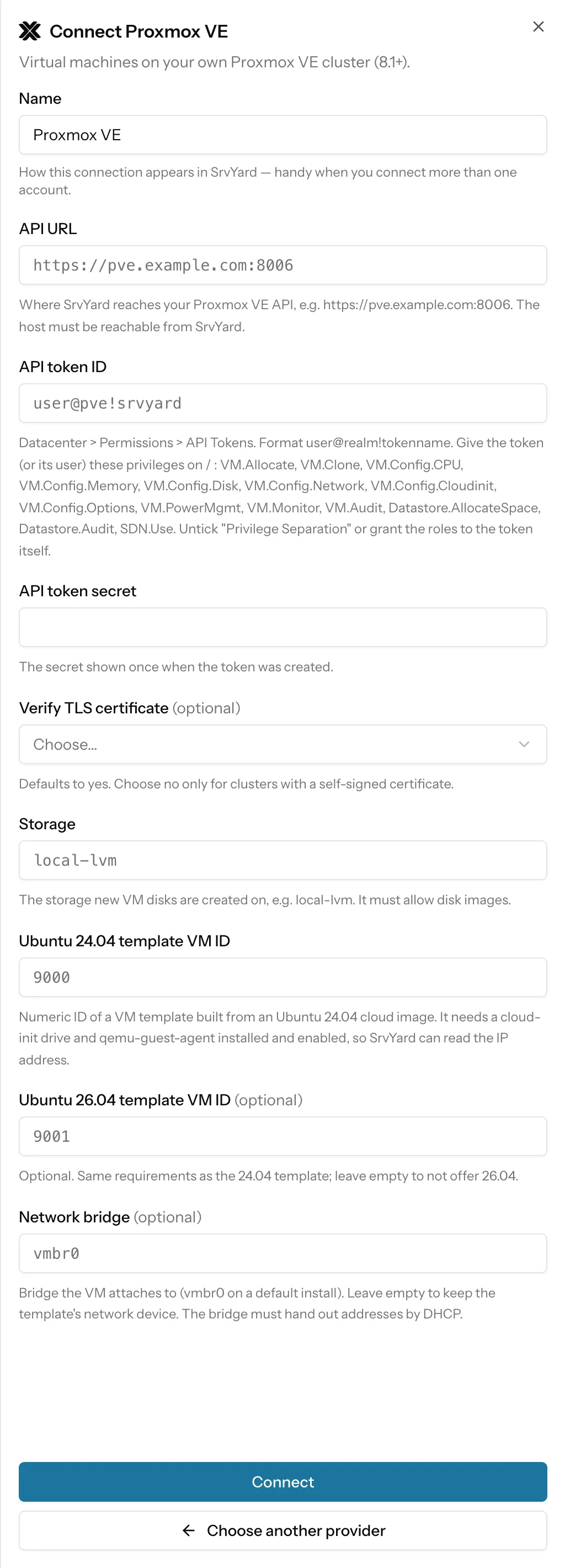
For each new server SrvYard asks for the next free VM ID, makes a full clone of your template, sets cores, memory, the root SSH key, DHCP addressing and the guest agent, grows the boot disk to the chosen size, starts the VM and waits for the guest agent to report an IPv4 address. If any step fails, the half-built VM is destroyed.
Each VM it creates carries a marker in its description with the server’s ID. When you delete the server, SrvYard only stops and destroys a VM that has that marker, and purges its disks. A VM ID that was freed and reused by someone else is left alone.
A connection is checked with two calls, /version and /nodes. It does not prove the privileges, template or storage are right: a missing one fails at the first create, with Proxmox’s own message.
Machines that are already running? Use Connect an existing server instead.
03Create a server
the Add server formName and provider
A name up to 60 characters, which becomes the VM name, and your Proxmox connection.
Server type
App server if you are unsure: sites, queue workers and a database on one machine.
Node and size
The “region” is a node of the cluster that is online. Sizes are six fixed plans, with no price: 1 vCPU, 1 GB, 25 GB; 1, 2, 50; 2, 4, 80; 4, 8, 160; 8, 16, 320 and 16, 32, 640 (vCPUs, GB of memory, GB of disk).
Create
Cloning a large template can take minutes; SrvYard waits up to 15 minutes for the clone and two minutes for each other task. The server shows Ready after provisioning.
04What works on a Proxmox VM
read from the integration| Capability | Proxmox VE |
|---|---|
| Provider backups, IPv6, private networks | Not offered in the SrvYard form. Use Proxmox’s own backups for the VM disks. |
| Restart | Not through the Proxmox API: SrvYard reboots from inside the server over SSH. |
| Snapshots | Not supported. The Snapshots section tells you so; use file and database backups, or Proxmox snapshots yourself. |
| Delete | Deleting the server in SrvYard stops and destroys the VM, unless you switch Preserve on. |
| Open in | None: a cluster has no stable console address. |
05Limits
so you can rule it out early- VMs only: no LXC containers, no Docker or Kubernetes.
- Only Ubuntu 24.04 and 26.04, and only from the templates you prepared.
- Addressing is DHCP; the first non-loopback IPv4 the guest agent reports is used.
- A cluster that is not reachable from where your SrvYard runs cannot be connected. Check the firewall in front of port 8006.
Building the template is your job and is the part that goes wrong most: a missing cloud-init drive or an agent that is not running means SrvYard never learns the VM’s address, and the create times out.
The docs article Add a server provider and its API token has the troubleshooting list.
06Provider questions
answers from the docsWhat do I need to prepare on Proxmox?
An API token with the listed privileges, a VM template built from an Ubuntu 24.04 cloud image with a cloud-init drive and the QEMU guest agent enabled, a storage that allows disk images, and optionally a bridge with DHCP. SrvYard clones the template for each server. See Add a server provider and its API token.
Can SrvYard snapshot or restart a Proxmox VM?
No snapshots. Restarts are done from inside the server over SSH, not through the Proxmox API. Use Proxmox's own snapshots and backups for the VM disks.
Connect a Proxmox cluster and create the first server.
Free: 1 server, 3 sites, 100 deploys a month. Read the docs first if you prefer.