Create EC2 and Lightsail instances without opening the AWS console.
Connect an AWS account with an IAM access key, pick a region and a size, and SrvYard launches the instance, waits for its public address, logs in with a key it generated and installs what the server type needs. Two services are supported: Amazon EC2 and Amazon Lightsail, each as its own connection. AWS bills you directly.
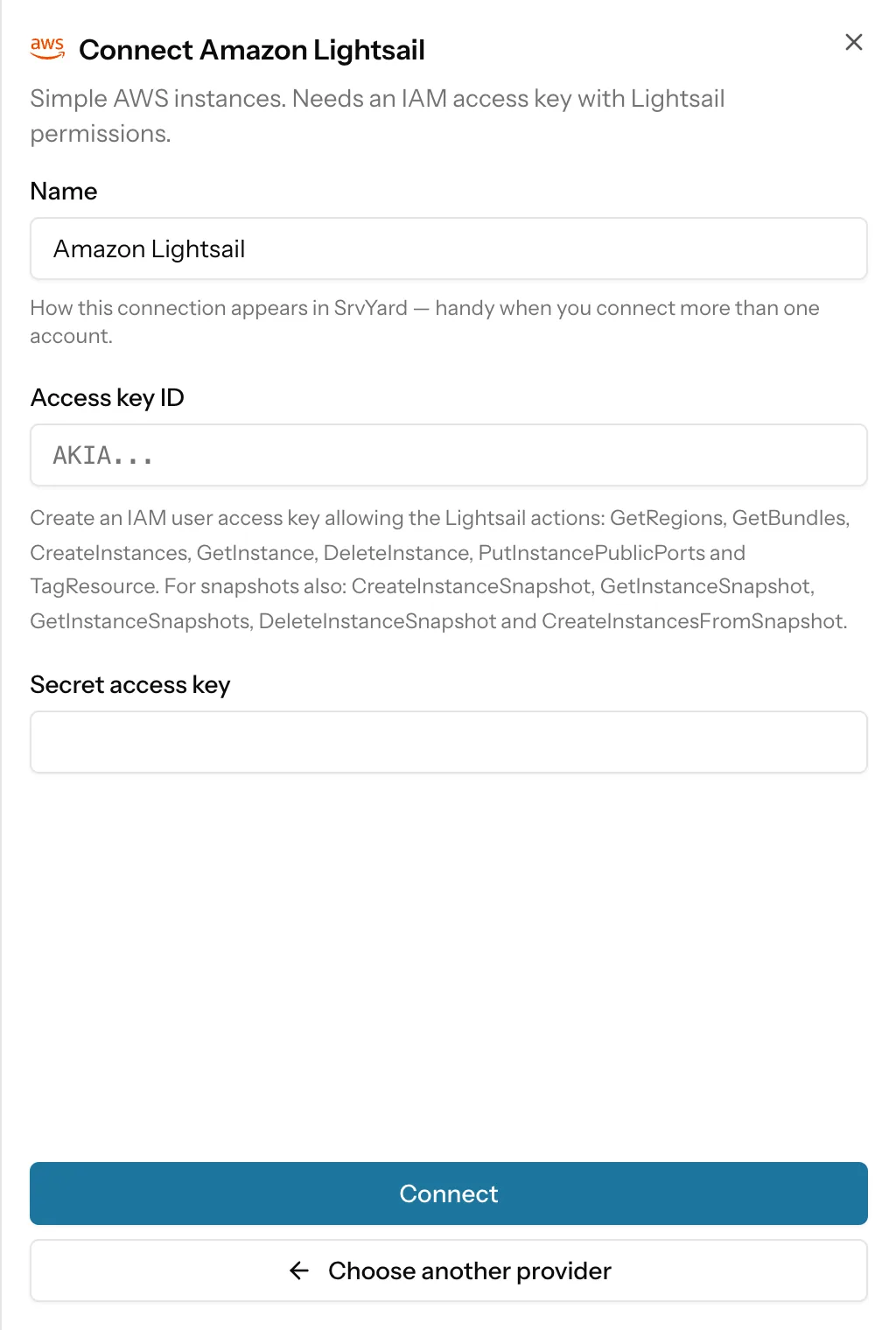
# Settings, Server providers, Amazon EC2 (or Lightsail)
name        AWS (production)
access key  IAM user access key ID
secret      secret access key
verify      sts:GetCallerIdentity, no permission needed
stored      encrypted, never shown again
# keys are signed per request; no AWS SDK, no role01What you need
| Item | Amazon EC2 | Amazon Lightsail |
|---|---|---|
| Credential | An IAM user access key ID and secret access key. | The same kind of key, with Lightsail permissions. |
| Permissions | ec2:RunInstances, DescribeInstances, TerminateInstances, DescribeRegions, DescribeImages, DescribeInstanceTypes, DescribeSecurityGroups, CreateSecurityGroup, AuthorizeSecurityGroupIngress, DescribeVpcs, DescribeSubnets, CreateTags. For snapshots also CreateImage, DeregisterImage, DeleteSnapshot. Reboot uses RebootInstances. | GetRegions, GetBundles, CreateInstances, GetInstance, DeleteInstance, PutInstancePublicPorts, TagResource. For snapshots also CreateInstanceSnapshot, GetInstanceSnapshot, GetInstanceSnapshots, DeleteInstanceSnapshot, CreateInstancesFromSnapshot. Reboot uses RebootInstance. |
| Regions | The regions that need no opt-in, with names such as Europe (Frankfurt) or US East (N. Virginia). | The regions Lightsail reports. |
| Network | A default VPC in the region. If there is none the form says so and how to create it. | Nothing to prepare. |
| Operating system | Ubuntu 24.04 or 26.04, the newest Canonical AMI (x86, 64-bit). | The Ubuntu 24.04 or 26.04 blueprint. |
| Plan | Hobby 1, Pro 10, Business unlimited servers. Archived servers do not count. | Same. |
02What SrvYard asks of AWS
and nothing else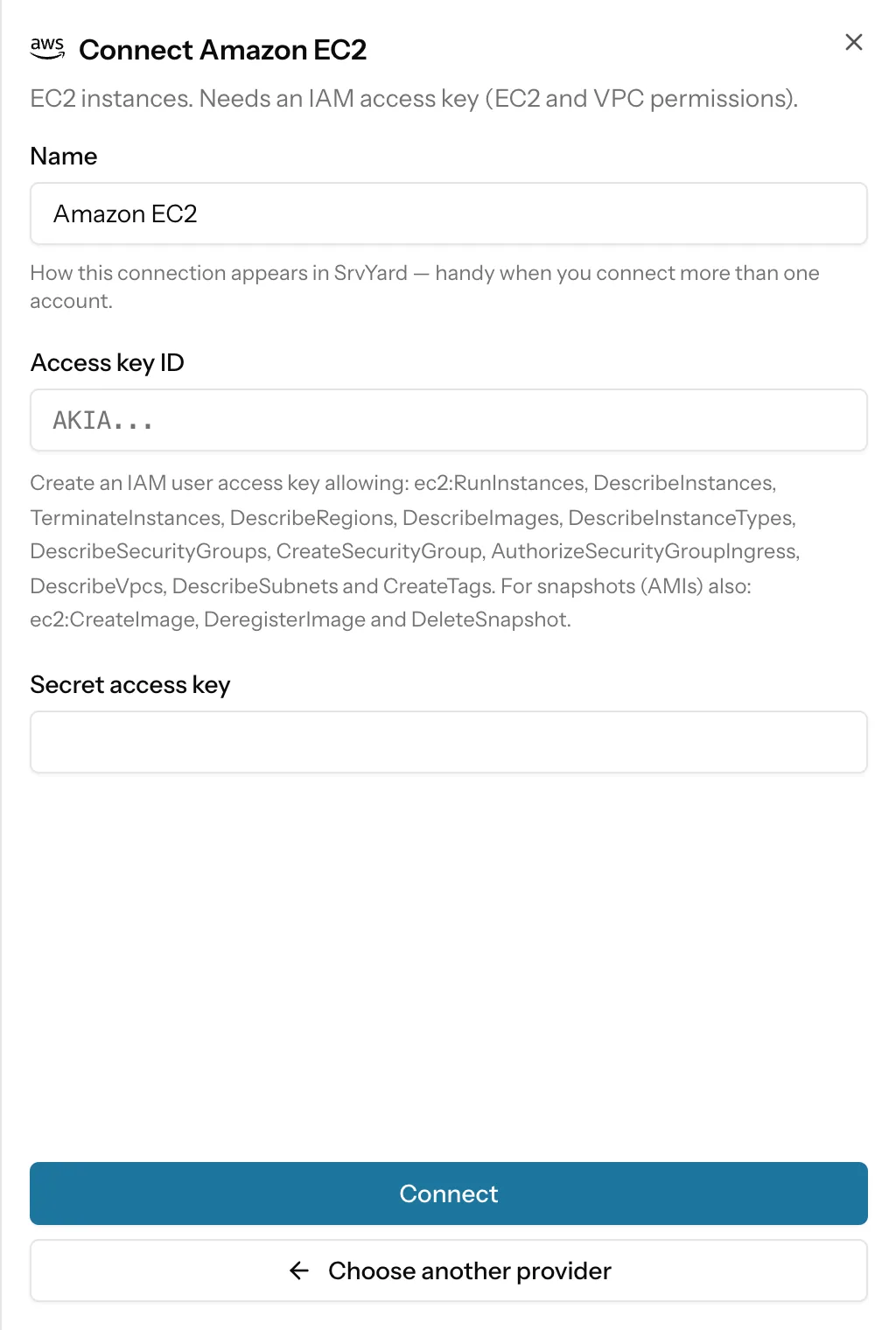
SrvYard signs its own requests with your key (no AWS SDK, no assumed role) and uses it for the calls in the table: catalogue reads, launching, rebooting, imaging and terminating the instances it made, and one security group. It does not touch your other instances, S3, RDS, Route 53, IAM or billing.
Create a dedicated IAM user for SrvYard with just those permissions. Removing the connection in SrvYard does not revoke the key; delete the key in IAM when you stop using SrvYard.
EC2 firewall. SrvYard creates a security group named srvyard-servers in the default VPC, if it does not exist, with SSH (22), HTTP (80) and HTTPS (443) open to the internet. Instances are tagged managed-by=srvyard and Name.
Lightsail firewall. Once the instance runs, SrvYard opens ports 22, 80 and 443 to the internet, and retries if Lightsail is not ready the first time.
Already have an instance? Use Connect an existing server: one command as root, no key.
03Create a server
the Add server formName and provider
A name up to 60 characters and your connected Amazon EC2 or Amazon Lightsail account.
Server type
App server if you are unsure: sites, queue workers and a database on one machine.
Region and size
EC2 offers a fixed list of general purpose types, those the region has: t3 and t3a micro to large, m6i and c6i large and xlarge, each with a 20 GB gp3 root volume. Lightsail lists its active Linux bundles with price. The EC2 form shows no price, because AWS publishes prices through a separate API that SrvYard does not call; check the AWS pricing page.
Create
SrvYard launches the instance, waits for it to run with a public address, provisions it over SSH and shows Ready when it is done.
04What works on AWS
read from the integration| Capability | Amazon EC2 | Amazon Lightsail |
|---|---|---|
| Prices in the form | None (AWS prices vary by region and terms). | Monthly bundle price from Lightsail. |
| Provider backups, IPv6 toggle, private network choice | Not offered in the SrvYard form. The instance uses the default VPC. | Not offered in the SrvYard form. |
| Restart | A graceful reboot through the EC2 API. No hard reset. | A reboot through the Lightsail API. |
| Snapshots | An AMI (with EBS snapshots) of the running instance, taken without a reboot, so crash consistent. It is billed as EBS snapshot storage. Deleting it deregisters the AMI and deletes its EBS snapshots. | An instance snapshot. A new server from it is created in the same region. |
| Delete | Terminates the instance, and the root volume goes with it, unless you switch Preserve on. | Deletes the instance and its add-ons, unless you switch Preserve on. |
| Open in | Links to the instance in the EC2 console. | Links to the instance in the Lightsail console. |
05Limits
so you can rule it out early- x86 only: no Graviton (Arm) instance types, no GPU types, no Windows.
- EC2 needs a default VPC in the region. SrvYard does not create VPCs, subnets or load balancers.
- SrvYard does not allocate an Elastic IP or a Lightsail static IP. Without one, AWS gives a stopped and started instance a new public address, and the server shows Disconnected until you fix it. Reboots keep the address.
- No ECS, EKS, Fargate, Elastic Beanstalk or Docker. Sites run on the instance with Nginx and PHP or Node.
Opt-in regions (for example Hong Kong or Milan) are not listed for EC2.
The first request SrvYard makes at connect time is sts:GetCallerIdentity, which AWS answers for any valid key. A key that works there but lacks an EC2 permission is accepted, and the first create fails with AWS’s own message.
The article Add a server provider and its API token lists the fields, and Provider snapshots the restore steps.
06Provider questions
answers from the docsDoes SrvYard support both EC2 and Lightsail?
Yes, as two separate connections: Amazon EC2 and Amazon Lightsail, each with an IAM access key and its own permission list. See Add a server provider and its API token.
What does SrvYard create in my AWS account?
On EC2, the instance (a 20 GB gp3 root volume) and, if missing, a security group named srvyard-servers in the default VPC with SSH, HTTP and HTTPS open. On Lightsail, the instance, with ports 22, 80 and 443 opened. Instances are tagged as managed by SrvYard.
Why is there no price in the EC2 size list?
AWS publishes prices through a separate API that SrvYard does not call, so the form shows the instance type, CPU and memory only. Lightsail bundles show their monthly price.
Connect an AWS account and create the first server.
Free: 1 server, 3 sites, 100 deploys a month. Read the docs first if you prefer.