Which ports are open and which keys can log in, as two lists you can read.
Every server SrvYard builds runs a firewall that denies incoming traffic unless a rule allows it. You add rules on the server’s Firewall tab and SrvYard applies them, always keeping SSH open. The SSH keys tab shows every key that may log in, and a library saves keys so they can be added to servers deliberately.
SSH    allow  22   tcp  anywhere   # the port sshd really uses
HTTP   allow  80   tcp  anywhere
HTTPS  allow  443  tcp  anywhere
# everything else incoming is denied01Firewall rules
server, Firewall tab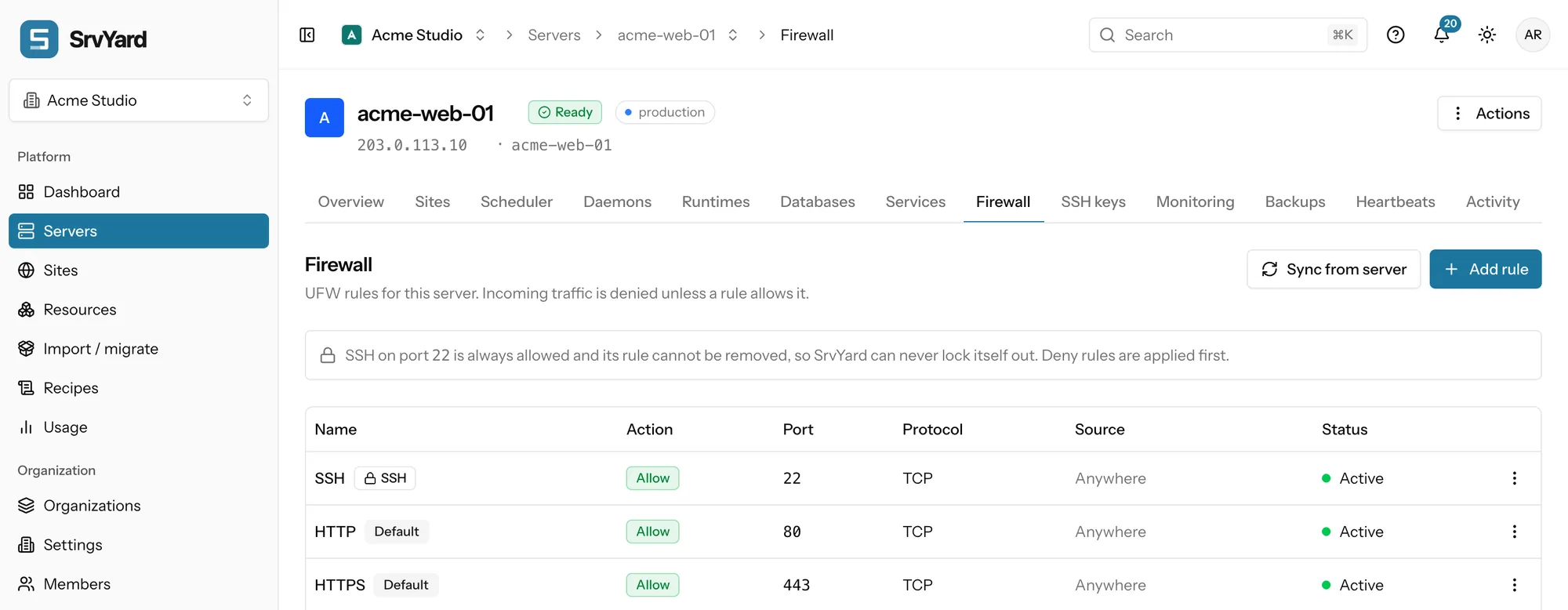
- Action: Allow or Deny. Deny rules are applied first.
- Protocol: TCP, UDP, or both. Port: one number or a range with a colon, such as
8000:8100(a range needs TCP or UDP). - Source: IPv4 or IPv6 addresses or CIDR ranges, separated by commas. Empty means anywhere. A rule needs a port, a source, or both.
- SrvYard rebuilds the whole ruleset in one go. If applying fails it restores the previous firewall, shows Some rules could not be applied, and offers Apply again.
- It refuses a deny rule that would block SSH for everyone. The SSH rule cannot be edited or deleted; HTTP and HTTPS cannot be edited but can be deleted, with a warning that sites stop answering.
| Purpose | Action | Protocol | Port | Source |
|---|---|---|---|---|
| Your office reaches PostgreSQL | Allow | TCP | 5432 | your office range, for example 198.51.100.0/24 |
| A web server reaches MySQL on a database server | Allow | TCP | 3306 | the web server’s private address |
| A web server reaches Redis on a cache server | Allow | TCP | 6379 | the web server’s private address |
| Block one noisy address everywhere | Deny | TCP and UDP | empty | the address to block |
Databases and caches should almost never be open to anywhere: give them a source, or use an SSH tunnel. Rules added by hand with ufw are imported with Sync from server, which changes nothing on the machine. On a server you adopted from another panel the firewall is observe-only: SrvYard shows the rules and applies nothing, because rules it cannot reproduce could lock you out. Your provider’s own firewall or security group is separate, and a port must be open in both.
02SSH keys
server, SSH keys tab, and Settings, Security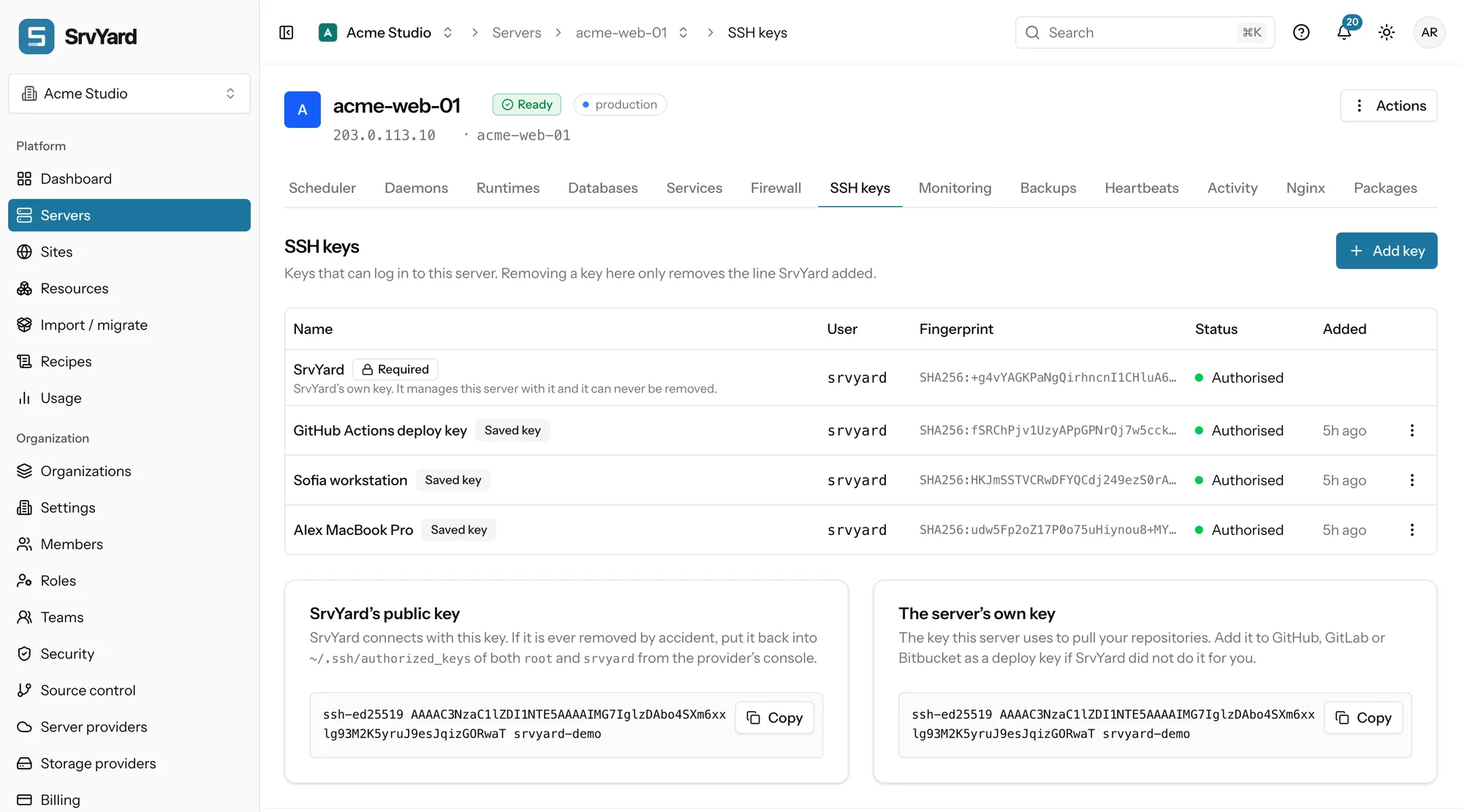
- Two lists. The library (Settings, Security) saves public keys for the organisation or only for you. The server list holds the keys actually authorised there. Saving a key authorises nothing.
- Add a saved key to a server, or paste a new one and optionally save it to the organisation. Choose the login user:
srvyard(owns your sites, hassudo) orroot. - ed25519, ECDSA and RSA of 2048 bits or more. A private key, or a key SrvYard cannot parse, is refused.
- SrvYard’s own key is required and cannot be removed. If it is ever removed by accident the page shows it again so you can put it back from the provider’s console.
- Removing a key only removes the line SrvYard added. Lines you put in
authorized_keysby hand are left alone.
New servers
Switch New servers on for an organisation key and it is authorised for the srvyard user while a server is provisioned, as long as Add my organization SSH keys is on in that server’s advanced settings. Existing servers are not changed. Personal keys are never added automatically.
When someone leaves
Deleting a key from the library does not remove it from servers it was already added to; the dialog says so. Use the On servers column to find where it is still authorised and remove it on each server’s tab. The server’s own public key, shown below the table, is the one it uses to pull your repositories: add it as a deploy key at your Git host.
03What is set for you, and what stays yours
at provisioning| Area | Default |
|---|---|
| Firewall | ufw with incoming denied. Allowed: the SSH port, 80 and 443. |
| SSH | Password and keyboard-interactive logins off, root only by key (PermitRootLogin prohibit-password), X11 forwarding off. |
| Updates | Daily package list refresh and unattended security upgrades. The machine is not rebooted for you. |
| Web server | A request for a name that is not one of your sites gets no answer, so strangers do not see your sites by IP address. |
| Access | One SSH key for SrvYard itself that cannot be removed, plus the keys you add. |
A machine you connected after the fact, or adopted, may differ, so check it. What remains yours: keep ports closed, remove keys nobody uses, apply updates and reboots, keep databases off the internet. The hardening checklist, in the docs
04Plans and limits
every planThe firewall and SSH keys are on every plan. Changing the firewall, adding keys and removing keys are three separate permissions, so a member can be allowed one and not the others. Roles and permissions · Compare plans
Not covered
- Your provider’s firewall or security groups. SrvYard manages ufw on the machine only.
- Removing SrvYard’s own key from the panel: it is how the server is managed.
- Anything on a server SrvYard cannot log in to. The tabs are read-only until it is Ready again.
05Firewall and key questions
answers from the docsCan I lock myself out of SSH with a firewall rule?
Not through SrvYard. SSH stays open however you edit the rules, the whole ruleset is rebuilt in one go, and the previous firewall is restored if the new one fails. A firewall at your provider is separate. See Open and close ports with the firewall.
Which ports are open by default?
SSH, HTTP (80) and HTTPS (443). Everything else incoming is denied until a rule allows it. See Open and close ports with the firewall.
Does SrvYard manage my provider's firewall?
No. It manages ufw on the machine. A port must be open in both places if your provider has security groups or a cloud firewall. See Open and close ports with the firewall.
I added a rule with `ufw` by hand. Will SrvYard know?
Press Sync from server. It imports rules that exist on the machine and changes nothing there. See Open and close ports with the firewall.
Which SSH key types are accepted?
ed25519, ECDSA and RSA of at least 2048 bits, pasted as the single line from the .pub file. A private key or an unparseable key is refused. See Add SSH keys to a server and to your account.
Is a key removed from my servers when I delete it from the library?
No. Deleting it from the library does not remove it from servers it was already added to. Check the On servers column and remove it on each server's SSH keys tab. See Add SSH keys to a server and to your account.
Can I remove SrvYard's own key?
No. It is marked Required and is how SrvYard manages the server. If it is removed by accident, the page shows it again so you can put it back from your provider's console. See Add SSH keys to a server and to your account.
Open one port to one address, and see the list change.
Free: 1 server, 3 sites, 100 deploys a month. Read the docs first if you prefer.