CPU, memory and disk once a minute, and a message when they stay too high.
SrvYard logs in over SSH, reads the figures from the operating system and disconnects: no agent to install. Charts keep 30 days. A monitor is a rule such as CPU at 90 per cent or more for five minutes. Scheduled tasks check in with a heartbeat URL, and you hear when one does not.
# ping only when the task exited without an error
/usr/bin/php /home/srvyard/shop.example/current/artisan invoices:run \
&& curl -fsS -m 10 --retry 3 -o /dev/null "<ping URL>"01What is measured
the Monitoring tab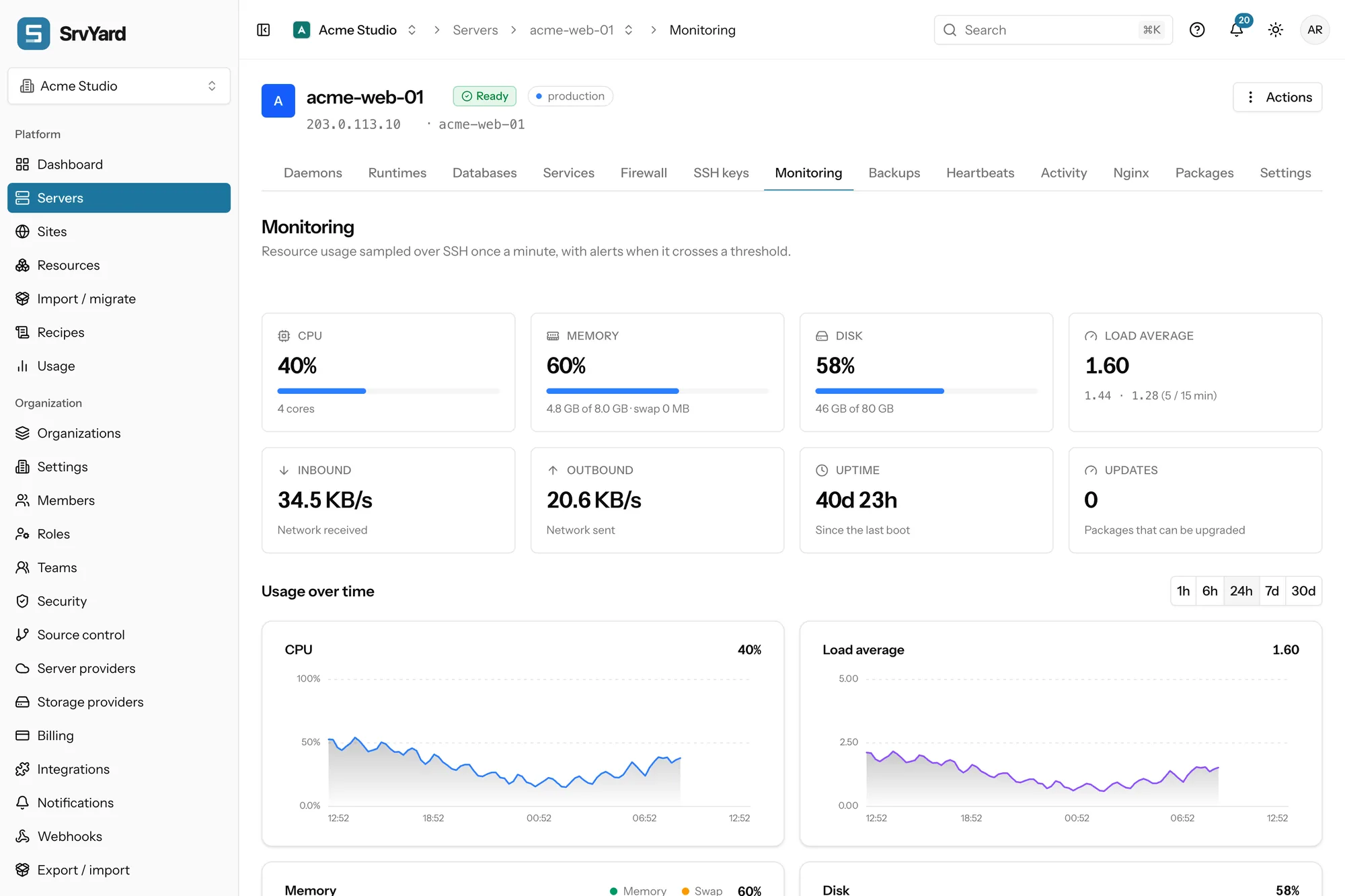
- CPU (with core count), memory with swap, disk of the main volume, load average, inbound and outbound traffic, uptime, and how many packages can be upgraded. A Reboot required note appears when an update needs one.
- One reading a minute per Ready server. A badge says Live, or Stale when the newest sample is more than three minutes old. Stale does not mean down: SrvYard may just have no fresh reading.
- Ranges 1h, 6h, 24h, 7d and 30d. Longer ranges are averaged (one point per minute for an hour, per 15 minutes for 24 hours, per 6 hours for 30 days), so a short spike looks smaller there.
- Samples are kept 30 days. At most 20 servers are sampled at the same moment across SrvYard; a server that finds no free slot skips that minute, so a gap is possible.
- Only resource figures are read. File contents and application data are not.
02Monitors
Pro and Business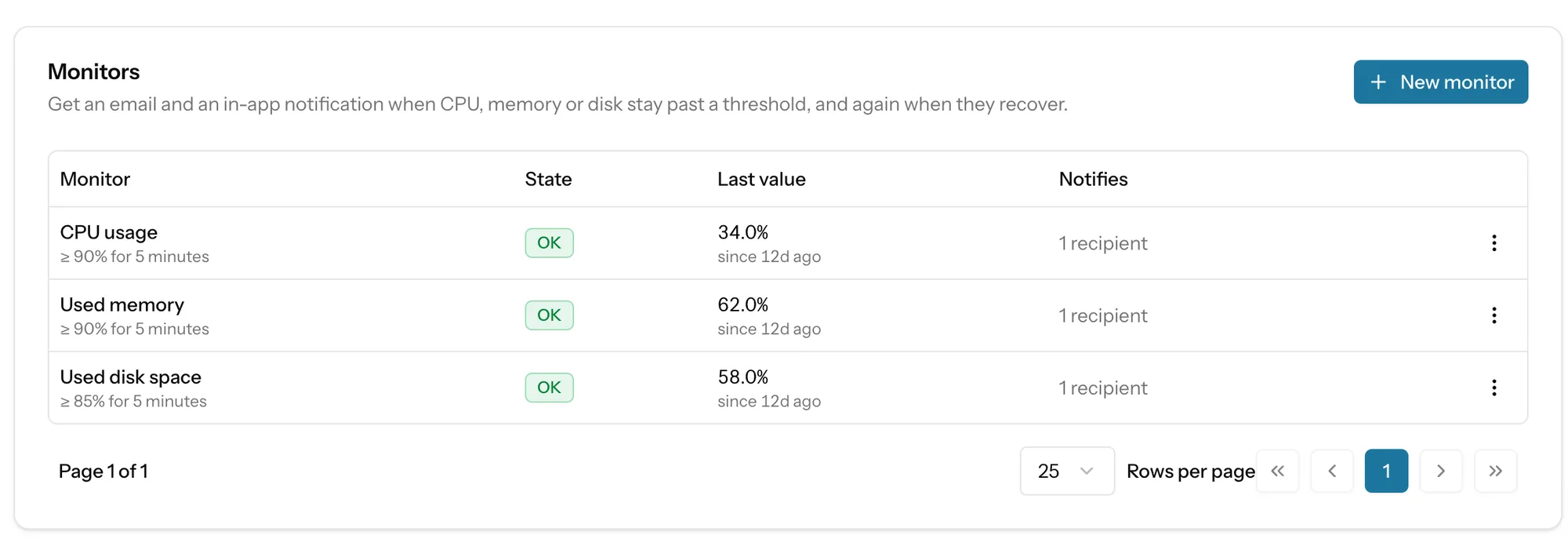
| Field | Choices |
|---|---|
| Metric | CPU usage, used memory or used disk space, as a percentage. |
| Condition | Greater than or equal to, or less than or equal to. |
| Threshold | 1 to 100. |
| For at least | 1 to 1440 minutes, without a break. Five to fifteen minutes catches real trouble without waking anyone for a deployment. |
| Who is told | Members you tick, and up to five other addresses. At least one is needed. Up to 20 monitors per server. |
| Plus | Slack, Discord, Telegram or email channels set up for the organisation can receive the same alerts. |
03How a monitor decides
so a flapping reading does not page youAlert
Every sample in the last N minutes breaches the threshold, and the samples cover the whole period. Partial evidence does not alert.
One message
You are told when it goes into Alert and once when it recovers, not every minute. The first OK sends nothing.
Recover
No sample in the last few minutes breaches: the monitor’s duration, capped at five minutes.
Gaps
Missing samples never change the state. A server that stops answering while in Alert stays in Alert.
Quiet
Disable stops the checks. Mute keeps checking but sends nothing to anyone. Mute this server on its Overview card silences it for you alone.
04Heartbeats
for work that happens on a timerSome failures are silent: a nightly job stops, a scheduler never starts. A heartbeat turns the check round. You give it a frequency (every minute up to every week) and a wait (1 minute to 1 day), and your task calls its URL when it finishes. If no call arrives by the last ping plus the frequency plus the wait, you are told once, and again when it checks in.
Turn on Monitor with heartbeats on a scheduled job and SrvYard creates the heartbeat, works the frequency out from the schedule, and adds the ping to the command so it is sent only after a run that exited cleanly. The Laravel scheduler job is the best candidate.
- States: Waiting for the first ping, Healthy, Missed.
- The URL answers GET and POST with an empty 204, and allows 120 pings a minute per heartbeat. It is the only credential: keep it out of repositories.
- Missed heartbeats notify owners and admins by email and in the app, and any channel that listens to Heartbeat missed.
- Heartbeats of a site also show under that site’s Observe tab.
05Per site
Observe tab and application monitoring| What | How it works |
|---|---|
| Health check | After each deployment SrvYard requests a path from the server itself and records the result on the site’s Observe tab. It does not roll anything back. Deployments. |
| Activity | The last 14 days of what changed on the site, filterable. |
| Application monitoring | For Laravel sites only: connect the site to TraceBeat or Nightwatch for slow requests, failing jobs and exceptions. SrvYard writes the settings into the .env, keeps the agent running as a background process and marks deployments. You add laravel/nightwatch to your app yourself. |
06Plans and limits
from the plan catalogueCharts and heartbeats are on every plan. Monitors, the rules that alert, need Pro and Business; on Hobby SrvYard refuses to add or change them. Compare plans
Not covered
- An outside uptime check. SrvYard does not request your public site on a timer; use an external uptime service for that view.
- Per-process, per-site or per-disk metrics: the figures are for the server.
- History beyond 30 days of samples.
- Alert rules on metrics other than CPU, memory and disk.
07Monitoring questions
answers from the docsDo I need to install an agent?
No. SrvYard connects over SSH once a minute, reads CPU, memory, disk, load, network, uptime and pending updates from the operating system, and disconnects. See Read your server's metrics and charts.
How long is history kept?
One-minute samples are kept for 30 days, which is why the longest chart range is 30 days. Longer ranges show averages. See Read your server's metrics and charts.
What can an alert watch?
CPU usage, used memory and used disk space, as a percentage with a duration you choose, up to 20 monitors per server. Monitors are on Pro and Business; charts are on every plan. See Get alerted when CPU, memory or disk run hot.
How often will I be notified?
Once when a monitor goes into alert and once when it recovers, not every minute. Missing samples never change a monitor's state. See Get alerted when CPU, memory or disk run hot.
Does SrvYard check that my site is up?
No. It does not request your public site on a timer. The only site check it runs by itself is the health check after a deployment. For an outside view, use an external uptime service. See Get told when a scheduled task stops running.
What is a heartbeat?
A URL your scheduled task requests when it finishes. If no request arrives by the expected time plus the wait you chose, SrvYard notifies you. It proves that something on your server ran. See Get told when a scheduled task stops running.
Why does the Monitoring tab say Stale?
The newest sample is more than three minutes old. It does not mean the server is down: it may be busy, restarting or temporarily unreachable over SSH. See Read your server's metrics and charts.
Look at a server for a week, then set a threshold.
Free: 1 server, 3 sites, 100 deploys a month. Read the docs first if you prefer.